Join us at FabCon Atlanta from March 16 - 20, 2026, for the ultimate Fabric, Power BI, AI and SQL community-led event. Save $200 with code FABCOMM.
Register now!The Power BI Data Visualization World Championships is back! Get ahead of the game and start preparing now! Learn more
hi everyone,
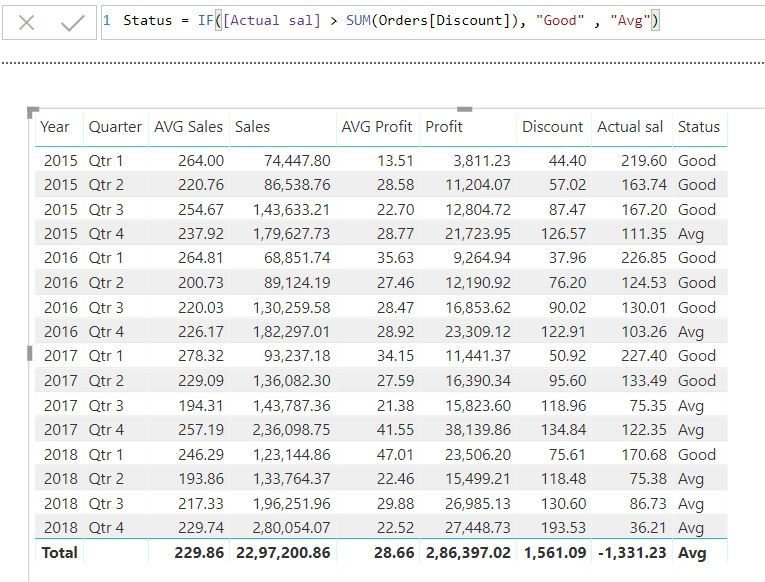
i have sample super store table. and i calculated "Actual Sales". now i wanted to show "Actual sales" %contribution for each status on particular year.
can any one help on this. data provided in this link.
.
Thanks in advance
regards
venu
Solved! Go to Solution.
Hi @Anonymous ,
Please try the measure below.
Measure 2 =
VAR totalforeachyear =
CALCULATE (
SUM ( 'Table1'[Actual sales] ),
ALLEXCEPT ( Table1, 'Table1'[Year] )
)
VAR salesforeachstatus =
CALCULATE (
SUM ( 'Table1'[Actual sales] ),
ALLEXCEPT ( Table1, Table1[Status_], Table1[Year] )
)
RETURN
salesforeachstatus / totalforeachyear
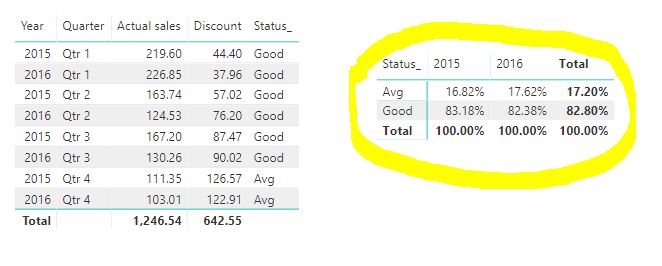
Here is the output.
More details, please refer to my attachment.
Best Regards,
Cherry
Looks like you need
a) a measure to SUM [Actual Sal] taking into account Year and Status.
b) a measure to SUM [Actual Sal] taking into account Year
Then DIVIDE a by b
That should give you a start
Hi @Anonymous ,
Please try the measure below.
Measure 2 =
VAR totalforeachyear =
CALCULATE (
SUM ( 'Table1'[Actual sales] ),
ALLEXCEPT ( Table1, 'Table1'[Year] )
)
VAR salesforeachstatus =
CALCULATE (
SUM ( 'Table1'[Actual sales] ),
ALLEXCEPT ( Table1, Table1[Status_], Table1[Year] )
)
RETURN
salesforeachstatus / totalforeachyear
Here is the output.
More details, please refer to my attachment.
Best Regards,
Cherry
The Power BI Data Visualization World Championships is back! Get ahead of the game and start preparing now!
| User | Count |
|---|---|
| 41 | |
| 38 | |
| 36 | |
| 30 | |
| 28 |
| User | Count |
|---|---|
| 128 | |
| 88 | |
| 79 | |
| 67 | |
| 62 |