Get Fabric certified for FREE!
Don't miss your chance to take the Fabric Data Engineer (DP-700) exam on us!
Learn more- Power BI forums
- Get Help with Power BI
- Desktop
- Service
- Report Server
- Power Query
- Mobile Apps
- Developer
- DAX Commands and Tips
- Custom Visuals Development Discussion
- Health and Life Sciences
- Power BI Spanish forums
- Translated Spanish Desktop
- Training and Consulting
- Instructor Led Training
- Dashboard in a Day for Women, by Women
- Galleries
- Data Stories Gallery
- Themes Gallery
- Contests Gallery
- QuickViz Gallery
- Quick Measures Gallery
- Visual Calculations Gallery
- Notebook Gallery
- Translytical Task Flow Gallery
- TMDL Gallery
- R Script Showcase
- Webinars and Video Gallery
- Ideas
- Custom Visuals Ideas (read-only)
- Issues
- Issues
- Events
- Upcoming Events
We've captured the moments from FabCon & SQLCon that everyone is talking about, and we are bringing them to the community, live and on-demand. Starts on April 14th. Register now
- Power BI forums
- Forums
- Get Help with Power BI
- Desktop
- DAX Table Function With Multiple Filters
- Subscribe to RSS Feed
- Mark Topic as New
- Mark Topic as Read
- Float this Topic for Current User
- Bookmark
- Subscribe
- Printer Friendly Page


- Mark as New
- Bookmark
- Subscribe
- Mute
- Subscribe to RSS Feed
- Permalink
- Report Inappropriate Content
DAX Table Function With Multiple Filters
Hi experts,
I need help creating a table function that transforms a singular source table based on a hierarchy of rules (each "rule" is based on a separate column). I'm new to DAX so I'm not sure if this can all be done in one table function or if I need to create helper columns in the source table first.
Sample Source:
| ID | Date | Version | Amount |
| ABC | 1/1/2019 | Initial | 100 |
| ABC | 2/1/2019 | Final | 200 |
| DEF | 1/1/2019 | Initial | 150 |
| DEF | 1/1/2019 | Revision | 300 |
| DEF | 1/1/2019 | Final | 450 |
| GHI | 2/1/2019 | 600 | |
| GHI | 2/1/2019 | Initial | 700 |
| JKL | 2/1/2019 | Initial | 200 |
| JKL | 2/1/2019 | Revision | 300 |
| MNO | 1/1/2019 | Initial | 400 |
| MNO | 1/1/2019 | Revision | 250 |
| MNO | 2/1/2019 | Initial | 600 |
| PQR | 1/1/2019 | Initial | 200 |
| PQR | 1/1/2019 | Data Call | 300 |
For each distinct ID, the output should show a Date/Amount combination chosen as follows:
- If there are multiple Dates, choose the most recent with its corresponding Amount
- Else if there are multiple Versions, choose the "Final" Amount first; if not available, choose "Revision"
- Else choose the highest Amount (and its corresponding Date)
*In all cases, the outputted Date/Amount combination should be from the same line of the original table, i.e. these should not be computed separately but rather the rules should dictate which row from the original table is kept*
Desired Outcome:
| ID | Date | Amount |
| ABC | 2/1/2019 | 200 |
| DEF | 1/1/2019 | 450 |
| GHI | 2/1/2019 | 700 |
| JKL | 2/1/2019 | 300 |
| MNO | 2/1/2019 | 600 |
| PQR | 1/1/2019 | 300 |
Thank you in advance!
Solved! Go to Solution.


- Mark as New
- Bookmark
- Subscribe
- Mute
- Subscribe to RSS Feed
- Permalink
- Report Inappropriate Content
You may create measures and use table visual to get the table.For example:
Count_date = CALCULATE(DISTINCTCOUNT(Table1[Date]),ALLEXCEPT(Table1,Table1[ID]))
Measure =
VAR a =
    CALCULATETABLE (
        VALUES ( Table1[Version] ),
        ALLEXCEPT ( Table1, Table1[ID], Table1[Date] )
    )
RETURN
    IF (
        [Count_date] >= 2,
        CALCULATE ( SUM ( Table1[Amount] ), FILTER ( Table1, Table1[Rank_date] = 1 ) ),
        IF (
            "Final" IN a,
            CALCULATE (
                SUM ( Table1[Amount] ),
                FILTER ( Table1, Table1[Version] = "Final" )
            ),
            IF (
                "Revision" IN a,
                CALCULATE (
                    SUM ( Table1[Amount] ),
                    FILTER ( Table1, Table1[Version] = "Revision" )
                ),
                CALCULATE (
                    MAX ( Table1[Amount] ),
                    ALLEXCEPT ( Table1, Table1[ID], Table1[Date] )
                )
            )
        )
    )
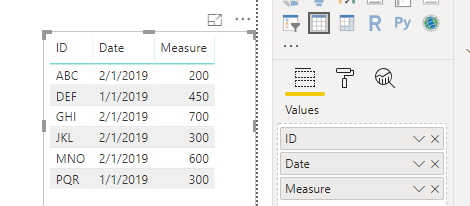
Regards,
If this post helps, then please consider Accept it as the solution to help the other members find it more quickly.
- Mark as New
- Bookmark
- Subscribe
- Mute
- Subscribe to RSS Feed
- Permalink
- Report Inappropriate Content
Thank you for all of your help! This wasn't exactly what I needed (I really needed a table for future modelling processes and I realize now that I also needed to account for more than one "Final" or "Revision" version) but I was able to use your great ideas to figure it out.
Here is the final DAX code:
In the original table I created two columns -
MostRecentDate = CALCULATE( LASTDATE( Tables[Date] ), FILTER( Tables, Tables[ID] = EARLIER( Tables[ID] ) ) )
MostRecentAmount =
VAR FinalCount = CALCULATE( COUNTROWS( Tables ),
    FILTER( Tables, Tables[ID] = EARLIER( Tables[ID] ) ),
    FILTER( Tables, Tables[Version] = "Final" ),
    FILTER( Tables, Tables[Date] = Tables[MostRecentDate] )
)
VAR RevisionCount = CALCULATE( COUNTROWS( Tables ),
    FILTER( Tables, Tables[ID] = EARLIER( Tables[ID] ) ),
    FILTER( Tables, Tables[Version] = "Revision" ),
    FILTER( Tables, Tables[Date] = Tables[MostRecentDate] )
)
RETURN IF( FinalCount > 0,
    CALCULATE( MAX( Tables[Amount] ), FILTER( Tables, Tables[ID] = EARLIER( Tables[ID] ) ), FILTER( Tables, Tables[Date] = Tables[MostRecentDate] ), FILTER( Tables, Tables[Version] = "Final" ) ),
    IF( RevisionCount > 0,
        CALCULATE( MAX( Tables[Amount] ), FILTER( Tables, Tables[ID] = EARLIER( Tables[ID] ) ), FILTER( Tables, Tables[Date] = Tables[MostRecentDate] ), FILTER( Tables, Tables[Version] = "Revision" ) ),
        CALCULATE( MAX( Tables[Amount] ), FILTER( Tables, Tables[ID] = EARLIER( Tables[ID] ) ), FILTER( Tables, Tables[Date] = Tables[MostRecentDate] ) )
    )
)
Then I created my new table as -
ProposalHistory_MostRecent =
    SUMMARIZECOLUMNS( Tables[ID],
        Tables[MostRecentDate],
        Tables[MostRecentAmount] )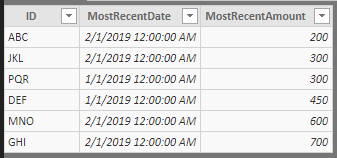
Please let me know if you think it can be done with any more efficiency given the new information. If I don't hear from you, I will mark these both as solutions as I think they could each help others (given different requirements).
Thanks again!
- Mark as New
- Bookmark
- Subscribe
- Mute
- Subscribe to RSS Feed
- Permalink
- Report Inappropriate Content
I was able to do this with the creation of two helper columns and a new table, is there a better way?
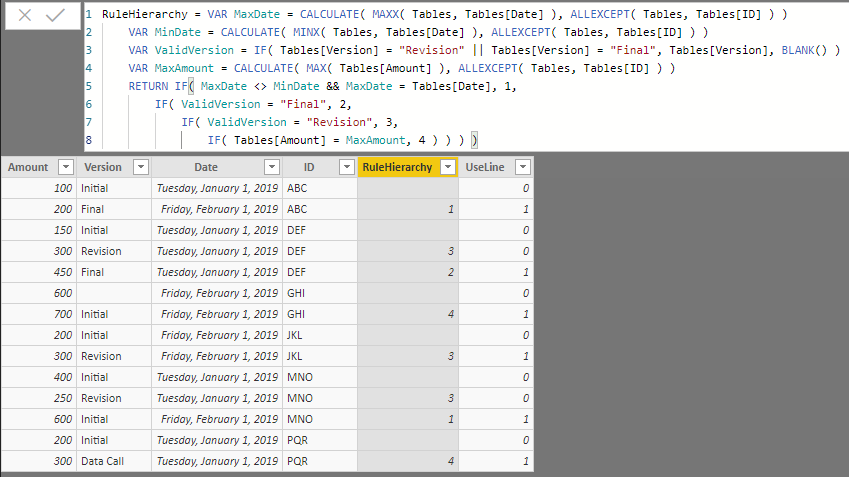
RuleHierarchy = VAR MaxDate = CALCULATE( MAXX( Tables, Tables[Date] ), ALLEXCEPT( Tables, Tables[ID] ) )
    VAR MinDate = CALCULATE( MINX( Tables, Tables[Date] ), ALLEXCEPT( Tables, Tables[ID] ) )
    VAR ValidVersion = IF( Tables[Version] = "Revision" || Tables[Version] = "Final", Tables[Version], BLANK() )
    VAR MaxAmount = CALCULATE( MAX( Tables[Amount] ), ALLEXCEPT( Tables, Tables[ID] ) )
    RETURN IF( MaxDate <> MinDate && MaxDate = Tables[Date], 1,
        IF( ValidVersion = "Final", 2,
            IF( ValidVersion = "Revision", 3,
                IF( Tables[Amount] = MaxAmount, 4 ) ) ) )
UseLine = IF( CALCULATE( MIN( Tables[RuleHierarchy] ), ALLEXCEPT( Tables, Tables[ID] ) ) = Tables[RuleHierarchy], 1, 0 )

It seems like there is a less convoluted way to get there...
Thanks again!
- Mark as New
- Bookmark
- Subscribe
- Mute
- Subscribe to RSS Feed
- Permalink
- Report Inappropriate Content
You may create measures and use table visual to get the table.For example:
Count_date = CALCULATE(DISTINCTCOUNT(Table1[Date]),ALLEXCEPT(Table1,Table1[ID]))
Measure =
VAR a =
    CALCULATETABLE (
        VALUES ( Table1[Version] ),
        ALLEXCEPT ( Table1, Table1[ID], Table1[Date] )
    )
RETURN
    IF (
        [Count_date] >= 2,
        CALCULATE ( SUM ( Table1[Amount] ), FILTER ( Table1, Table1[Rank_date] = 1 ) ),
        IF (
            "Final" IN a,
            CALCULATE (
                SUM ( Table1[Amount] ),
                FILTER ( Table1, Table1[Version] = "Final" )
            ),
            IF (
                "Revision" IN a,
                CALCULATE (
                    SUM ( Table1[Amount] ),
                    FILTER ( Table1, Table1[Version] = "Revision" )
                ),
                CALCULATE (
                    MAX ( Table1[Amount] ),
                    ALLEXCEPT ( Table1, Table1[ID], Table1[Date] )
                )
            )
        )
    )
Regards,
If this post helps, then please consider Accept it as the solution to help the other members find it more quickly.
- Mark as New
- Bookmark
- Subscribe
- Mute
- Subscribe to RSS Feed
- Permalink
- Report Inappropriate Content
Thank you for all of your help! This wasn't exactly what I needed (I really needed a table for future modelling processes and I realize now that I also needed to account for more than one "Final" or "Revision" version) but I was able to use your great ideas to figure it out.
Here is the final DAX code:
In the original table I created two columns -
MostRecentDate = CALCULATE( LASTDATE( Tables[Date] ), FILTER( Tables, Tables[ID] = EARLIER( Tables[ID] ) ) )
MostRecentAmount =
VAR FinalCount = CALCULATE( COUNTROWS( Tables ),
    FILTER( Tables, Tables[ID] = EARLIER( Tables[ID] ) ),
    FILTER( Tables, Tables[Version] = "Final" ),
    FILTER( Tables, Tables[Date] = Tables[MostRecentDate] )
)
VAR RevisionCount = CALCULATE( COUNTROWS( Tables ),
    FILTER( Tables, Tables[ID] = EARLIER( Tables[ID] ) ),
    FILTER( Tables, Tables[Version] = "Revision" ),
    FILTER( Tables, Tables[Date] = Tables[MostRecentDate] )
)
RETURN IF( FinalCount > 0,
    CALCULATE( MAX( Tables[Amount] ), FILTER( Tables, Tables[ID] = EARLIER( Tables[ID] ) ), FILTER( Tables, Tables[Date] = Tables[MostRecentDate] ), FILTER( Tables, Tables[Version] = "Final" ) ),
    IF( RevisionCount > 0,
        CALCULATE( MAX( Tables[Amount] ), FILTER( Tables, Tables[ID] = EARLIER( Tables[ID] ) ), FILTER( Tables, Tables[Date] = Tables[MostRecentDate] ), FILTER( Tables, Tables[Version] = "Revision" ) ),
        CALCULATE( MAX( Tables[Amount] ), FILTER( Tables, Tables[ID] = EARLIER( Tables[ID] ) ), FILTER( Tables, Tables[Date] = Tables[MostRecentDate] ) )
    )
)
Then I created my new table as -
ProposalHistory_MostRecent =
    SUMMARIZECOLUMNS( Tables[ID],
        Tables[MostRecentDate],
        Tables[MostRecentAmount] )
Please let me know if you think it can be done with any more efficiency given the new information. If I don't hear from you, I will mark these both as solutions as I think they could each help others (given different requirements).
Thanks again!

Helpful resources

New to Fabric Survey
If you have recently started exploring Fabric, we'd love to hear how it's going. Your feedback can help with product improvements.

Power BI DataViz World Championships - June 2026
A new Power BI DataViz World Championship is coming this June! Don't miss out on submitting your entry.

Join our Fabric User Panel
Share feedback directly with Fabric product managers, participate in targeted research studies and influence the Fabric roadmap.

Power BI Community Update - March 2026
Check out the March 2026 Power BI update to learn about new features.

| User | Count |
|---|---|
| 53 | |
| 36 | |
| 33 | |
| 19 | |
| 17 |


| User | Count |
|---|---|
| 73 | |
| 72 | |
| 38 | |
| 35 | |
| 26 |


