Hi everyone,
I'm struggling with DAX calculation problem as follows:
I have a table similar as mentioned below. I want to find a calculation based on summed maximumn value of 'SERVICE_QTY' times 'NET_PRICE'. I should be able to filter the data by Product Line and Model name.
| PROD_ID | PRODUCT_LINE | MODEL_NAME | NET_PRICE | SERVICE_QTY | SALES |
| AAAA | PRODUCT A | MODEL A | 259.9 | 2 | 20 |
| AAAA | PRODUCT A | MODEL B | 259.9 | 3 | 20 |
| AAAA | PRODUCT A | MODEL C | 259.9 | 2 | 20 |
| AAAA | PRODUCT A | MODEL D | 259.9 | 2 | 20 |
| AAAA | PRODUCT B | MODEL E | 259.9 | 2 | 20 |
| AAAA | PRODUCT B | MODEL F | 259.9 | 3 | 20 |
| BBBB | PRODUCT A | MODEL A | 300.5 | 4 | 15 |
| BBBB | PRODUCT A | MODEL B | 300.5 | 3 | 15 |
| BBBB | PRODUCT A | MODEL C | 300.5 | 1 | 15 |
| BBBB | PRODUCT A | MODEL D | 300.5 | 1 | 15 |
| CCCC | PRODUCT B | MODEL E | 350.2 | 2 | 10 |
| DDDD | PRODUCT B | MODEL E | 259.9 | 2 | 5 |
| DDDD | PRODUCT B | MODEL F | 259.9 | 3 | 5 |
I have created this measure:
QTY_PRICE =
var MaxQty =
    CALCULATE(max('Table'[QTY]), ALLEXCEPT('Table', 'Table'[PROD_ID], 'Table'[PRODUCT_LINE], 'Table'[MODEL_NAME]))
Return
    CALCULATE(MaxQty * MAX('Table'[NET_PRICE]), 'Table'[SALES] > 5)
With that I am able to filter the data and calculation by rows is right, however total sum showed is completly wrong...
In the example, it suppose to be 2936 instead of 1400 (image below)
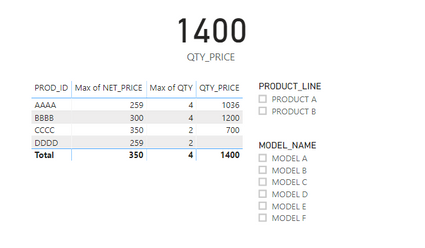
Any thoughts?
Thanks in advance.


