Join us at FabCon Atlanta from March 16 - 20, 2026, for the ultimate Fabric, Power BI, AI and SQL community-led event. Save $200 with code FABCOMM.
Register now!The Power BI Data Visualization World Championships is back! Get ahead of the game and start preparing now! Learn more
Hi,
I am working on Power BI Project and have table with Category and Revenue Amount.
I am looking to SUM Distinct Revenue Amount of Same Category ,but not getting correct Syntax
I am looking to Create NEW DAX Measure, I cannot create Separate table in Model, Only Additional DAX Measure need can be added.
When data is See for
Category A : Output should be 10+20=30
Category B: Output Should be 5+15=20
Category C: Output Should be 3
Category D : Output Should be 1
Please assist with DAX Measure
Solved! Go to Solution.
Hi, @Anonymous , you may use this measure
Sum Distinct = SUMX(SUMMARIZE(DATA, DATA[Category], DATA[Revenue]), DATA[Revenue])
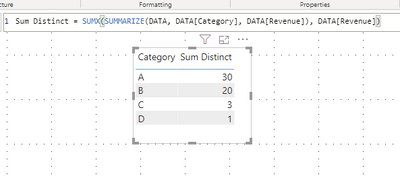
btw, it's fairly easy to get the job done in Power Query.
let
Source = Table.FromRows(Json.Document(Binary.Decompress(Binary.FromText("i45WclTSUTI0UIrVwWAaYYg6AZmmWFiGEKYzkGmMxnIBSSvFxgIA", BinaryEncoding.Base64), Compression.Deflate)), let _t = ((type nullable text) meta [Serialized.Text = true]) in type table [Category = _t, Revenue = _t]),
#"Changed Type" = Table.TransformColumnTypes(Source,{{"Revenue", Int64.Type}}),
#"Grouped Rows" = Table.Group(#"Changed Type", {"Category"}, {{"Distinct", each List.Sum(List.Distinct([Revenue]))}})
in
#"Grouped Rows"| Thanks to the great efforts by MS engineers to simplify syntax of DAX! Most beginners are SUCCESSFULLY MISLED to think that they could easily master DAX; but it turns out that the intricacy of the most frequently used RANKX() is still way beyond their comprehension! |
DAX is simple, but NOT EASY! |
Hi, @Anonymous , you may use this measure
Sum Distinct = SUMX(SUMMARIZE(DATA, DATA[Category], DATA[Revenue]), DATA[Revenue])
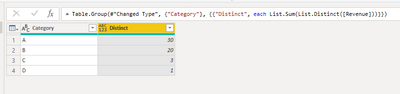
btw, it's fairly easy to get the job done in Power Query.
let
Source = Table.FromRows(Json.Document(Binary.Decompress(Binary.FromText("i45WclTSUTI0UIrVwWAaYYg6AZmmWFiGEKYzkGmMxnIBSSvFxgIA", BinaryEncoding.Base64), Compression.Deflate)), let _t = ((type nullable text) meta [Serialized.Text = true]) in type table [Category = _t, Revenue = _t]),
#"Changed Type" = Table.TransformColumnTypes(Source,{{"Revenue", Int64.Type}}),
#"Grouped Rows" = Table.Group(#"Changed Type", {"Category"}, {{"Distinct", each List.Sum(List.Distinct([Revenue]))}})
in
#"Grouped Rows"| Thanks to the great efforts by MS engineers to simplify syntax of DAX! Most beginners are SUCCESSFULLY MISLED to think that they could easily master DAX; but it turns out that the intricacy of the most frequently used RANKX() is still way beyond their comprehension! |
DAX is simple, but NOT EASY! |
The Power BI Data Visualization World Championships is back! Get ahead of the game and start preparing now!
| User | Count |
|---|---|
| 41 | |
| 38 | |
| 36 | |
| 30 | |
| 28 |
| User | Count |
|---|---|
| 129 | |
| 88 | |
| 79 | |
| 68 | |
| 63 |