cancel
Showing results for 
Search instead for 
Did you mean: 

Join the FabCon + SQLCon recap series. Up next: Power BI, Real-Time Intelligence, IQ and AI, and Data Factory take center stage. All sessions are available on-demand after the live show. Register now

Reply
eaglesilo
Frequent Visitor

DAX RemoveFilters issue --SOLVED

I am trying to get a RemoveFilters function to work. 

Basically, I want to get a Count of ID in QtData for a specific EquipmentGroup and TimePeriod that ignores any Slicers that impact the Visual Page.  As it's ignoring the Slicers, however, I would like to get a count of all the values created in the past 6 months.  Below is what I have:


M_6MonthQtCt_Type1-Type2 = 
CALCULATE (
    COUNT ( QtData[Id] ),
    FILTER (
        ALL ( EquipmentSelect ),
        EquipmentSelect[TypeGrouping] IN { "Type1", "Type1" }
    ),
    FILTER ( ALL ( 'QtData' ), QtData[qtDate] >= 'Calendar'[M_6MonthsPrev] )
)


with M_6MonthsPrev as:


M_6MonthsPrev = EDATE(TODAY(), -6)


I've inlcuded the Data Model below and highlighted the various relations.  In the DAX I have so far, I'm only trying to remove the filters on the EquipmentSelect and Calendar table (since I can't get this simple version to work for me yet) but I will eventually add in REMOVEFILTERS, or whatever the correct process is, to remove QtType, QtStatus, EmployeeTeam, and PartnerName, and the filters to PartnerName.

Look forward to any insights on what I'm doing incorrectly here!
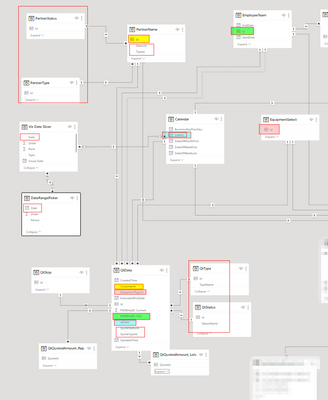
eaglesilo_1-1692026069155.png


***Edit:  As a note, I need to use Calculate, instead of, say, a CountRows (if that would work), as I'll also want to get the SUM of QuotedValue at a later time.


UPDATE:  Solution found

M_6MonthQtCt_Type1-Type2 = 
CALCULATE ( COUNT ( QtData[Id] )
    , ALL(DateRangePicker) 
    , FILTER ( ALL ( 'QtData' )
    , QtData[qtDate] >= 'Calendar'[M_6MonthsPrev] ) 
    , EquipmentSelect[TypeGrouping] IN { "Type1", "Type2" } 
)

Greg's solution probably would have worked, but found this before figuring out how to implement my solution.

2 REPLIES 2
Greg_Deckler
Community Champion
Community Champion

@eaglesilo Let's say that Type1 and Type2 have ID's of 1 and 2, you could do this:

M_6MonthQtCt_Type1-Type2 = 
  VAR __Table = FILTER( ALL( 'QtData'), EquipmentTypeId IN { 1, 2 } && [qtDate] >= [M_6MonthsPrev])
  VAR __Result = COUNTROWS( __Table )
RETURN
  __Result

If later you want to do a SUM, then you could replace COUNTROWS with SUMX.


Follow on LinkedIn
@ me in replies or I'll lose your thread!!!
Instead of a Kudo, please vote for this idea
Become an expert!: Enterprise DNA
External Tools: MSHGQM
YouTube Channel!: Microsoft Hates Greg
Latest book!:
DAX For Humans

DAX is easy, CALCULATE makes DAX hard...

Ended up with the below as the solution:

M_6MonthQtCt_Type1-Type2 = 
CALCULATE ( COUNT ( QtData[Id] )
    , ALL(DateRangePicker) 
    , FILTER ( ALL ( 'QtData' )
    , QtData[qtDate] >= 'Calendar'[M_6MonthsPrev] ) 
    , EquipmentSelect[TypeGrouping] IN { "Type1", "Type2" } 
)


I think your solution would have worked, but EquipmentType.TypeGrouping contains many TypeIDs and this allows for the IDs in the group to change server side and flow through to PBI.  (The EquipmentSelect table is pulled directly from SQL and managed and updated within there)

Helpful resources

Announcements
April Power BI Update Carousel

Power BI Monthly Update - April 2026

Check out the April 2026 Power BI update to learn about new features.

New to Fabric survey Carousel

New to Fabric Survey

If you have recently started exploring Fabric, we'd love to hear how it's going. Your feedback can help with product improvements.

Power BI DataViz World Championships carousel

Power BI DataViz World Championships - June 2026

A new Power BI DataViz World Championship is coming this June! Don't miss out on submitting your entry.

FabCon and SQLCon Highlights Carousel

FabCon &SQLCon Highlights

Experience the highlights from FabCon & SQLCon, available live and on-demand starting April 14th.