Join us at FabCon Atlanta from March 16 - 20, 2026, for the ultimate Fabric, Power BI, AI and SQL community-led event. Save $200 with code FABCOMM.
Register now!The Power BI Data Visualization World Championships is back! Get ahead of the game and start preparing now! Learn more
I have three tables as shown below. I need to find the rank at store,product level based on units sold.Also,in the view I need another rank column whcih displays rank of the product at city,product,Rank1 based on the units sold
Location
| Country | SATE | CITY | Store |
| US | TEXAS | PLANO | 1 |
| US | TEXAS | PLANO | 2 |
| US | TEXAS | IRVING | 3 |
| US | TEXAS | IRVING | 4 |
| US | TEXAS | DALLAS | 5 |
| US | TEXAS | DALLAS | 6 |
Product
| productcat | productsubcat | productname |
| C1 | SC1 | P1 |
| C1 | SC1 | P2 |
| C1 | SC1 | P3 |
| C1 | SC2 | P4 |
| C1 | SC2 | P5 |
| C1 | SC2 | P6 |
FactSales
| Store | productname | salesunit |
| 1 | P1 | 2 |
| 1 | P2 | 3 |
| 1 | P3 | 1 |
| 1 | P4 | 2 |
| 2 | P3 | 5 |
| 2 | P2 | 1 |
| 2 | p1 | 1 |
| 3 | P4 | 2 |
| 3 | P1 | 1 |
| 3 | P2 | 3 |
| 3 | P5 | 1 |
Solved! Go to Solution.
Hi @Anonymous ,
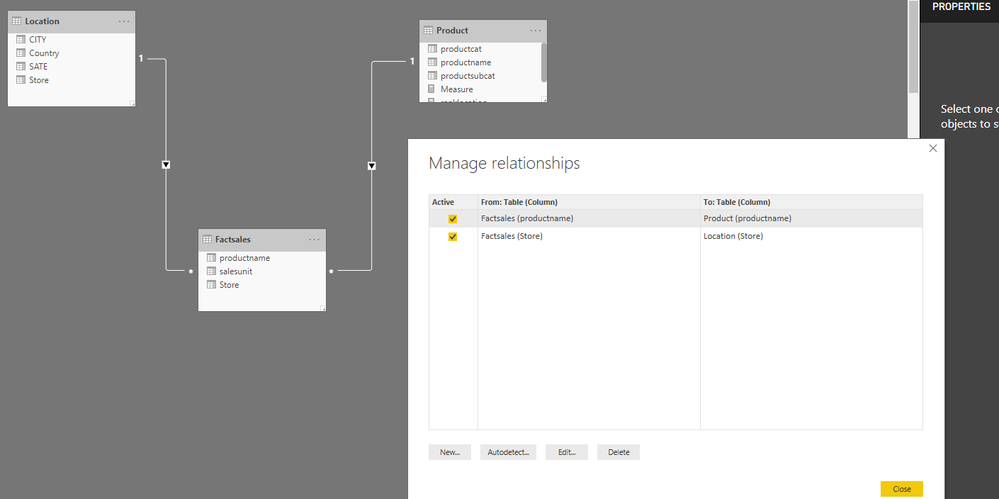
Here I create the relationship between tables as below.
Then I create three measures.
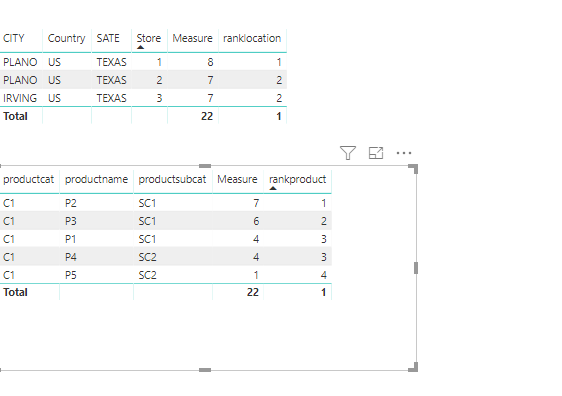
Measure = CALCULATE(SUM(Factsales[salesunit]))
ranklocation = IF(ISBLANK([Measure]),BLANK(),RANKX(ALL(Location),[Measure],,DESC,Dense))
rankproduct = IF(ISBLANK([Measure]),BLANK(),RANKX(ALL('Product'),[Measure],,DESC,Dense))
Regards,
Frank
Hi @Anonymous ,
Here I create the relationship between tables as below.
Then I create three measures.
Measure = CALCULATE(SUM(Factsales[salesunit]))
ranklocation = IF(ISBLANK([Measure]),BLANK(),RANKX(ALL(Location),[Measure],,DESC,Dense))
rankproduct = IF(ISBLANK([Measure]),BLANK(),RANKX(ALL('Product'),[Measure],,DESC,Dense))
Regards,
Frank
Hi @Anonymous ,
Does that make sense? If so, kindly mark my answer as the solution to close the case please. Thanks in advance.
Regards,
Frank
Hi @Anonymous
Im not quite sure about what you want...according to what I understand, you want to create 3 rank measures, right?
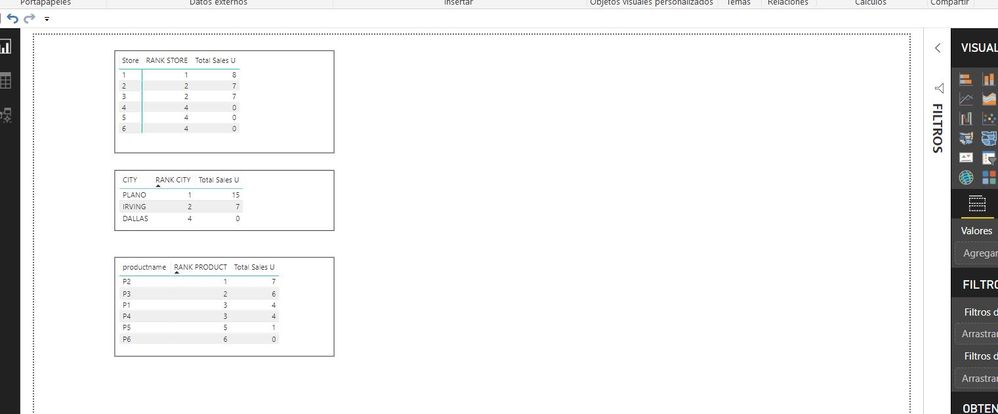
If you create a total store units measure, you could do this: (if this work, dont forget to give a like) see ya.
You will get something like these:
The Power BI Data Visualization World Championships is back! Get ahead of the game and start preparing now!
| User | Count |
|---|---|
| 39 | |
| 37 | |
| 33 | |
| 32 | |
| 29 |
| User | Count |
|---|---|
| 132 | |
| 88 | |
| 82 | |
| 68 | |
| 64 |