Join us at FabCon Atlanta from March 16 - 20, 2026, for the ultimate Fabric, Power BI, AI and SQL community-led event. Save $200 with code FABCOMM.
Register now!The Power BI Data Visualization World Championships is back! Get ahead of the game and start preparing now! Learn more
Hi,
I have the following query to give me a recommended selling price for an item:
Recommended Selling Price =
IF(HASONEVALUE(SAGE_Extract[Symbol]),
[Cost Price]
+ [Cost to Deliver]
+ [Haulage]
- [Discount - Volume (£&€)])
I want to apply my own rounding rules so that if a selling price ends with a certain number a rule is applied e.g. ends with a 4 then round to 5, ends with a 6 then round to 5, ends with an 8 then round to 8.
I have tried using FORMAT to change the number to text, REPLACE and RIGHT to get the last character and a SWITCH function wrapped around this to give the different rounding options, but cannot get the DAX correct. Can anyone help?
Thanks.
Solved! Go to Solution.
Hi @jcarville,
A IF statement would help. Please try the formula below.
Column =
VAR lastDigital =
INT ( RIGHT ( FIXED ( [Column1], 2 ), 1 ) )
RETURN
IF (
lastDigital IN { 0, 2, 3, 5, 7, 8 },
[Column1],
MROUND ( [Column1], 0.05 )
)
Maybe you need to pay attention to the numbers end with 9.
Best Regards,
Dale
Hi @jcarville,
Maybe the function MROUND could help.
Column = MROUND([Column1],0.3)
Best Regards,
Dale
Hi @v-jiascu-msft,
MROUND does not meet my requirements as can be seen below by the inconsistent values in my calculated column.
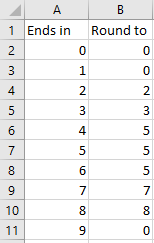
To be more specific, these are the roundings I need to apply:
Hi @jcarville,
A IF statement would help. Please try the formula below.
Column =
VAR lastDigital =
INT ( RIGHT ( FIXED ( [Column1], 2 ), 1 ) )
RETURN
IF (
lastDigital IN { 0, 2, 3, 5, 7, 8 },
[Column1],
MROUND ( [Column1], 0.05 )
)
Maybe you need to pay attention to the numbers end with 9.
Best Regards,
Dale
@v-jiascu-msft, amazing DAX knowledge! That works perfectly to suit my needs. A bit heavy on the processing side, but my model is large anyways.
Thanks for your help with this, much appreciated.
Jake
The Power BI Data Visualization World Championships is back! Get ahead of the game and start preparing now!
| User | Count |
|---|---|
| 161 | |
| 132 | |
| 117 | |
| 79 | |
| 54 |