Learn from the best! Meet the four finalists headed to the FINALS of the Power BI Dataviz World Championships! Register now
Hello
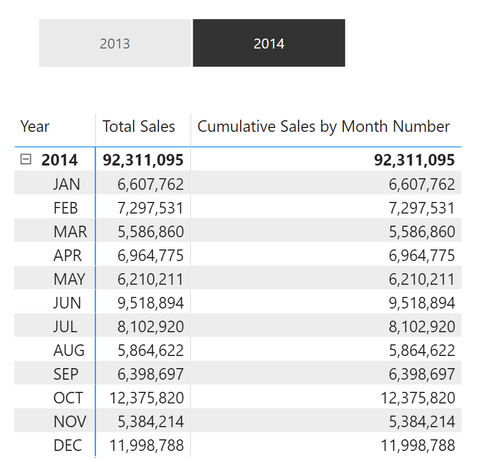
I am trying to work out the cumulative amounts for each month using the following dax queries with Rankx.
Month Numbers =
SWITCH([Total Sales Ranking by Month],
"JAN", 1,
"FEB", 2,
"MAR", 3,
"APR", 4,
"MAY", 5,
"JUN", 6,
"JUL", 7,
"AUG", 8,
"SEP", 9,
"OCT", 10,
"NOV", 11,
"DEC", 12,0)
Cumulative Sales by Month Number =
var monthNos = [Month Numbers]
RETURN
SUMX(
FILTER(
SUMMARIZE(
'Calendar', 'Calendar'[Month],
"Sales", [Total Sales],
"Sales Ranking", RANKX(ALL('Calendar'[Month]), [Total Sales], , ASC)
),
[Sales Ranking] >= monthNos
),
[Sales]
)
But I end up with the same values in both the Total Sales and Cumulative columns. What am I doing wrong?
Thanks
Yoshi
If you're looking to do cumulative sum based on column that is not date, you may find this helpful: https://community.powerbi.com/t5/Desktop/Cumulative-SUM-using-Rank-NOT-Dates/m-p/170623
@Yoshimitsu411 , As you have date and you want a yearly total then you can use datesytd
example
YTD Sales = CALCULATE(SUM(Sales[Sales Amount]),DATESYTD('Date'[Date],"12/31"))
For Cumulative with help from date table
Cumm Sales = CALCULATE(SUM(Sales[Sales Amount]),filter(allselected(date),date[date] <=max(date[Date])))
If you have recently started exploring Fabric, we'd love to hear how it's going. Your feedback can help with product improvements.
A new Power BI DataViz World Championship is coming this June! Don't miss out on submitting your entry.
Share feedback directly with Fabric product managers, participate in targeted research studies and influence the Fabric roadmap.
| User | Count |
|---|---|
| 57 | |
| 38 | |
| 34 | |
| 19 | |
| 16 |
| User | Count |
|---|---|
| 70 | |
| 66 | |
| 42 | |
| 32 | |
| 25 |