Join us at FabCon Atlanta from March 16 - 20, 2026, for the ultimate Fabric, Power BI, AI and SQL community-led event. Save $200 with code FABCOMM.
Register now!The Power BI Data Visualization World Championships is back! Get ahead of the game and start preparing now! Learn more
Hello guys,
I'm pretty new to DAX and whant a measure that calculates the value of declaraties.The hard thing to me are the arguments:
The measure must calculate only the values where the time between the date of declaration (Fact Table Column enddate) and the start date (Fact Table Colum startdate) is not bigger than 2 years.
How can help me out?
Kind regards.
PS. the datemodel has a fact and a date table
Solved! Go to Solution.
Hi @Anonymous,
Based on my test, you could refer to below steps:
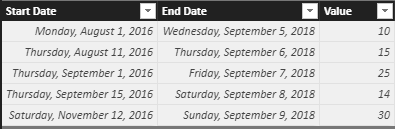
Sample data:
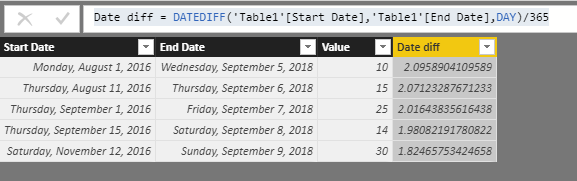
Create a calculated column:
Date diff = DATEDIFF('Table1'[Start Date],'Table1'[End Date],DAY)/365Create a measure and you could see the result:
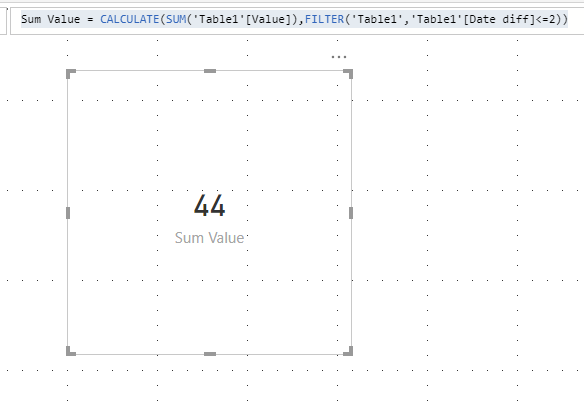
Sum Value = CALCULATE(SUM('Table1'[Value]),FILTER('Table1','Table1'[Date diff]<=2))You could also download the pbix file to have a view:
Regards,
Daniel He
Hi @Anonymous,
Based on my test, you could refer to below steps:
Sample data:
Create a calculated column:
Date diff = DATEDIFF('Table1'[Start Date],'Table1'[End Date],DAY)/365Create a measure and you could see the result:
Sum Value = CALCULATE(SUM('Table1'[Value]),FILTER('Table1','Table1'[Date diff]<=2))You could also download the pbix file to have a view:
Regards,
Daniel He
Hey @v-danhe-msft
How would the structure of DAX change if I say that my end date is in a differen table?
I have to sum the demand for a part during the timeline of RTS_date + 90. For example a part X has an RTS 01/01/2000 then I have to calculate the total demand for this part using period from demand table which is RTS date + 90 days. SO basically sum the demand from demand table where the period is before 03/01/2000(assumed 30 days each month)
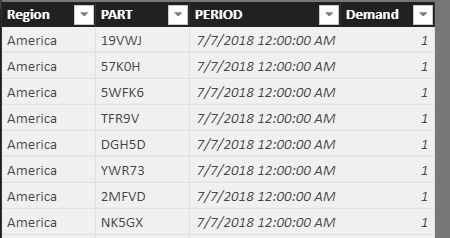
I have attached the table pic for two different tables.
Demand Table:
Thanks Daniel! It works :):)
The Power BI Data Visualization World Championships is back! Get ahead of the game and start preparing now!
Check out the November 2025 Power BI update to learn about new features.
| User | Count |
|---|---|
| 59 | |
| 46 | |
| 42 | |
| 23 | |
| 17 |
| User | Count |
|---|---|
| 190 | |
| 122 | |
| 96 | |
| 66 | |
| 47 |