cancel
Showing results for 
Search instead for 
Did you mean: 

The Power BI Data Visualization World Championships is back! Get ahead of the game and start preparing now! Learn more

Reply
Anonymous
Not applicable

DAX Help

Hi,

Need some help with DAX. I have data something like below (second screenshot). Total Current Hours and 'Measure3' are the 2 metrics.

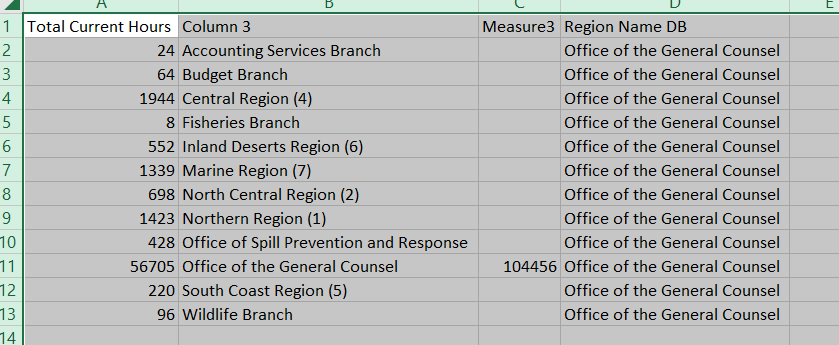
Total current hours has data for multiple regions (column3) for specific set of Task ID where as Measure is only associated with one Region for those specific Task IDs. In this case Measure3 is associated with 'Office of the General Counsel'. When I try to show of the data in a single table, Measure 3 is repeated. What is required that is that I should have only record for 'Measure3' for the corresponding Region name (firstscreenhot would be the ideal output). 

The DAX I have is 

Measure3 = CALCULATE([Total Mission Hours],
FILTER(Fact_Mission_Hours,Fact_Mission_Hours[Region Name]=SELECTEDVALUE('Dim_Region (2)'[Region Name DB]))).
 
Please suggest.correct.PNG


table data.PNG

7 REPLIES 7
jdbuchanan71
Super User
Super User

Without seeing the model it is tricky to help.  Give this a try.

Measure3 =
CALCULATE (
    [Total Mission Hours],
    KEEPFILTERS (
        FILTER (
            Fact_Mission_Hours,
            Fact_Mission_Hours[Region Name]
                = SELECTEDVALUE ( 'Dim_Region (2)'[Region Name DB] )
        )
    )
)
Anonymous
Not applicable

Hi,

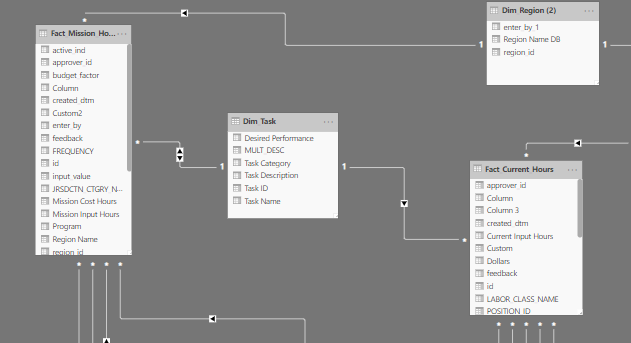
Below is the model. The thing is that there is no relation between Dim Region and Fact Current Hours. If I create a relationship between the fact current hours table gets filtered for the region from the fact mission hours. Not sure, if a left join can be defined which can help me get the values I want.

The formula you sent me is giving me the same results.

model.PNG

We might be able to get this without the relationship.  Give this a try.


Measure3 = 
VAR TheList = VALUES ( 'Fact Current Hours'[Column 3] )
VAR TheFilter = VALUES ( 'Dim_Region (2)'[Region Name DB] )
RETURN
    CALCULATE (
        [Total Mission Hours],
        INTERSECT ( TheList, TheFilter )
    )

Intersect only allows tables, not values so I could not use SELECTEDVALUE but if you have a filter set on 'Dim_Region (2)'[Region Name DB] that will feed in only the single selection and flow into the INTERSECT

Anonymous
Not applicable

Hi,

Still does not work. Am I missing something? Please see below.snapshot.PNG

Can you share your .pbix file?

Anonymous
Not applicable

Hi,

This is confidential data and I am afraid I won't be able to share the file with you. Any thing else can help you understand the data?


The only other thing I can think to do is add a realationship between the two tables but set it to INACTIVE and use it in your measure.  Something like.

Measure3 =
CALCULATE (
    [Total Mission Hours],
    FILTER (
        Fact_Mission_Hours,
        Fact_Mission_Hours[Region Name]
            = SELECTEDVALUE ( 'Dim_Region (2)'[Region Name DB] )
    ),
    USERELATIONSHIP ( 'Dim_Region (2)'[Region Name DB], 'Fact Current Hours'[Column 3] )
)

Helpful resources

Announcements
Power BI DataViz World Championships

Power BI Dataviz World Championships

The Power BI Data Visualization World Championships is back! Get ahead of the game and start preparing now!

December 2025 Power BI Update Carousel

Power BI Monthly Update - December 2025

Check out the December 2025 Power BI Holiday Recap!

FabCon Atlanta 2026 carousel

FabCon Atlanta 2026

Join us at FabCon Atlanta, March 16-20, for the ultimate Fabric, Power BI, AI and SQL community-led event. Save $200 with code FABCOMM.