cancel
Showing results for 
Search instead for 
Did you mean: 

Level up your Power BI skills this month - build one visual each week and tell better stories with data! Get started

Reply
Anonymous
Not applicable

DAX Help needed

Hi, 


I have a Vehicle Data set where I have few OBD and Non OBD Fault Code data (Time they were active in seconds ). I want to divide sum of length of OBD Faults active (Sum of time when OBD Fault was active ) and Divide it by the total length (Sum of total length both OBD and Non OBD). 


Something like this : Sum(Faut code length - OBD only)/ Sum of all fault code length


Fault Code length is the time in seconds the Fault Code is active

1 ACCEPTED SOLUTION
Anonymous
Not applicable

Hi! @Anonymous 


I used something like this 

OBD_Lamp_Percentage = DIVIDE(CALCULATE(SUM( 'Active Faults'[Length of Active Fault Code]),FILTER('Active Faults','Active Faults'[Lamp. OBD Type ]="OBD")),SUM('Active Faults'[Master Data.Day_Length_Final]))
 
and it seems to be performing the way how I wanted to the calculation to be. 

View solution in original post

3 REPLIES 3
Anonymous
Not applicable

Hi @Anonymous ,


Will this work for you?


I created a measure like this to calculate the total sum by  category.

measure = calculate(sum(Sheet12[Time in s]))

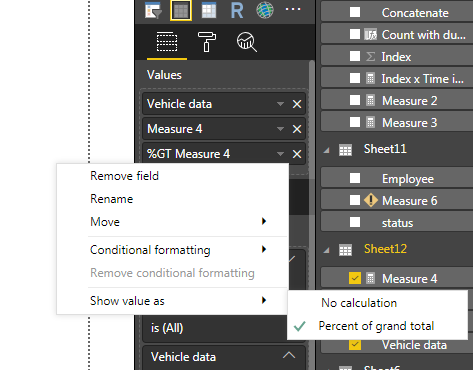
Then I used the same measure and calculated the % of Grand total like this.

step 5.PNG

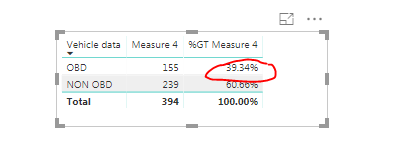
Than in the table Visual I added the fields to show somethign like this:

step 6.PNG

Please let me know if this works.


Thanks,

Tejaswi


Anonymous
Not applicable

Hi! @Anonymous 


I used something like this 

OBD_Lamp_Percentage = DIVIDE(CALCULATE(SUM( 'Active Faults'[Length of Active Fault Code]),FILTER('Active Faults','Active Faults'[Lamp. OBD Type ]="OBD")),SUM('Active Faults'[Master Data.Day_Length_Final]))
 
and it seems to be performing the way how I wanted to the calculation to be. 
Anonymous
Not applicable

Hi @Anonymous ,

That's Nice!


If you think your issue is resolved you can mark it as a solution.


Thanks,

Tejaswi

Helpful resources

Announcements
April Power BI Update Carousel

Power BI Monthly Update - April 2026

Check out the April 2026 Power BI update to learn about new features.

Fabric SQL PBI Data Days

Data Days 2026 coming soon!

Sign up to receive a private message when registration opens and key events begin.

New to Fabric survey Carousel

New to Fabric Survey

If you have recently started exploring Fabric, we'd love to hear how it's going. Your feedback can help with product improvements.

Power BI DataViz World Championships carousel

Power BI DataViz World Championships - June 2026

A new Power BI DataViz World Championship is coming this June! Don't miss out on submitting your entry.