Join us at FabCon Atlanta from March 16 - 20, 2026, for the ultimate Fabric, Power BI, AI and SQL community-led event. Save $200 with code FABCOMM.
Register now!The Power BI Data Visualization World Championships is back! Get ahead of the game and start preparing now! Learn more
Hello all,
I am strugelling to get bellwo requirement could you please help me here.
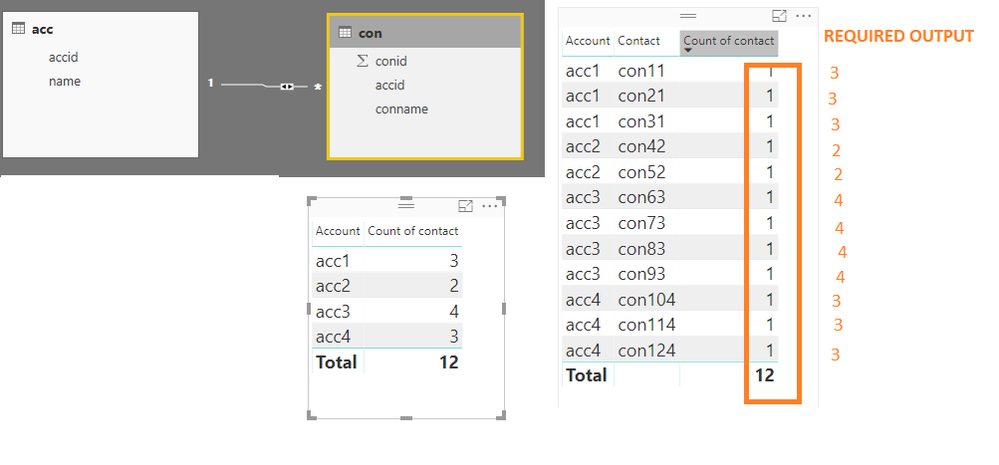
1) I have account and contact tables where each account have multiple contacts .Bellow is my required output
when i drag account and count of contacts i am getting exact count but when i drag contact also i need same count
Hi,
Try this
=CALCULATE(COUNTROWS(Conname),ALL(Con[Conname]))
Hope this helps.
Hi @Ashish_Mathur,
Thank you for your valuable time but unfortuntely it dint work for me but you are very closer i guess .
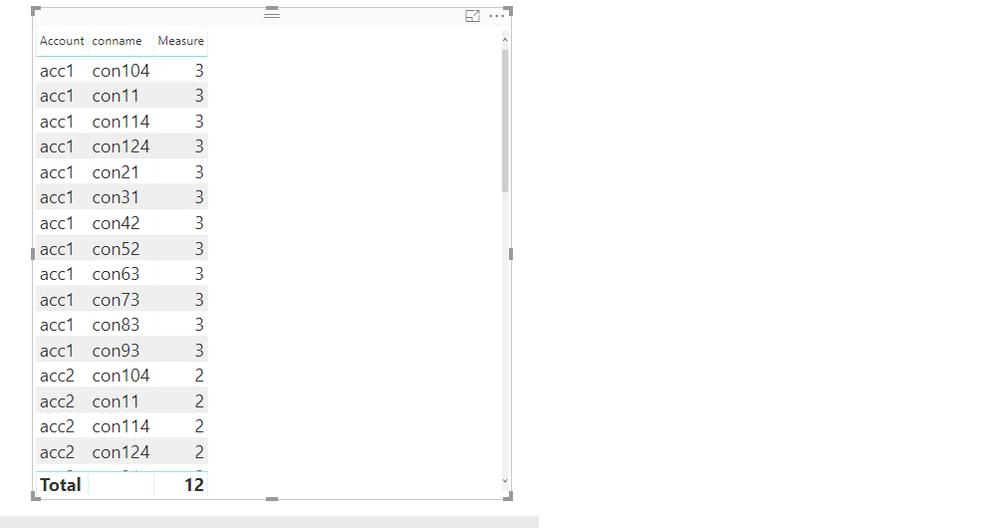
I am getting count but conname is repeating lot of times (conname related to remaining accounts also repeatting which i dont requried.
for
acc1 con104 3
acc1 con11 3
acc1 con114 3
this is what i am expecing bellow is the output i am getting from your measure
Hi,
Share the link from where i can download your PBI file.
Hey,
Use this :
NumOfProducts = CALCULATE(DISTINCTCOUNT('Sheet1'[Product]),ALLEXCEPT('Sheet1','Sheet1'[Month]))
Changs column names Accordingly !!!
Use this :
NumOfContacts = CALCULATE(DISTINCTCOUNT('Con'[Conname]),ALLEXCEPT('acc','acc'[accid]))
HI @chotu27 ,
YES i need sum but i need the same sum vlue wheni drag contact too in the report absically i need to remove filter context of contact
The Power BI Data Visualization World Championships is back! Get ahead of the game and start preparing now!
| User | Count |
|---|---|
| 38 | |
| 38 | |
| 37 | |
| 28 | |
| 28 |
| User | Count |
|---|---|
| 124 | |
| 89 | |
| 73 | |
| 66 | |
| 65 |