Join us at FabCon Atlanta from March 16 - 20, 2026, for the ultimate Fabric, Power BI, AI and SQL community-led event. Save $200 with code FABCOMM.
Register now!Vote for your favorite vizzies from the Power BI Dataviz World Championship submissions. Vote now!
Hello All,
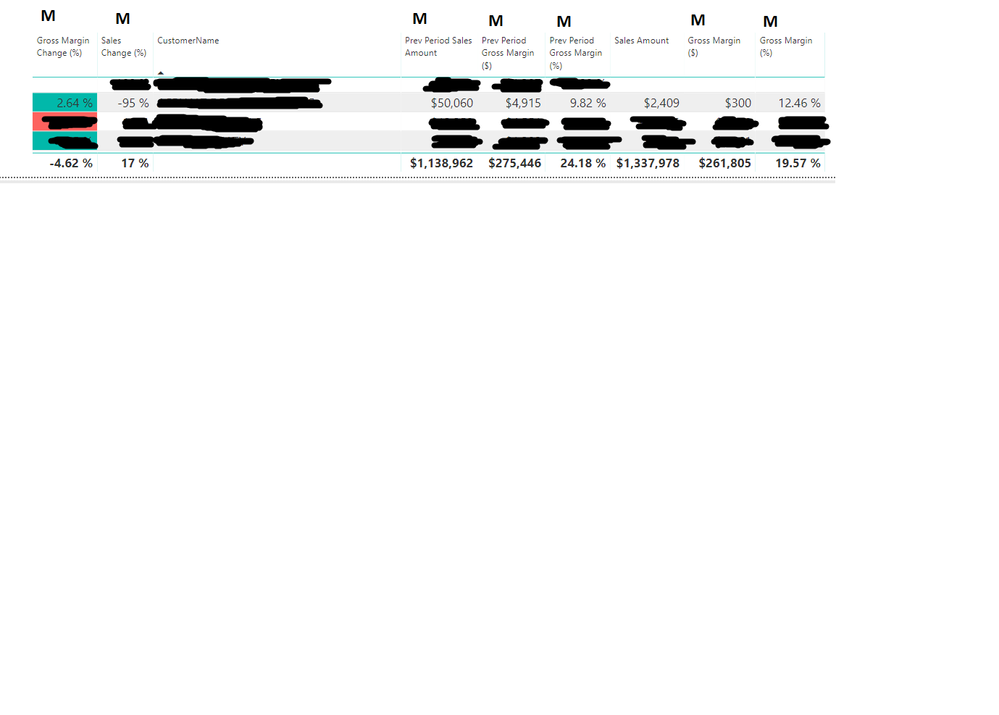
I'm currently trying to recreate a formula in Power BI that is being used in Excel for a report. On the image below I've place an M above the columns of my table that represent Measures I created. Sales Amount is a column that has a Default Summarization of Sum. I need a formula that looks like this:
(total of Prev Period Gross Margin $, subtract Prev Period Gross Margin $, add Gross Margin $)
divide--------------------------------------------------------------------------------------------------
(total of Prev Period Sales Amount, subtract Prev Period Sales Amount, add Sales Amount)
(275,446 - 4915 + 300) / (1,138,962 - 50,060 + 2,409) -----> 270,831 / 1,061,311 ------> .24817 ------> 24.82%
Any help would be greatly appreciated!!!
Thanks,
Create a measure and try DAX formula like pattern below:
Measure =
CALCULATE ( SUM ( Table[Prev Period Gross Margin] ), ALL ( Table ) )
- MAX ( Table[Prev Period Gross Margin] )
+ MAX ( Table[Gross Margin] )
/ CALCULATE ( SUM ( Table[Prev Period Sales Amount] ), ALL ( Table ) )
- MAX ( Table[Prev Period Sales Amount] )
+ MAX ( Table[Sales Amount] )
Regards,
Jimmy Tao
Have you solved your issue by now? If you have, could you please help mark the correct answer to finish the thread? Your contribution will be much appreciated.
Regards,
Jimmy Tao
There wasn't a correct answer. It looks like what I'm trying to do can not be done in Power BI.
Could you share the original table for further test?
Community Support Team _ Jimmy Tao
If this post helps, then please consider Accept it as the solution to help the other members find it more quickly.
Vote for your favorite vizzies from the Power BI World Championship submissions!
If you love stickers, then you will definitely want to check out our Community Sticker Challenge!
Check out the January 2026 Power BI update to learn about new features.
| User | Count |
|---|---|
| 57 | |
| 52 | |
| 45 | |
| 17 | |
| 16 |
| User | Count |
|---|---|
| 109 | |
| 108 | |
| 40 | |
| 33 | |
| 26 |