Join us at FabCon Atlanta from March 16 - 20, 2026, for the ultimate Fabric, Power BI, AI and SQL community-led event. Save $200 with code FABCOMM.
Register now!The Power BI Data Visualization World Championships is back! Get ahead of the game and start preparing now! Learn more
I've read a couple of posts on how to do this but I still can't make mine work. I need the correct DAX formula to make my line graph figures cumulative by period. It's really the filter part of the formula I'm getting confused with. Here are my examples:
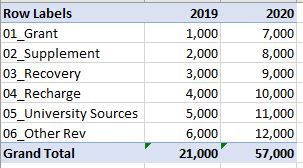
This is an example of the information I would be using;
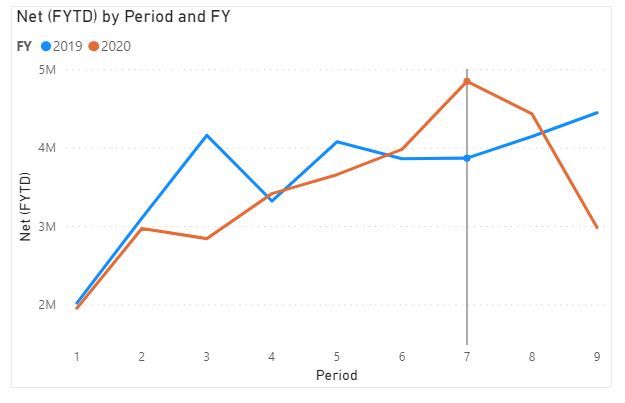
This is the line graph I need and need the totals to be cumulative.
Thanks for your help!
Solved! Go to Solution.
The X axis, are those months? A general running total pattern is like this. Try modifying it according to your needs and let me know.
Running Total =
CALCULATE (
[Total Sales],
FILTER ( ALL ( 'Date' ), 'Date'[Date] <= MAX ( 'Date'[Date] ) )
)
Hi @kaytrishjr
Added on the above posts, if there's no date column could be using for [date]<=max(table(date)), you can just take the period column as index, and create the measure similar as:
Running Total =
CALCULATE (
[Total Sales],
FILTER ( ALL ( 'Table' ), 'Table'[period] <= MAX ( 'Table'[period] ) )
)
Hi @kaytrishjr
Added on the above posts, if there's no date column could be using for [date]<=max(table(date)), you can just take the period column as index, and create the measure similar as:
Running Total =
CALCULATE (
[Total Sales],
FILTER ( ALL ( 'Table' ), 'Table'[period] <= MAX ( 'Table'[period] ) )
)
The X axis, are those months? A general running total pattern is like this. Try modifying it according to your needs and let me know.
Running Total =
CALCULATE (
[Total Sales],
FILTER ( ALL ( 'Date' ), 'Date'[Date] <= MAX ( 'Date'[Date] ) )
)
For Cumulative COlumn use the below DAX:
Column = CALCULATE(SUM(Table[SalesColumn]),ALL(Table),Table[DateColumn]<=EARLIER(Table[DateColumn]))
For Cumulative MEasure use the below DAX:
Measure = CALCULATE(SUM(Table[SalesColumn]),FILTER(ALL(Table),Table[DateColumn]<=Max(Table[DateColumn])))
The Power BI Data Visualization World Championships is back! Get ahead of the game and start preparing now!
| User | Count |
|---|---|
| 38 | |
| 38 | |
| 36 | |
| 28 | |
| 28 |
| User | Count |
|---|---|
| 124 | |
| 88 | |
| 74 | |
| 66 | |
| 65 |