cancel
Showing results for 
Search instead for 
Did you mean: 

The Power BI Data Visualization World Championships is back! Get ahead of the game and start preparing now! Learn more

Reply
Anonymous
Not applicable

DAX Formula Error

Hi Experts

i am trying to replicate the Calculation in tabke below in Power BI. i.e. Cell H4*G5 and copy down in column H5 onwrds. Here is a link to a site that was given to me and i have followed example 5 (see link)

See example 5:

https://exceleratorbi.com.au/compound-growth-using-dax/


Sample.PNG


Attached is my PBIX file with sample data. please refer to Table STEMBRANDYEARS

My H Column is [Holder Column]

1-D/N is 1-e_i/d_i and i am trying to populate the result into column s(t) my measure is in this column.

not sure what i am doing wrong.

https://www.dropbox.com/s/auvmnu2so83rfiv/Test_KPV_1.1_%281%29.pbix?dl=0

1 ACCEPTED SOLUTION
dax
Community Support
Community Support

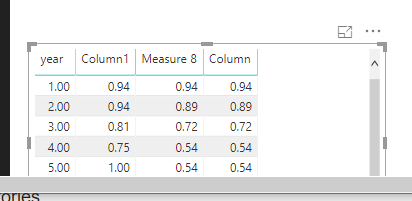
Hi, It seems that you want to calculate running multiplication based on year, right? If so, you could try to use below expression to see whether it works or not

Column = exp(
     SUMX(
          FILTER(ALL(Table4), Table4[year]<=EARLIER(Table4[year])),
          ln(Table4[Column1])
         )
    
      )

Or

Measure 8 = exp(
     SUMX(
          FILTER(ALL(Table4), Table4[year]<=MAX(Table4[year])),
          ln(Table4[Column1])
         )
    
      )

31.png

You could refer to Cumulative Interest or Inflation, Multiplying Every Value in a Column, Why Don’t We Have PRODUCTX? for details

Best Regards,
Zoe Zhi

If this post helps, then please consider Accept it as the solution to help the other members find it more quickly.


View solution in original post

2 REPLIES 2
dax
Community Support
Community Support

Hi, It seems that you want to calculate running multiplication based on year, right? If so, you could try to use below expression to see whether it works or not

Column = exp(
     SUMX(
          FILTER(ALL(Table4), Table4[year]<=EARLIER(Table4[year])),
          ln(Table4[Column1])
         )
    
      )

Or

Measure 8 = exp(
     SUMX(
          FILTER(ALL(Table4), Table4[year]<=MAX(Table4[year])),
          ln(Table4[Column1])
         )
    
      )

31.png

You could refer to Cumulative Interest or Inflation, Multiplying Every Value in a Column, Why Don’t We Have PRODUCTX? for details

Best Regards,
Zoe Zhi

If this post helps, then please consider Accept it as the solution to help the other members find it more quickly.


Anonymous
Not applicable

Hi zoe. Thanks for the feedback. I'll test shortly and come back to you.

Helpful resources

Announcements
Power BI DataViz World Championships

Power BI Dataviz World Championships

The Power BI Data Visualization World Championships is back! Get ahead of the game and start preparing now!

December 2025 Power BI Update Carousel

Power BI Monthly Update - December 2025

Check out the December 2025 Power BI Holiday Recap!

FabCon Atlanta 2026 carousel

FabCon Atlanta 2026

Join us at FabCon Atlanta, March 16-20, for the ultimate Fabric, Power BI, AI and SQL community-led event. Save $200 with code FABCOMM.