Join us at FabCon Atlanta from March 16 - 20, 2026, for the ultimate Fabric, Power BI, AI and SQL community-led event. Save $200 with code FABCOMM.
Register now!The Power BI Data Visualization World Championships is back! Get ahead of the game and start preparing now! Learn more
Hi,
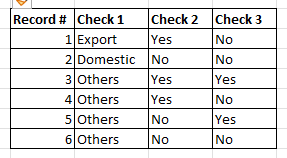
I am using this sample table:
I would like to set-up a DAX wherein:
If Check 1 = "Export" show "Export",
If Check 1 = "Domestic show "Domestic",
If Check 1 = "Others", go to Check 2,
If Check 2 = "Yes", show "Import",
If Check 2 = "No", go to Check 3,
If Check 3 = "Yes", show "Import",
If Check 3 = "No", show "Unclassified"
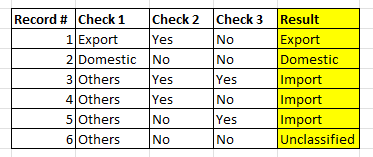
Here is a sample result when the above is used:
Appreciate your kind assistance.
Best regards,
Mark V
Solved! Go to Solution.
Hi,
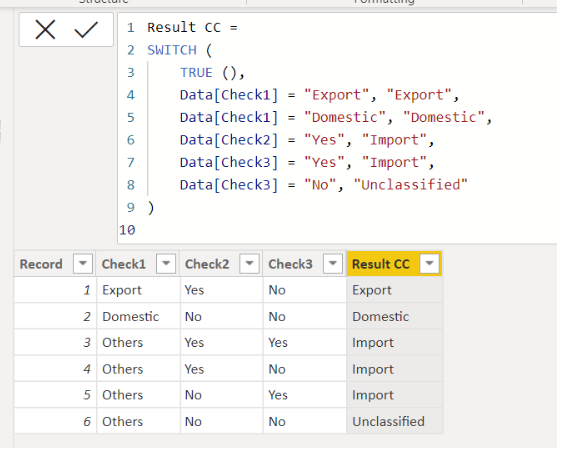
Please check the below picture and the attached pbix file.
Result CC =
SWITCH (
TRUE (),
Data[Check1] = "Export", "Export",
Data[Check1] = "Domestic", "Domestic",
Data[Check2] = "Yes", "Import",
Data[Check3] = "Yes", "Import",
Data[Check3] = "No", "Unclassified"
)
Hi,
Please check the below picture and the attached pbix file.
Result CC =
SWITCH (
TRUE (),
Data[Check1] = "Export", "Export",
Data[Check1] = "Domestic", "Domestic",
Data[Check2] = "Yes", "Import",
Data[Check3] = "Yes", "Import",
Data[Check3] = "No", "Unclassified"
)
The Power BI Data Visualization World Championships is back! Get ahead of the game and start preparing now!
| User | Count |
|---|---|
| 41 | |
| 38 | |
| 36 | |
| 30 | |
| 28 |
| User | Count |
|---|---|
| 129 | |
| 88 | |
| 79 | |
| 68 | |
| 63 |