cancel
Showing results for 
Search instead for 
Did you mean: 

Vote for your favorite vizzies from the Power BI Dataviz World Championship submissions. Vote now!

Reply
mpicca13
Resolver IV
Resolver IV

DAX Dynamic RANKX not changing Axis values

I'm currently working on a Covid-19 Dashboard and I have created a measure which ranks the top 10 counties in the US by new confirmed cases for the day.


The measure for new confirmed cases is : 

DoD Confirmed Case Count Change = [Confirmed Cases for Current Day] - [Confirmed Cases Yesterday]
 
My Rank Measure is:
Top Counties =
VAR RankByCounty = RANKX( ALLSELECTED( Region[County & State]), [DoD Confirmed Case Count Change], , DESC)

RETURN
CALCULATE(
    [DoD Confirmed Case Count Change],
        FILTER( Region, RankByCounty <= 10 )
)  
 
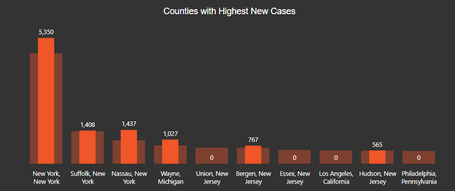
Now when I select a date from the past, all of my [DoD Confirmed Case Count Change] values will change accordingly by the but the Axis values Region[County & State] will remain in place in the visual, this leads to the same county and region axis values but whichever county is not placed in top 10 for the selected prior date that is currently palced top 10 for the current date  will show a DoD case count value of 0.
 
See below images for reference:
 
Visual with date filter set to today:
Capture.PNG
 
Visual with date filter set to 4/03/2020:
Capture1.PNG 
 
I need te Axis values to change accordingly showing the corresponding DoD Case Count values
I feel that this issue lies in my Rank formula.
 
1 ACCEPTED SOLUTION
mpicca13
Resolver IV
Resolver IV

I have resolved the problem.

The issue was not in the DAX formula, it was in the visual interaction.

The interaction was set to "Highlight" .

I have changed it to "Filter" and now it works as intended.

View solution in original post

1 REPLY 1
mpicca13
Resolver IV
Resolver IV

I have resolved the problem.

The issue was not in the DAX formula, it was in the visual interaction.

The interaction was set to "Highlight" .

I have changed it to "Filter" and now it works as intended.

Helpful resources

Announcements
Sticker Challenge 2026 Carousel

Join our Community Sticker Challenge 2026

If you love stickers, then you will definitely want to check out our Community Sticker Challenge!

January Power BI Update Carousel

Power BI Monthly Update - January 2026

Check out the January 2026 Power BI update to learn about new features.

FabCon Atlanta 2026 carousel

FabCon Atlanta 2026

Join us at FabCon Atlanta, March 16-20, for the ultimate Fabric, Power BI, AI and SQL community-led event. Save $200 with code FABCOMM.