Don't miss your chance to take exam DP-600 or DP-700 on us!
Request nowLearn from the best! Meet the four finalists headed to the FINALS of the Power BI Dataviz World Championships! Register now
Hello. I'm just trying to do some dynamic segmentation of customers according to the units they buy. Very simple in theory.
The category would be: less than 100 units, between 100 and 250 units, more than 250 units.
It was easy to do it for a particular month:
Category = if [units] <100 then "<100" else if [units] <250 then "100-250" else ">250"
But if I want to do it for the whole year I can't find the better way to solve that as I couldn't use the YTD function in M language.
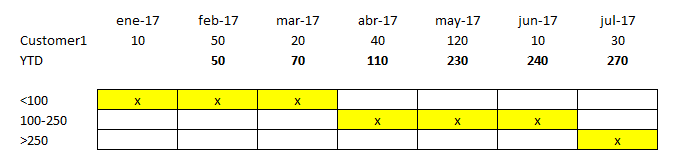
For example, this customer it would be at the "<100" category from january to march, but then it would be at the "100-250" from april to june, and finally it would end up at the ">250" category.
I'm afraid it's really simple but I couldn't do it. Please I need help!
Solved! Go to Solution.
@JuliaYebra,
Create YTD measure using DAX following the tips in the blog below.
https://www.mssqltips.com/sqlservertip/4841/calculating-mtd-qtd-ytd-running-and-cumulative-total-in-...
Then create a column in your table using DAX rather than M, you can also use SWITCH function as other's post to create the column.
Column = IF([YTDMeasure]<100,"<100",(IF([YTDMeasure]<250,"100-250",">250")))
Regards,
Lydia
@JuliaYebra,
Create YTD measure using DAX following the tips in the blog below.
https://www.mssqltips.com/sqlservertip/4841/calculating-mtd-qtd-ytd-running-and-cumulative-total-in-...
Then create a column in your table using DAX rather than M, you can also use SWITCH function as other's post to create the column.
Column = IF([YTDMeasure]<100,"<100",(IF([YTDMeasure]<250,"100-250",">250")))
Regards,
Lydia
what about the switch statement? if you create it as a measure it should just roll up at whatever date level you look at it i think
ie
SWITCH (TRUE (),
AND ( unit >= 0, unit <= 100 ), "<100",
keep going as above until last one
"na" )
Proud to be a Super User!
Share feedback directly with Fabric product managers, participate in targeted research studies and influence the Fabric roadmap.
Check out the February 2026 Power BI update to learn about new features.
| User | Count |
|---|---|
| 50 | |
| 40 | |
| 37 | |
| 14 | |
| 14 |
| User | Count |
|---|---|
| 85 | |
| 71 | |
| 38 | |
| 29 | |
| 26 |