cancel
Showing results for 
Search instead for 
Did you mean: 

Get Fabric Certified for FREE during Fabric Data Days. Don't miss your chance! Request now

Reply
SurferJames
Frequent Visitor

Customer Name Appear More than Once Formula in a month

Hi,


I have table that consists of the following:


Column 1 : Originator (This is telephone number)

Column 2:  Orginated Time (This is where the call came in)


What I want to do and have as a new table is:


1. Is calculate how many times an orginator has called in a month, there might be an originator that has called me 10 times

2. Condition formatting where if a specific originator has called more than ten times in a single month its flagged as red

3. I want to repeat step 2 by saying if Customer called 5 times in 7 days it goes amber aswell.


How the new table should look:


Column 1: Orginator 

Column 2: How many times they have called in a month

Column 3: How many times they have called in a week

Column 4: How many times they have called in a day


This with conditional formatting as above.


Thanks!

3 REPLIES 3
MFelix
Super User
Super User

Hi @SurferJames ,


When you refer to a table is it a visualization or a table in your model?


For this the best option is to create some measures that calculate the values based on the dates something similar to:

Times call = COUNT(Table[Originator])


Then if you use the the columns for the date of month , week or day on your visualization you get the result you need and then can make a condittional formatting.


Regards

Miguel Félix


Did I answer your question? Mark my post as a solution!

Proud to be a Super User!

Check out my blog: Power BI em Português


Thanks for this.


I am looking at where a customer has called more than 10 times in a month to flag red based on a table I have with:


- Orginated time

- Orginator

- Customer name.


If the customer calls more than 10 times in 30 days it flags as red?

Hi  @SurferJames ,


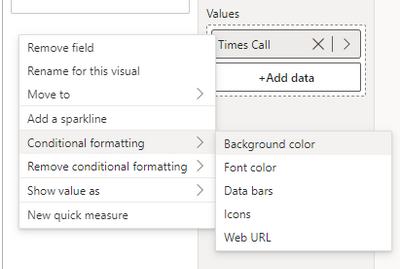
You need to add the measure then use condittional format:


MFelix_1-1695737194706.png


MFelix_0-1695737108694.png

This is done on Icons but you can do background.


See the file attach


Regards

Miguel Félix


Did I answer your question? Mark my post as a solution!

Proud to be a Super User!

Check out my blog: Power BI em Português


Helpful resources

Announcements
Fabric Data Days Carousel

Fabric Data Days

Advance your Data & AI career with 50 days of live learning, contests, hands-on challenges, study groups & certifications and more!

October Power BI Update Carousel

Power BI Monthly Update - October 2025

Check out the October 2025 Power BI update to learn about new features.

FabCon Atlanta 2026 carousel

FabCon Atlanta 2026

Join us at FabCon Atlanta, March 16-20, for the ultimate Fabric, Power BI, AI and SQL community-led event. Save $200 with code FABCOMM.

Top Solution Authors