
This time we’re going bigger than ever. Fabric, Power BI, SQL, AI and more. We're covering it all. You won't want to miss it.
Learn moreDid you hear? There's a new SQL AI Developer certification (DP-800). Start preparing now and be one of the first to get certified. Register now
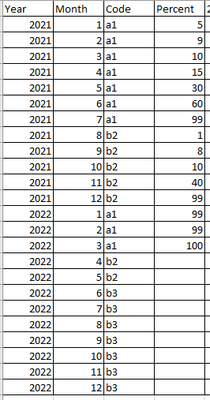
I have data source like
with multiples codes
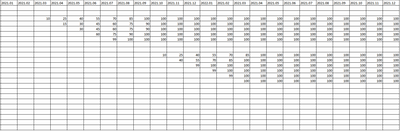
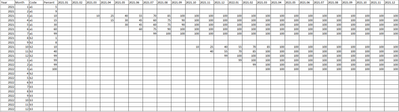
I need make measure which should do something like that
Fomula: If Percent >=10 then predict each next month goes by 15 percent until get 100
So how to write measure to achive that?
I found this article http://blog.gbrueckl.at/2015/04/recursive-calculations-powerpivot-dax/ it partialy that what i want but problem is there are no PBX file only DAX inside Xlsx and i cant move measures to PBI as they not work
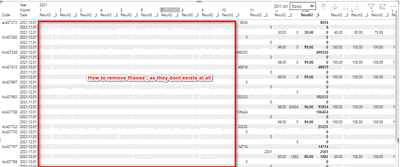
First prolem with @SergKolomiets example, is what showing empty column without data
And Sums not goes to each month, so i cant multiply sum of all dates grouped by code by percentage
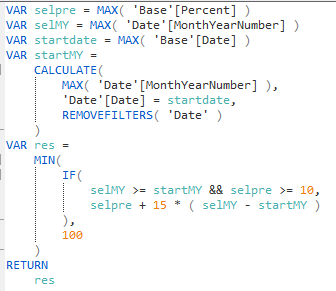
Good afternoon. There are two tables that are not related to each other: the Date calendar and the Base source table. The measure is as follows:
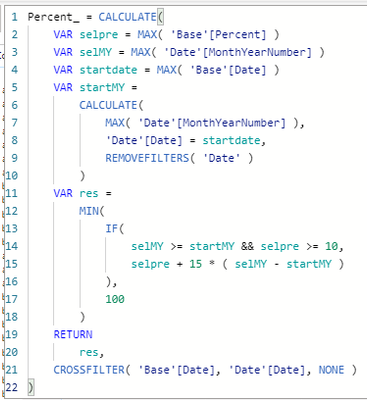
@SergKolomiets T.y. good try but it not work with relations enabled, ineed relation between Base[date] and Date[Date]
Hi, @Digger
The logic here is not too difficult to implement.But just curious how you would like to display in Power BI to get the results.Add a column for each month up to the maximum date, like in the image above? Or generate a forecast trend for each month on a line chart?
Please share more details about what you want to achieve with PowerBI
Best Regards,
Community Support Team _ Zeon Zheng
If this post helps, then please consider Accept it as the solution to help the other members find it more quickly.
@v-angzheng-msft I want put measure to values and date in columns on axis will be code, everything in matrix
Check out the April 2026 Power BI update to learn about new features.
Sign up to receive a private message when registration opens and key events begin.
If you have recently started exploring Fabric, we'd love to hear how it's going. Your feedback can help with product improvements.
| User | Count |
|---|---|
| 35 | |
| 32 | |
| 25 | |
| 23 | |
| 16 |
| User | Count |
|---|---|
| 65 | |
| 50 | |
| 30 | |
| 23 | |
| 23 |