cancel
Showing results for 
Search instead for 
Did you mean: 

The Power BI Data Visualization World Championships is back! It's time to submit your entry. Live now!

Reply
Anonymous
Not applicable

Custom forward projection

Hi All,

I have a table as shown below. FY and Qtr are derived from a [Dates] table. The values in Red are projected. Each projected value is based on the previous one (previous quarter). The black ones are observed values so 3377 is 3396 + X (X being a calculation based on a sum of parameters), 3368 is 3377 + X, and so on.

My [Dates] table has dates up to 2025 so I'd like to run that projection for all those dates.


FYQtrValue
FY20Q11186
FY20Q23087
FY20Q33310
FY20Q43780
FY21Q13717
FY21Q23396
FY21Q33377
FY21Q43368


Could someone help me with that or point me to an article?

Many thanks!

1 ACCEPTED SOLUTION

Hi @Anonymous ,

I created a sample measure for calculating the value of time-based variables: X, Y, Z...

test parameters = QUARTER(MAX(Dates[Date]))*100


Then create measures:

Sum_Parameters = 
IF(
    COUNTROWS(Dates) = COUNTROWS( ALLSELECTED(Dates) ),
    SUMX(
        SUMMARIZE(
            'Dates',
            Dates[FY],
            Dates[Qtr],
            "_sum",
            [test parameters]
        ),
        [_sum]
    ),
    [test parameters]
)
Measure = 
var Last_Date = MAXX(ALL('Table'),'Table'[Date])
var QuarterEnd = 
    CALCULATE(
        VALUES('Table'[Date]),
        ENDOFQUARTER('Table'[Date])
    )
var FactValue = SUM('Table'[Value])
var ProjectedValue = 
    CALCULATE(
        SUM('Table'[Value]),
        FILTER(
            ALL(Dates),
            Dates[Date].[Year] = YEAR(Last_Date)
            && Dates[Date].[QuarterNo] = QUARTER(Last_Date)
        )
    ) +
    CALCULATE(
        [Sum_Parameters],
        FILTER(
            ALL(Dates),
            Dates[Date] > Last_Date
            && Dates[Date] <= MAX(Dates[Date])
        )
    )
return 
    IF(
        MAX(Dates[Date]) > QuarterEnd,
        ProjectedValue,
        FactValue
    )
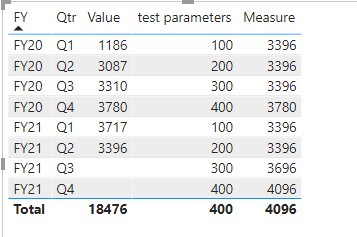
image.png

If the problem is still not resolved, please provide detailed error information or the expected result you expect. Let me know immediately, looking forward to your reply.

Best Regards,
Winniz

If this post helps, then please consider Accept it as the solution to help the other members find it more quickly.

View solution in original post

4 REPLIES 4
amitchandak
Super User
Super User

@Anonymous , What you do is take max QTR Value and then take diff in Qtr and Multiple parameters with that

3396 +X

3396+ 2X

Have a column 

QTR in YYYYQ  format

and qtr rank column

Qtr Rank = RANKX(all('Date'),'Date'[QTR Rank],,ASC,Dense)

Measure  =

Var _max = Maxx(allselected(Table), Table[Qtr Rank]) // Have Year qtr in YYYYQQ format

var _maxVal = maxx(filter(allselected(Table), Table[Qtr Rank] = _max), Table[Value])

return

_maxVal +(2* max(Table[Qtr Rank])  -_max)

Share with Power BI Enthusiasts: Full Power BI Video (20 Hours) YouTube
Microsoft Fabric Series 60+ Videos YouTube
Microsoft Fabric Hindi End to End YouTube
Anonymous
Not applicable

@amitchandak Thanks a lot for that quick response! I'm a bit confused though...

I don't understand the "3396 + 2X" part and the DAX formula. Could you elaborate?

Maybe I should provide clarity:

First projected value is = previous value + X

Second projected value is = first projected value + Y

Third projected value is = second projected value + Z...

X, Y and Z are calculations that are also date related.


I have a Date table ready that is providing the Quarter value from a proper date

So I guess I could work with time intelligence rather that RANK, right?

Hi @Anonymous ,

I created a sample measure for calculating the value of time-based variables: X, Y, Z...

test parameters = QUARTER(MAX(Dates[Date]))*100


Then create measures:

Sum_Parameters = 
IF(
    COUNTROWS(Dates) = COUNTROWS( ALLSELECTED(Dates) ),
    SUMX(
        SUMMARIZE(
            'Dates',
            Dates[FY],
            Dates[Qtr],
            "_sum",
            [test parameters]
        ),
        [_sum]
    ),
    [test parameters]
)
Measure = 
var Last_Date = MAXX(ALL('Table'),'Table'[Date])
var QuarterEnd = 
    CALCULATE(
        VALUES('Table'[Date]),
        ENDOFQUARTER('Table'[Date])
    )
var FactValue = SUM('Table'[Value])
var ProjectedValue = 
    CALCULATE(
        SUM('Table'[Value]),
        FILTER(
            ALL(Dates),
            Dates[Date].[Year] = YEAR(Last_Date)
            && Dates[Date].[QuarterNo] = QUARTER(Last_Date)
        )
    ) +
    CALCULATE(
        [Sum_Parameters],
        FILTER(
            ALL(Dates),
            Dates[Date] > Last_Date
            && Dates[Date] <= MAX(Dates[Date])
        )
    )
return 
    IF(
        MAX(Dates[Date]) > QuarterEnd,
        ProjectedValue,
        FactValue
    )

image.png

If the problem is still not resolved, please provide detailed error information or the expected result you expect. Let me know immediately, looking forward to your reply.

Best Regards,
Winniz

If this post helps, then please consider Accept it as the solution to help the other members find it more quickly.

Anonymous
Not applicable

That's perfect! Thanks!

Helpful resources

Announcements
Power BI DataViz World Championships

Power BI Dataviz World Championships

The Power BI Data Visualization World Championships is back! It's time to submit your entry.

January Power BI Update Carousel

Power BI Monthly Update - January 2026

Check out the January 2026 Power BI update to learn about new features.

FabCon Atlanta 2026 carousel

FabCon Atlanta 2026

Join us at FabCon Atlanta, March 16-20, for the ultimate Fabric, Power BI, AI and SQL community-led event. Save $200 with code FABCOMM.