cancel
Showing results for 
Search instead for 
Did you mean: 

Get Fabric Certified for FREE during Fabric Data Days. Don't miss your chance! Request now

Reply
mesuyog
Regular Visitor

Custom date filter

I have to create custom date filter where Month start should be last months 13 and month end should be that months 12.

For Example -

Normally : January 2022 Starts - 1st ends at 31st

I need : January 2022 Start - 13th Dec 2021 and should end on 12 Jan 2022


Like wise every month should start at 13th of last month and end on 12th of that perticular month. 

1 ACCEPTED SOLUTION
Anonymous
Not applicable

Hi @mesuyog ,


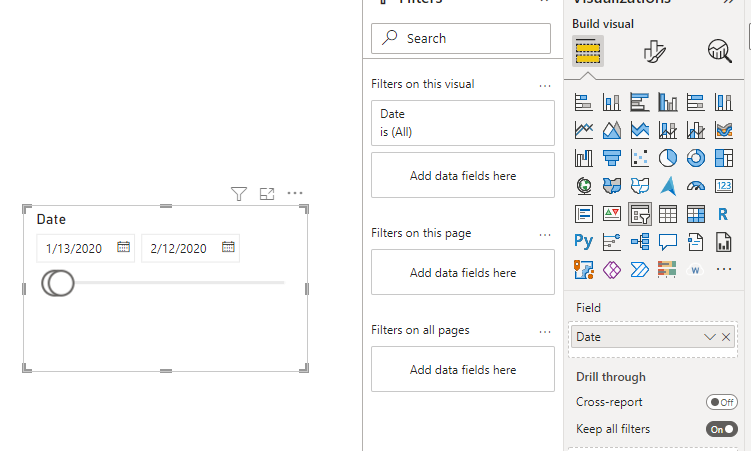
What's your expected output? If you want to simply apply a date filter, you may drag Date column to Slicer field, then you could custom date period:

Eyelyn9_0-1648693510935.png

Or if you want to re-arrange the date month, for example, 

 2021 December is  from   2021/12/13  to   2022/1/12  

 2022 January     is  from   2022/1/13    to   2022/2/12 


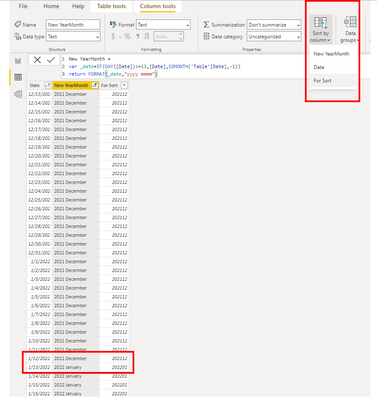
Please create a column:

New YearMonth = 
var _date=IF(DAY([Date])>=13,[Date],EOMONTH('Table'[Date],-1))
return FORMAT(_date,"yyyy mmmm")

And I created another column for sort:

Eyelyn9_3-1648694651518.png

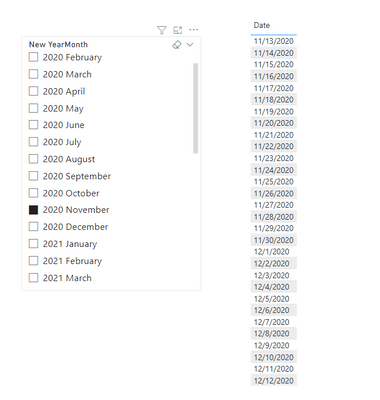
Output:

Eyelyn9_4-1648694685176.png


Best Regards,
Eyelyn Qin
If this post helps, then please consider Accept it as the solution to help the other members find it more quickly.

View solution in original post

5 REPLIES 5
Anonymous
Not applicable

Hi @mesuyog ,


What's your expected output? If you want to simply apply a date filter, you may drag Date column to Slicer field, then you could custom date period:

Eyelyn9_0-1648693510935.png

Or if you want to re-arrange the date month, for example, 

 2021 December is  from   2021/12/13  to   2022/1/12  

 2022 January     is  from   2022/1/13    to   2022/2/12 


Please create a column:

New YearMonth = 
var _date=IF(DAY([Date])>=13,[Date],EOMONTH('Table'[Date],-1))
return FORMAT(_date,"yyyy mmmm")

And I created another column for sort:

Eyelyn9_3-1648694651518.png

Output:

Eyelyn9_4-1648694685176.png


Best Regards,
Eyelyn Qin
If this post helps, then please consider Accept it as the solution to help the other members find it more quickly.

Pbiuserr
Post Prodigy
Post Prodigy

You didnt mention it, perhaps you can try pattern down below

Column = SWITCH( TRUE()
, Calendar[Date] >= DATE(2019,1,1) && Calendar[Date] <= DATE(2020,12,31), 1
, Calendar[Date] >= DATE(2021,1,1) && Calendar[Date] <= DATE(2021,12,31), 2
)


Just adjust dates for your requirements

Pbiuserr
Post Prodigy
Post Prodigy

Try something like this


custom date filter =
VAR start_date = DATE (2021, 12, 13)
VAR end_date = DATE (2022, 01, 12)
RETURN
IF (
'Calendar'[Date] IN DATESBETWEEN('Calendar'[Date], start_date, end_date),
1,
0
)
 
and you've got a filter for the visuals

Thanks but it will not work as I need to create the same for all years. I have data for total 5 years and will be updating moving forwarad.

You didnt mention you've got multiple years

Try this, just adjust dates up to your requirements ( i dont know your dates )

Column = SWITCH( TRUE()
, Calendar[Date] >= DATE(2019,1,1) && Calendar[Date] <= DATE(2020,12,31), 1
, Calendar[Date] >= DATE(2021,1,1) && Calendar[Date] <= DATE(2021,12,31), 2
)


by this way you have filter for multiple scenarios and you can filter by your result as per visual

Helpful resources

Announcements
November Power BI Update Carousel

Power BI Monthly Update - November 2025

Check out the November 2025 Power BI update to learn about new features.

Fabric Data Days Carousel

Fabric Data Days

Advance your Data & AI career with 50 days of live learning, contests, hands-on challenges, study groups & certifications and more!

FabCon Atlanta 2026 carousel

FabCon Atlanta 2026

Join us at FabCon Atlanta, March 16-20, for the ultimate Fabric, Power BI, AI and SQL community-led event. Save $200 with code FABCOMM.

Top Solution Authors
Top Kudoed Authors