cancel
Showing results for 
Search instead for 
Did you mean: 

Vote for your favorite vizzies from the Power BI Dataviz World Championship submissions. Vote now!

Reply
Anonymous
Not applicable

Custom channel group GA4 in PBI


Does any one know how to replicate a custom channel group that can be set up in GA4 in the same was in Power BI.


Below is what it looks like to  GA4

HarryB_0-1711033750066.png


1 ACCEPTED SOLUTION
ReportMaster
Post Partisan
Post Partisan

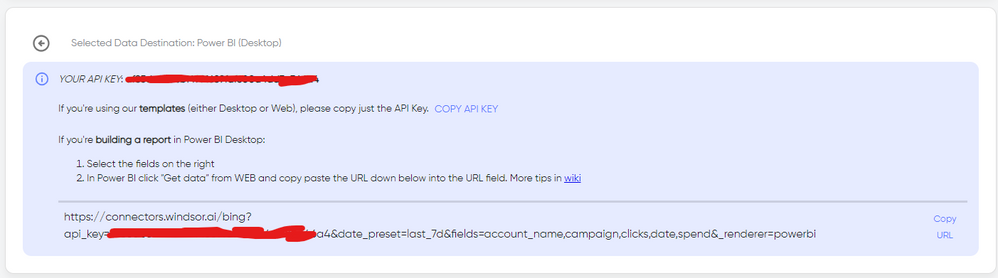
Hi @Anonymous As a workaround, maybe you can try to test your connection with a 3rd party tool. I've tried windsor.ai, supemetrics and funnel.io. I stayed with windsor because it is much cheaper so just to let you know other options. I can easily query data by custom channel group with no issues. In case you wonder, to make the connection first search for the GA4 connector in the data sources list:


GA4-1.png


After that, just grant access to your GA4 account using your credentials, then on preview and destination page you will see a preview of your GA4 fields:


GA4-2.png


There just select the fields you need. Finally, just select PBI as your data destination and finally just copy and paste the url on PBI --> Get Data --> Web --> Paste the url. 


SELECT_DESTINATION_NEW.png

View solution in original post

3 REPLIES 3
ReportMaster
Post Partisan
Post Partisan

Hi @Anonymous As a workaround, maybe you can try to test your connection with a 3rd party tool. I've tried windsor.ai, supemetrics and funnel.io. I stayed with windsor because it is much cheaper so just to let you know other options. I can easily query data by custom channel group with no issues. In case you wonder, to make the connection first search for the GA4 connector in the data sources list:


GA4-1.png


After that, just grant access to your GA4 account using your credentials, then on preview and destination page you will see a preview of your GA4 fields:


GA4-2.png


There just select the fields you need. Finally, just select PBI as your data destination and finally just copy and paste the url on PBI --> Get Data --> Web --> Paste the url. 


SELECT_DESTINATION_NEW.png

Anonymous
Not applicable

@ReportMaster this is helpful thank you

Anonymous
Not applicable

Hi @Anonymous ,

I think you can navigate to the Admin panel in the GA4 property. Then you can click on Data Settings and then Channel Groups under the Property settings.

In this picture, it seems that you have created the channel groups. Here is the link you can read and it will teach you how to replicate a custom channel group: [GA4] Custom channel groups - Analytics Help (google.com)

vyilongmsft_0-1711071979784.png

vyilongmsft_1-1711072043042.png


Best Regards

Yilong Zhou

If this post helps, then please consider Accept it as the solution to help the other members find it more quickly.

Helpful resources

Announcements
Power BI DataViz World Championships

Power BI Dataviz World Championships

Vote for your favorite vizzies from the Power BI World Championship submissions!

Sticker Challenge 2026 Carousel

Join our Community Sticker Challenge 2026

If you love stickers, then you will definitely want to check out our Community Sticker Challenge!

January Power BI Update Carousel

Power BI Monthly Update - January 2026

Check out the January 2026 Power BI update to learn about new features.

FabCon Atlanta 2026 carousel

FabCon Atlanta 2026

Join us at FabCon Atlanta, March 16-20, for the ultimate Fabric, Power BI, AI and SQL community-led event. Save $200 with code FABCOMM.