FabCon is coming to Atlanta
Join us at FabCon Atlanta from March 16 - 20, 2026, for the ultimate Fabric, Power BI, AI and SQL community-led event. Save $200 with code FABCOMM.
Register now!- Power BI forums
- Get Help with Power BI
- Desktop
- Service
- Report Server
- Power Query
- Mobile Apps
- Developer
- DAX Commands and Tips
- Custom Visuals Development Discussion
- Health and Life Sciences
- Power BI Spanish forums
- Translated Spanish Desktop
- Training and Consulting
- Instructor Led Training
- Dashboard in a Day for Women, by Women
- Galleries
- Data Stories Gallery
- Themes Gallery
- Contests Gallery
- QuickViz Gallery
- Quick Measures Gallery
- Visual Calculations Gallery
- Notebook Gallery
- Translytical Task Flow Gallery
- TMDL Gallery
- R Script Showcase
- Webinars and Video Gallery
- Ideas
- Custom Visuals Ideas (read-only)
- Issues
- Issues
- Events
- Upcoming Events
The Power BI Data Visualization World Championships is back! It's time to submit your entry. Live now!
- Power BI forums
- Forums
- Get Help with Power BI
- Desktop
- Custom Week Number Column
- Subscribe to RSS Feed
- Mark Topic as New
- Mark Topic as Read
- Float this Topic for Current User
- Bookmark
- Subscribe
- Printer Friendly Page


- Mark as New
- Bookmark
- Subscribe
- Mute
- Subscribe to RSS Feed
- Permalink
- Report Inappropriate Content
Custom Week Number Column
Hi all,
How can I create a Week Number column from a date column I have in my data?
I want the below data range to be 'Week 1' and so on...
10/04/20 00:00:00 - 17/04/2020 00:00:00 - WEEK 1
Thanks,
Solved! Go to Solution.


- Mark as New
- Bookmark
- Subscribe
- Mute
- Subscribe to RSS Feed
- Permalink
- Report Inappropriate Content
There is a week number function in DAX that should work for you.
Column =
VAR _Wk = WEEKNUM ( DATES[Date] )
RETURN
"week " & _Wk

- Mark as New
- Bookmark
- Subscribe
- Mute
- Subscribe to RSS Feed
- Permalink
- Report Inappropriate Content
Hi @HenryJS ,
You could refer to the following codes in query editor.
= "WEEK " & Number.ToText(Date.WeekOfYear([Column1]))
If this post helps, then please consider Accept it as the solution to help the other members find it.
- Mark as New
- Bookmark
- Subscribe
- Mute
- Subscribe to RSS Feed
- Permalink
- Report Inappropriate Content
Hi @HenryJS ,
You could refer to the following codes in query editor.
= "WEEK " & Number.ToText(Date.WeekOfYear([Column1]))
If this post helps, then please consider Accept it as the solution to help the other members find it.

- Mark as New
- Bookmark
- Subscribe
- Mute
- Subscribe to RSS Feed
- Permalink
- Report Inappropriate Content
@HenryJS , you can do like.
replace the startofyear('Date'[Date]) with starting date you want
Week Start With Year=  QUOTIENT(DATEDIFF(STARTOFYEAR('Date'[Date]),'Date'[Date],DAY),7)+1

Week Start Date with Year = var _1 =QUOTIENT(DATEDIFF(STARTOFYEAR('Date'[Date]),'Date'[Date],DAY),7) return STARTOFYEAR('Date'[Date]) + if(_1<52,_1,51)*7
- Mark as New
- Bookmark
- Subscribe
- Mute
- Subscribe to RSS Feed
- Permalink
- Report Inappropriate Content
There is a week number function in DAX that should work for you.
Column =
VAR _Wk = WEEKNUM ( DATES[Date] )
RETURN
"week " & _Wk
- Mark as New
- Bookmark
- Subscribe
- Mute
- Subscribe to RSS Feed
- Permalink
- Report Inappropriate Content
I have some questions
1. There are 8 days from day 10 to day 17. Do you want each custom week has 8 days?
2. how to stop the week? If you don't set up the terminal day. The week number will continue growing.
Column =
VAR week="week"&ROUNDUP(('Table'[Date]-date(2020,4,10)+1)/7,0)
return if('Table'[Date]<date(2020,4,10),blank(),week)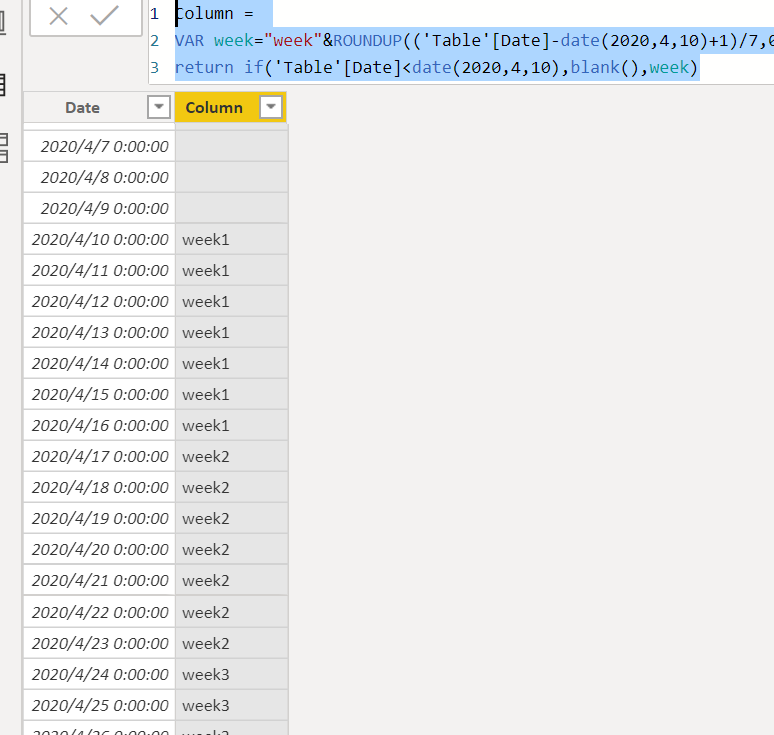
Did I answer your question? Mark my post as a solution!
Proud to be a Super User!


- Mark as New
- Bookmark
- Subscribe
- Mute
- Subscribe to RSS Feed
- Permalink
- Report Inappropriate Content
how do the weeks stop? when you reach December 31 I should stop.
- Mark as New
- Bookmark
- Subscribe
- Mute
- Subscribe to RSS Feed
- Permalink
- Report Inappropriate Content
it looks like the fiscal year and calendar year are the same. then you can use WEEKNUM function
Did I answer your question? Mark my post as a solution!
Proud to be a Super User!

Helpful resources

Power BI Dataviz World Championships
The Power BI Data Visualization World Championships is back! It's time to submit your entry.

Power BI Monthly Update - December 2025
Check out the December 2025 Power BI Holiday Recap!

FabCon Atlanta 2026
Join us at FabCon Atlanta, March 16-20, for the ultimate Fabric, Power BI, AI and SQL community-led event. Save $200 with code FABCOMM.

| User | Count |
|---|---|
| 50 | |
| 41 | |
| 32 | |
| 26 | |
| 24 |


| User | Count |
|---|---|
| 130 | |
| 128 | |
| 59 | |
| 45 | |
| 45 |


