cancel
Showing results for 
Search instead for 
Did you mean: 

We've captured the moments from FabCon & SQLCon that everyone is talking about, and we are bringing them to the community, live and on-demand. Starts on April 14th. Register now

Reply
Anonymous
Not applicable

Custom Shape Map Issue

Hi guys,


Coming across a strange issue with a shape map - hopefully someone can help!


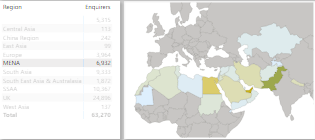
So in the desktop app I have a custom regions table built (in the background countries are linked to said regions). Data from this has then filled in the accompanying map. The map is set to auto zoom on selection of a region which all works fine and does as expected - see below.


MENAworking.png


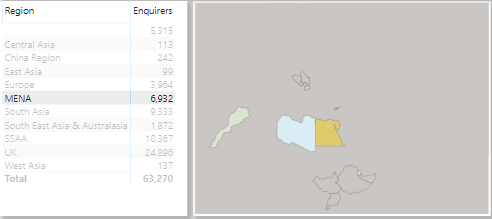
However, problems surface when I publish the report and view in browser (tried 2 so far). All regions work and the map zooms fine - barring one; MENA. For some reason, when I click MENA in the browser report, a sublay of Antarctica covers most of the region once the map has zoomed (see below). If I custom zoom out of the same map a couple of times, it suddenly displays fine, but when I custom zoom in again, same problem.


MENAnotworking.png


I can't replicate the issue within the desktop app, and Antarctica in the backend tables has its own region defined - so I'm not entirely sure what could be causing this issue? I am using a custom map shape which is the only thing I could think of so far which could be causing issues.


Any help/advice would be appreciated!

1 ACCEPTED SOLUTION
lbendlin
Super User
Super User

you need to help Power BI by categorizing your data columns, otherwise country codes can be misinterpreted as province names and vice versa etc.

View solution in original post

3 REPLIES 3
v-lionel-msft
Community Support
Community Support

Hi @Anonymous ,


Please provide a sample location data.


Best regards,
Lionel Chen

If this post helps, then please consider Accept it as the solution to help the other members find it more quickly.

lbendlin
Super User
Super User

you need to help Power BI by categorizing your data columns, otherwise country codes can be misinterpreted as province names and vice versa etc.

Anonymous
Not applicable

thanks - it appeared I'd missed this on one of the tables I was using. Fixed and now working!

Helpful resources

Announcements
New to Fabric survey Carousel

New to Fabric Survey

If you have recently started exploring Fabric, we'd love to hear how it's going. Your feedback can help with product improvements.

Power BI DataViz World Championships carousel

Power BI DataViz World Championships - June 2026

A new Power BI DataViz World Championship is coming this June! Don't miss out on submitting your entry.

Join our Fabric User Panel

Join our Fabric User Panel

Share feedback directly with Fabric product managers, participate in targeted research studies and influence the Fabric roadmap.

March Power BI Update Carousel

Power BI Community Update - March 2026

Check out the March 2026 Power BI update to learn about new features.