cancel
Showing results for 
Search instead for 
Did you mean: 

The Power BI Data Visualization World Championships is back! Get ahead of the game and start preparing now! Learn more

Reply
Anonymous
Not applicable

Custom Query/Function to convert UTC to EST

Hi all


Struggling with some datetime conversions in PowerBI Desktop and Service. Seen this topic all over the internet with no great answer. I'm hoping someone has a simple function I can invoke to solve this, as I have many datetime columns to convert.


I am pulling datetimes from a number of sources, which are mostly in UTC. In PowerBI Desktop I'm using ToLocal to display these in EST, which is my local time, and is how my end users need to see the data.


However this does not work in the report after publishing to the PowerBI service, which seems to use UTC as its local time.

If I take 18:00 UTC, ToLocal has no effect on the data -- it is still shown as 18:00  in the PowerBI Service.


A simple solution would just be to subtract X hours from my UTC times in PowerQuery. The data would "looks" like EST in PowerBI Desktop, and will "look" like EST in the PowerBI service (even though PowerBI thinks it is a UTC time).


However this does not account for daylight savings at all. It doesn't help of course that DST start/end changes every year.


So I'd like an M function that can...


-> Read in a DateTime that is in UTC

-> Check if that DateTime falls into Daylight Savings

-> If yes, subtract 5 hours

-> If no, subtract 4 hours


Any ideas?? Surely this has been solved somewhere!


2 ACCEPTED SOLUTIONS
MFelix
Super User
Super User

Hi @Anonymous ,


check the post below from RADACAD they present a couple of options to make this changes.


https://radacad.com/solving-dax-time-zone-issue-in-power-bi


Maybe one can fit your needs.


Regards

Miguel Félix


Did I answer your question? Mark my post as a solution!

Proud to be a Super User!

Check out my blog: Power BI em Português


View solution in original post

v-lionel-msft
Community Support
Community Support

Hi @Anonymous ,


Just do like this.


// Modify the parameters of the TIME() function according to the time difference between the two time zones
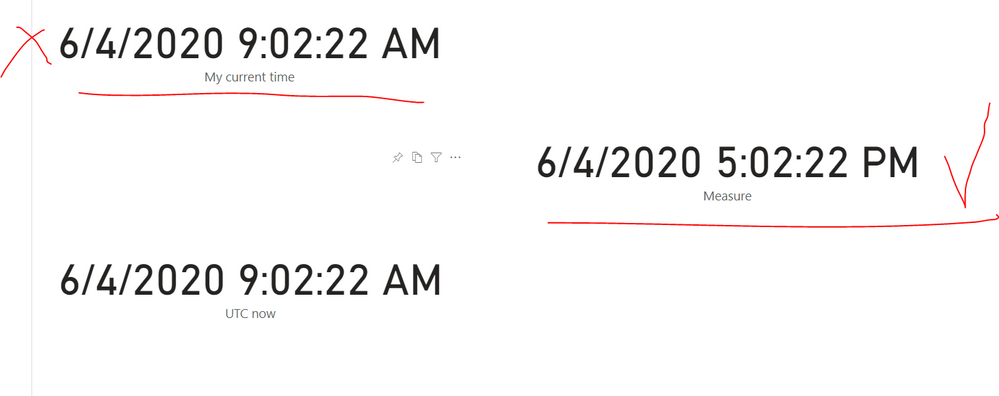
Measure = UTCNOW() + TIME(8, 0, 0)


For example, my current time differs from UTC time by 8 hours, so I add UTC time to 8 hours to get my current time.

jj9.PNG


Best regards,
Lionel Chen

If this post helps, then please consider Accept it as the solution to help the other members find it more quickly.


View solution in original post

2 REPLIES 2
v-lionel-msft
Community Support
Community Support

Hi @Anonymous ,


Just do like this.


// Modify the parameters of the TIME() function according to the time difference between the two time zones
Measure = UTCNOW() + TIME(8, 0, 0)


For example, my current time differs from UTC time by 8 hours, so I add UTC time to 8 hours to get my current time.

jj9.PNG


Best regards,
Lionel Chen

If this post helps, then please consider Accept it as the solution to help the other members find it more quickly.


MFelix
Super User
Super User

Hi @Anonymous ,


check the post below from RADACAD they present a couple of options to make this changes.


https://radacad.com/solving-dax-time-zone-issue-in-power-bi


Maybe one can fit your needs.


Regards

Miguel Félix


Did I answer your question? Mark my post as a solution!

Proud to be a Super User!

Check out my blog: Power BI em Português


Helpful resources

Announcements
Power BI DataViz World Championships

Power BI Dataviz World Championships

The Power BI Data Visualization World Championships is back! Get ahead of the game and start preparing now!

December 2025 Power BI Update Carousel

Power BI Monthly Update - December 2025

Check out the December 2025 Power BI Holiday Recap!

FabCon Atlanta 2026 carousel

FabCon Atlanta 2026

Join us at FabCon Atlanta, March 16-20, for the ultimate Fabric, Power BI, AI and SQL community-led event. Save $200 with code FABCOMM.