Join us at FabCon Atlanta from March 16 - 20, 2026, for the ultimate Fabric, Power BI, AI and SQL community-led event. Save $200 with code FABCOMM.
Register now!The Power BI Data Visualization World Championships is back! Get ahead of the game and start preparing now! Learn more
Hi,
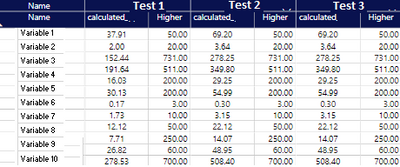
I have created a Matrix in Power BI where I have a list of components as rows and different tests as columns, and I show the concentration values for each test and component as shown below, where the concentration values is a calculated measure.
I would like now to add an extra variable to the table to show max_concentration (this variable is a column) but when I add it is shows the values per test, but I would like to have it only appearing once since it doesn't depend on the test, it will always be the same. Any idea how to achieve that?
Many thanks in advance!
Solved! Go to Solution.
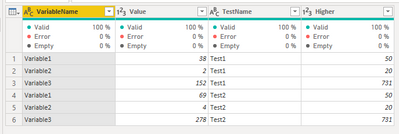
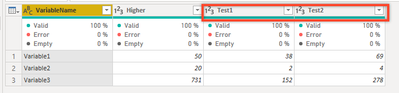
I don't know what your data structure is, but based on the screen I can see that the test names are in one column. You can pivot this column, set test values as value. This will give you Test1, Test2, Test3 columns.
Source:
Pivot:
New structure:
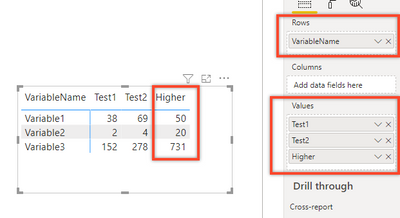
This structure will allow you to add these columns to the Values field in the Matrix settings and the Higher column will occur only once.
The result:
| Proud to be a Super User. If I helped, please accept the solution and give kudos! |
Please share the measure codes which you are using.
| Proud to be a Super User. If I helped, please accept the solution and give kudos! |
Hi @lkalawski ,
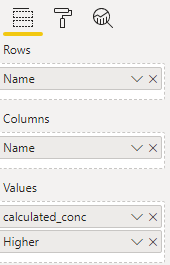
Thank you for your message. I'm not using DAX code to build the matrix, just standard visualisation graph. Please see below. All variables used are columns with plain numbers (no code) except for the measure which is calculated to change units etc
I see that each of the variable has own higher value, so what do you want to have in the "higher" column? Max, Avg, Sum of all variables?
If yes, then you can create a measures and use All([table]).
Example:
Calculate(Sum(table[Name]), All(table[Name]))
| Proud to be a Super User. If I helped, please accept the solution and give kudos! |
Hi @lkalawski ,
I would like the column 'higher' to appear only once in the table vs per variable since the values are the same always.
thanks
Laura
I don't know what your data structure is, but based on the screen I can see that the test names are in one column. You can pivot this column, set test values as value. This will give you Test1, Test2, Test3 columns.
Source:
Pivot:
New structure:
This structure will allow you to add these columns to the Values field in the Matrix settings and the Higher column will occur only once.
The result:
| Proud to be a Super User. If I helped, please accept the solution and give kudos! |
The Power BI Data Visualization World Championships is back! Get ahead of the game and start preparing now!
| User | Count |
|---|---|
| 39 | |
| 35 | |
| 33 | |
| 32 | |
| 29 |
| User | Count |
|---|---|
| 134 | |
| 96 | |
| 78 | |
| 67 | |
| 65 |