We've captured the moments from FabCon & SQLCon that everyone is talking about, and we are bringing them to the community, live and on-demand. Starts on April 14th. Register now
Hi,
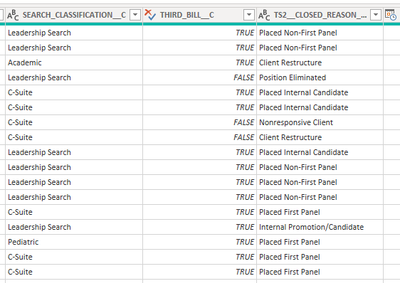
Based on the table below, can anyone help me write a custom column formula that will act as an IF function? Every time I try an IF statement, I am told that PowerBI does not recognize the IF term
Thank you in advance!
Solved! Go to Solution.
@JD ,
if function is power query is case sensitive. Your first one should work like this.
if ( [Search_Classification_C] = "Leadership Search"
and [Third_Bill_C] = "True" )
then 1
else 0
Think you should be able to follow the same syntax for your second bullet.
In future, please post data sample as text, not as a picture. Will help make it easier to solve your issues.
Hope this helps.
Regards,
@JD ,
if function is power query is case sensitive. Your first one should work like this.
if ( [Search_Classification_C] = "Leadership Search"
and [Third_Bill_C] = "True" )
then 1
else 0
Think you should be able to follow the same syntax for your second bullet.
In future, please post data sample as text, not as a picture. Will help make it easier to solve your issues.
Hope this helps.
Regards,
If you have recently started exploring Fabric, we'd love to hear how it's going. Your feedback can help with product improvements.
A new Power BI DataViz World Championship is coming this June! Don't miss out on submitting your entry.
Share feedback directly with Fabric product managers, participate in targeted research studies and influence the Fabric roadmap.
| User | Count |
|---|---|
| 53 | |
| 38 | |
| 33 | |
| 17 | |
| 17 |
| User | Count |
|---|---|
| 67 | |
| 62 | |
| 38 | |
| 34 | |
| 22 |