Don't miss your chance to take the Fabric Data Engineer (DP-600) exam for FREE! Find out how by attending the DP-600 session on April 23rd (pacific time), live or on-demand.
Learn moreNext up in the FabCon + SQLCon recap series: The roadmap for Microsoft SQL and Maximizing Developer experiences in Fabric. All sessions are available on-demand after the live show. Register now
Hey Guys,
I've been tasked to find what the impact speed is for processing our tasks with and without automation.
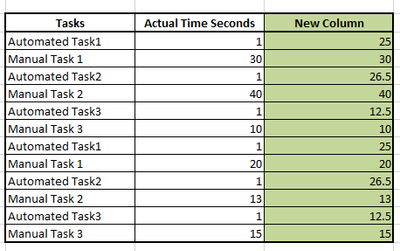
We collect data on both Manual and Automated tasks. The Automated tasks are followed by the manual tasks that cant be automated. Each task is measured in time (seconds), but I need my Automated tasks to show the avg. time of my manual tasks so that I can get a total time assuming the automated tasks were done manually.....
I'm thinking that creating a new column that replaces the current Automated time with the manual Avg time (for that task) and keeping the manual times the same will do the trick.
Below I've provided a grid of what I think my table should look like -Green being the new column result - Notice in the new column, Manual tasks are the same as the actual column and the automated tasks are avg for the manual task specific to that task (task1, task2, task3).
Appreciate the help.
Solved! Go to Solution.
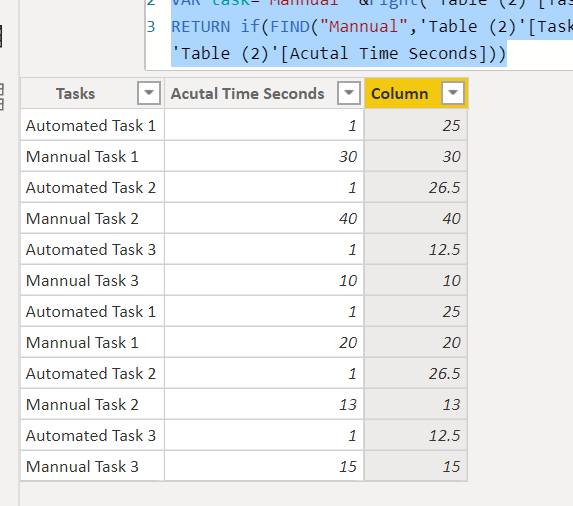
you can try to create a column like this
Column =
VAR task="Mannual "&right('Table (2)'[Tasks],len('Table (2)'[Tasks])-find("Task",'Table (2)'[Tasks],1,0)+1)
RETURN if(FIND("Mannual",'Table (2)'[Tasks],1,0)<>0,'Table (2)'[Acutal Time Seconds],AVERAGEX(FILTER('Table (2)','Table (2)'[Tasks]=task),'Table (2)'[Acutal Time Seconds]))
Proud to be a Super User!
Hi @zeke101 ,
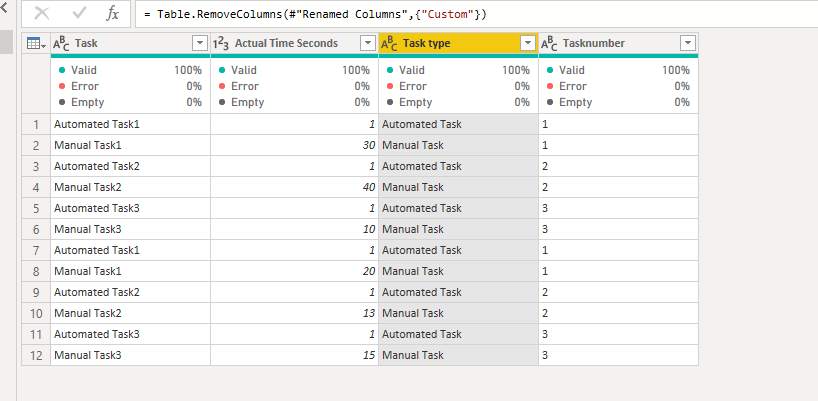
You can use the following m query to split your task column to two colums(Task type and Task number):
let
Source = Table.FromRows(Json.Document(Binary.Decompress(Binary.FromText("i45Wciwtyc9NLElNUQhJLM42VNJRMlSK1YlW8k3MK03MgQsaG4BFUVUbYVMNEjTBptoYm2qwIDbVOF1iRJJLDI1JcompUmwsAA==", BinaryEncoding.Base64), Compression.Deflate)), let _t = ((type nullable text) meta [Serialized.Text = true]) in type table [Task = _t, #"Actual Time Seconds" = _t]),
#"Changed Type" = Table.TransformColumnTypes(Source,{{"Task", type text}, {"Actual Time Seconds", Int64.Type}}),
#"Added Custom" = Table.AddColumn(#"Changed Type", "Custom", each Text.PositionOfAny([Task],{"0".."9"})),
#"Inserted First Characters" = Table.AddColumn(#"Added Custom", "First Characters", each Text.Start([Task], [Custom]), type text),
#"Inserted Text Range" = Table.AddColumn(#"Inserted First Characters", "Text Range", each Text.Middle([Task], [Custom], 1), type text),
#"Renamed Columns" = Table.RenameColumns(#"Inserted Text Range",{{"First Characters", "Task type"}, {"Text Range", "Tasknumber"}}),
#"Removed Columns" = Table.RemoveColumns(#"Renamed Columns",{"Custom"})
in
#"Removed Columns"
Then use the following calculated column:
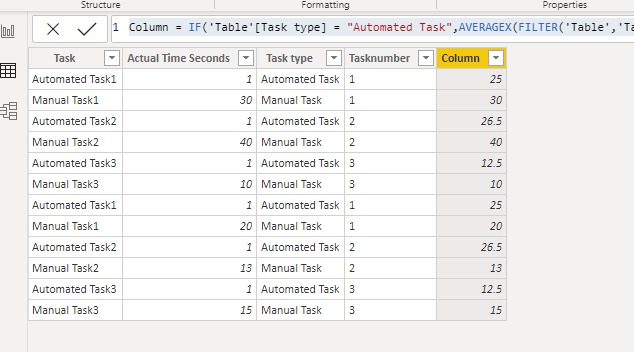
Column = IF('Table'[Task type] = "Automated Task",AVERAGEX(FILTER('Table','Table'[Tasknumber] =EARLIER('Table'[Tasknumber]) &&'Table'[Task type] = "Manual Task"),'Table'[Actual Time Seconds]),'Table'[Actual Time Seconds])
For more details, please refer to the pbix file:https://qiuyunus-my.sharepoint.com/:u:/g/personal/pbipro_qiuyunus_onmicrosoft_com/EX1YRC4AdOdKpf59-f...
If this post helps, then please consider Accept it as the solution to help the other members find it more quickly.
Best Regards,
Dedmon Dai
Hi @zeke101 ,
You can use the following m query to split your task column to two colums(Task type and Task number):
let
Source = Table.FromRows(Json.Document(Binary.Decompress(Binary.FromText("i45Wciwtyc9NLElNUQhJLM42VNJRMlSK1YlW8k3MK03MgQsaG4BFUVUbYVMNEjTBptoYm2qwIDbVOF1iRJJLDI1JcompUmwsAA==", BinaryEncoding.Base64), Compression.Deflate)), let _t = ((type nullable text) meta [Serialized.Text = true]) in type table [Task = _t, #"Actual Time Seconds" = _t]),
#"Changed Type" = Table.TransformColumnTypes(Source,{{"Task", type text}, {"Actual Time Seconds", Int64.Type}}),
#"Added Custom" = Table.AddColumn(#"Changed Type", "Custom", each Text.PositionOfAny([Task],{"0".."9"})),
#"Inserted First Characters" = Table.AddColumn(#"Added Custom", "First Characters", each Text.Start([Task], [Custom]), type text),
#"Inserted Text Range" = Table.AddColumn(#"Inserted First Characters", "Text Range", each Text.Middle([Task], [Custom], 1), type text),
#"Renamed Columns" = Table.RenameColumns(#"Inserted Text Range",{{"First Characters", "Task type"}, {"Text Range", "Tasknumber"}}),
#"Removed Columns" = Table.RemoveColumns(#"Renamed Columns",{"Custom"})
in
#"Removed Columns"
Then use the following calculated column:
Column = IF('Table'[Task type] = "Automated Task",AVERAGEX(FILTER('Table','Table'[Tasknumber] =EARLIER('Table'[Tasknumber]) &&'Table'[Task type] = "Manual Task"),'Table'[Actual Time Seconds]),'Table'[Actual Time Seconds])
For more details, please refer to the pbix file:https://qiuyunus-my.sharepoint.com/:u:/g/personal/pbipro_qiuyunus_onmicrosoft_com/EX1YRC4AdOdKpf59-f...
If this post helps, then please consider Accept it as the solution to help the other members find it more quickly.
Best Regards,
Dedmon Dai
you can try to create a column like this
Column =
VAR task="Mannual "&right('Table (2)'[Tasks],len('Table (2)'[Tasks])-find("Task",'Table (2)'[Tasks],1,0)+1)
RETURN if(FIND("Mannual",'Table (2)'[Tasks],1,0)<>0,'Table (2)'[Acutal Time Seconds],AVERAGEX(FILTER('Table (2)','Table (2)'[Tasks]=task),'Table (2)'[Acutal Time Seconds]))
Proud to be a Super User!
You can do this if you have a clear way to distinguish Automated vs Manual Task.
Take this formula for example:
Copying DAX from this post? Click here for a hack to quickly replace it with your own table names
Has this post solved your problem? Please Accept as Solution so that others can find it quickly and to let the community know your problem has been solved.
If you found this post helpful, please give Kudos C
I work as a Microsoft trainer and consultant, specialising in Power BI and Power Query.
www.excelwithallison.com
If you have recently started exploring Fabric, we'd love to hear how it's going. Your feedback can help with product improvements.
A new Power BI DataViz World Championship is coming this June! Don't miss out on submitting your entry.
Experience the highlights from FabCon & SQLCon, available live and on-demand starting April 14th.
| User | Count |
|---|---|
| 47 | |
| 44 | |
| 40 | |
| 20 | |
| 15 |
| User | Count |
|---|---|
| 70 | |
| 68 | |
| 32 | |
| 27 | |
| 25 |