cancel
Showing results for 
Search instead for 
Did you mean: 

July 7 - July 17 | Round 2 of the Power BI Dataviz World Championships. Don't miss your chance! Learn more

Reply
Anonymous
Not applicable

Current week data compare previous data

Hi Power BI export,

every week we got same  structure data in excel

Example:

21-june-2021

IDName
1001A
1002B
1003C


14-June-2021

IDName
1001A
1002B
1004X


21-june compare to 14-june if record not availbe then MDD

14-june compare 21-june if record not availble then FDD


output lookmlikebelow

IteamCount
WeeK 32
MDD1
FDD1


Thanks

Shanvitha

1 ACCEPTED SOLUTION
Anonymous
Not applicable

Hi @Anonymous ,

I created a sample pbix file(see attachment) for you, please check whether that is what you want.

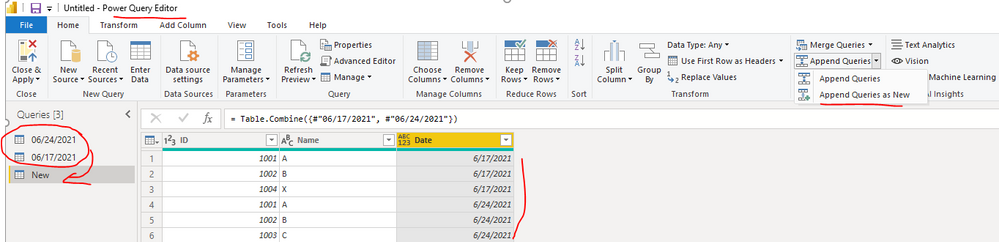
1. Create a custom column with the date which the date is get from

2. Append these two queries from different two dates in Power Query Editor

yingyinr_0-1624849721890.png

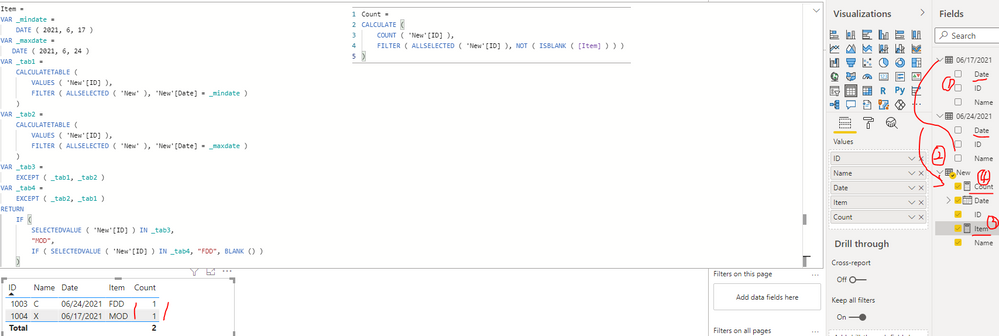
3. Create two measures to get the item and count separately

Item = 
VAR _mindate =
    DATE ( 2021, 6, 17 ) 
VAR _maxdate =
   DATE ( 2021, 6, 24 ) 
VAR _tab1 =
    CALCULATETABLE (
        VALUES ( 'New'[ID] ),
        FILTER ( ALLSELECTED ( 'New' ), 'New'[Date] = _mindate )
    )
VAR _tab2 =
    CALCULATETABLE (
        VALUES ( 'New'[ID] ),
        FILTER ( ALLSELECTED ( 'New' ), 'New'[Date] = _maxdate )
    )
VAR _tab3 =
    EXCEPT ( _tab1, _tab2 )
VAR _tab4 =
    EXCEPT ( _tab2, _tab1 )
RETURN
    IF (
        SELECTEDVALUE ( 'New'[ID] ) IN _tab3,
        "MOD",
        IF ( SELECTEDVALUE ( 'New'[ID] ) IN _tab4, "FDD", BLANK () )
    )
Count = 
CALCULATE (
    COUNT ( 'New'[ID] ),
    FILTER ( ALLSELECTED ( 'New'[ID] ), NOT ( ISBLANK ( [Item] ) ) )
)

yingyinr_1-1624849856635.png

Best Regards

View solution in original post

1 REPLY 1
Anonymous
Not applicable

Hi @Anonymous ,

I created a sample pbix file(see attachment) for you, please check whether that is what you want.

1. Create a custom column with the date which the date is get from

2. Append these two queries from different two dates in Power Query Editor

yingyinr_0-1624849721890.png

3. Create two measures to get the item and count separately

Item = 
VAR _mindate =
    DATE ( 2021, 6, 17 ) 
VAR _maxdate =
   DATE ( 2021, 6, 24 ) 
VAR _tab1 =
    CALCULATETABLE (
        VALUES ( 'New'[ID] ),
        FILTER ( ALLSELECTED ( 'New' ), 'New'[Date] = _mindate )
    )
VAR _tab2 =
    CALCULATETABLE (
        VALUES ( 'New'[ID] ),
        FILTER ( ALLSELECTED ( 'New' ), 'New'[Date] = _maxdate )
    )
VAR _tab3 =
    EXCEPT ( _tab1, _tab2 )
VAR _tab4 =
    EXCEPT ( _tab2, _tab1 )
RETURN
    IF (
        SELECTEDVALUE ( 'New'[ID] ) IN _tab3,
        "MOD",
        IF ( SELECTEDVALUE ( 'New'[ID] ) IN _tab4, "FDD", BLANK () )
    )
Count = 
CALCULATE (
    COUNT ( 'New'[ID] ),
    FILTER ( ALLSELECTED ( 'New'[ID] ), NOT ( ISBLANK ( [Item] ) ) )
)

yingyinr_1-1624849856635.png

Best Regards

Helpful resources

Announcements
FabCon and SQLCon Barcelona 2026

FabCon & SQLCon – Barcelona 2026

Join us in Barcelona for FabCon and SQLCon, the Fabric, Power BI, SQL, and AI community event. Save €200 with code FABCMTY200.

60 days of Data Days Carousel

Data Days 2026

Join Fabric Data Days 2026: 60 days of free live/on-demand sessions, challenges, study groups, and certification opportunities.

Power BI DataViz World Championships carousel

Power BI DataViz World Championships - June 2026

A new Power BI DataViz World Championship is coming this June! Don't miss out on submitting your entry.