FabCon is coming to Atlanta
Join us at FabCon Atlanta from March 16 - 20, 2026, for the ultimate Fabric, Power BI, AI and SQL community-led event. Save $200 with code FABCOMM.
Register now!- Power BI forums
- Get Help with Power BI
- Desktop
- Service
- Report Server
- Power Query
- Mobile Apps
- Developer
- DAX Commands and Tips
- Custom Visuals Development Discussion
- Health and Life Sciences
- Power BI Spanish forums
- Translated Spanish Desktop
- Training and Consulting
- Instructor Led Training
- Dashboard in a Day for Women, by Women
- Galleries
- Data Stories Gallery
- Themes Gallery
- Contests Gallery
- Quick Measures Gallery
- Notebook Gallery
- Translytical Task Flow Gallery
- TMDL Gallery
- R Script Showcase
- Webinars and Video Gallery
- Ideas
- Custom Visuals Ideas (read-only)
- Issues
- Issues
- Events
- Upcoming Events
Calling all Data Engineers! Fabric Data Engineer (Exam DP-700) live sessions are back! Starting October 16th. Sign up.
- Power BI forums
- Forums
- Get Help with Power BI
- Desktop
- Re: Current vs Previous value, not dependent on ba...
- Subscribe to RSS Feed
- Mark Topic as New
- Mark Topic as Read
- Float this Topic for Current User
- Bookmark
- Subscribe
- Printer Friendly Page

- Mark as New
- Bookmark
- Subscribe
- Mute
- Subscribe to RSS Feed
- Permalink
- Report Inappropriate Content
Current vs Previous value, not dependent on base value
Hi,
I'm wondering if there's a way for me to have a chart displaying one value over time, with a bar below showing the difference between the current and previous value, BUT i want to be able to change the base value between different values?
Let's say I have 15 different sets of values that I want to present this way, so instead of me making 15 different calculated measures, one for each value, I wonder if there's some sort of way for me to make a column/measure or something that does what I'm after? And then I can just click and change between the values that I want.
The only constant are the time values.
Hope this made any sense and thanks for any help.
To clarify: Ability to switch between different values to present both line for values and bars for increase or decrease of the value.
Thanks
Solved! Go to Solution.


- Mark as New
- Bookmark
- Subscribe
- Mute
- Subscribe to RSS Feed
- Permalink
- Report Inappropriate Content
Hi @Anonymous
I gave you some erroneous code previously (I hadn't tested it - i was making extrapolations from other similar work I've done, but I had some false assumptions).
Points 1-3 in the above reply still hold - please review them. However, now we need to modify the measures.
For transparency, we'll use 3 measures. I'll talk about where they can be combined afterwards
TodaysValue=
    SWITCH(
        [MType];
        "BJ-HÖ1"; AVERAGE(Blad1[BJ-HÖ1]);
        "BJ-MÄ"; AVERAGE(Blad1[BJ-MÄ]);
        "BJ-TS1"; AVERAGE(Blad1[BJ-TS1]);
        etc
    )

PrevDayValue = CALCULATE([TodaysValue]; PREVIOUSDAY(DateTimeTab[Date]))

Measure Delta = [TodaysValue] - [PrevDayValue]
The mistake was thinking we could store some of the complex code in variables and use the code again further down in the measure. I think we can really only have a minimum of 2 measures, unless you want to replicate a lot of code:
TodaysValue=
    SWITCH(
        [MType];
        "BJ-HÖ1"; AVERAGE(Blad1[BJ-HÖ1]);
        "BJ-MÄ"; AVERAGE(Blad1[BJ-MÄ]);
        "BJ-TS1"; AVERAGE(Blad1[BJ-TS1]);
        etc
    )

Measure Delta =
 //NOTE That variables are not needed here - just showing for illustrative purposes
   VAR __Todaysvalue = [TodaysValue]
   VAR __PrevValue = CALCULATE([TodaysValue], PREVIOUSDAY(DateTimeTab[Date])

   RETURN __Todaysvalue - __PrevValue

//You could do the following without any variables and get the same results
//Measure Delta = [TodaysValue] - CALCULATE([TodaysValue], PREVIOUSDAY(DateTimeTab[Date])
Hope this finally gets you to where you need to be. Sorry for the earlier confusion.
David
- Mark as New
- Bookmark
- Subscribe
- Mute
- Subscribe to RSS Feed
- Permalink
- Report Inappropriate Content
If I understand your issue correctly, try this pattern:
Slicer/button to choose your value
MType = SELECTEDVALUE(Slicer[Field])
Measure for bar or line
Bar/Line Value =
SWITCH (
    [MType],
    "Value1", [Measure 1],
    "Value2", [Measure 2],
...
)
Hope this helps
David
- Mark as New
- Bookmark
- Subscribe
- Mute
- Subscribe to RSS Feed
- Permalink
- Report Inappropriate Content
@dedelman_clng wrote:If I understand your issue correctly, try this pattern:
Slicer/button to choose your value
MType = SELECTEDVALUE(Slicer[Field])Measure for bar or line
Bar/Line Value =
SWITCH (
    [MType],
    "Value1", [Measure 1],
    "Value2", [Measure 2],
...
)
Hope this helps
David
Thank you, that will for sure help me with one part of my problem, but I'm still unsure as how to get the value difference working?
- Mark as New
- Bookmark
- Subscribe
- Mute
- Subscribe to RSS Feed
- Permalink
- Report Inappropriate Content
You can make [Measure 1], [Measure 2], etc as complex as you want to or need to. Getting a "previous" value is going to depend on what you mean by previous. Can you give some sample data and expected results?
Also, see this post on how to get the most out of the forums and get your question answered quickly:
https://community.powerbi.com/t5/Community-Blog/How-to-Get-Your-Question-Answered-Quickly/ba-p/38490
- Mark as New
- Bookmark
- Subscribe
- Mute
- Subscribe to RSS Feed
- Permalink
- Report Inappropriate Content
Thank you for the reply,
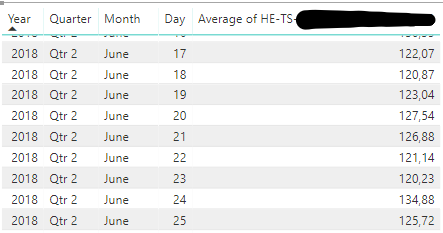
Here's a screen grab of a table displaying en example of the values. What I would like to do is have the value of june 23 - value of june 22, value of june 22 - value of june 21 etc etc. This is so that I can hopefully make it so that if the difference between two dates is more than x that bar should be red or something.
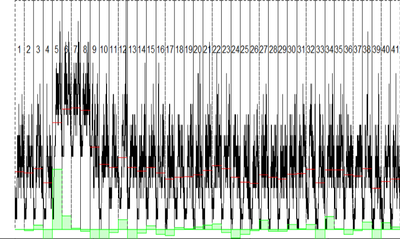
The second image is an example of what I mean.
Thank you so much for the help, I'm still pretty new to PowerBI
- Mark as New
- Bookmark
- Subscribe
- Mute
- Subscribe to RSS Feed
- Permalink
- Report Inappropriate Content
For the daily difference, you'll want something along these lines
Previous Day HE-TS =
  CALCULATE ( [Average of HE-TS], PREVIOUSDAY(DateTab[Date])

Day Delta =
 [Average of HE-TS] - [Previous Day HE-TS]
DateTab[Date] should be the name of your calendar/date table.
Hope this helps
David
- Mark as New
- Bookmark
- Subscribe
- Mute
- Subscribe to RSS Feed
- Permalink
- Report Inappropriate Content
Thank you,
But is there any way to make it not dependen on the value? If that makes sense.
So that I can change between the different value sets without changing or making new of these codes for every value? I typed and example of what I mean, don't know if there's any way to make it like that... hope you understand how I mean.
Previous Day HE-TS =
  CALCULATE ( [Average of HE-TS], PREVIOUSDAY(DateTab[Date])

Previous Day BJ-TS1 =
  CALCULATE ( [Average of BJ-TS1], PREVIOUSDAY(DateTab[Date])

Example:
CALCULATE ( [Average of SELECTEDVALUE], PREVIOUSDAY(DateTab[Date])

Thanks
- Mark as New
- Bookmark
- Subscribe
- Mute
- Subscribe to RSS Feed
- Permalink
- Report Inappropriate Content
Combining my first answer with my second answer, you would want to do something like this:
Slicer/button to choose your value
MType = SELECTEDVALUE(Slicer[Field])
Delta based on selected type
Measure Delta =
var __SelectedMeasure =
   SWITCH (
      [MType],
      "Value1", [Measure 1],
      "Value2", [Measure 2],
    ...)

var __PDMeasure = CALCULATE(__SelectedMeasure, PREVIOUSDAY(DateTab[Date))

RETURN __SelectedMeasure - __PDMeasure
Hope this helps
David
- Mark as New
- Bookmark
- Subscribe
- Mute
- Subscribe to RSS Feed
- Permalink
- Report Inappropriate Content
Hi,
So I'm having some troubles with this, when I try to create the first measue (MType = etc) I can't add this to my slicer, and I also seem to not be able to add all the values I want to the slicer, I can only add one of them. So instead of me having the 15 values in a list I can only have one and filter by it's values. Instead of only filtering based on the set of values, if that makes sense.
Could this have something to do with the structure of the data? It's all imported from one excel table.

Thank you again
- Mark as New
- Bookmark
- Subscribe
- Mute
- Subscribe to RSS Feed
- Permalink
- Report Inappropriate Content
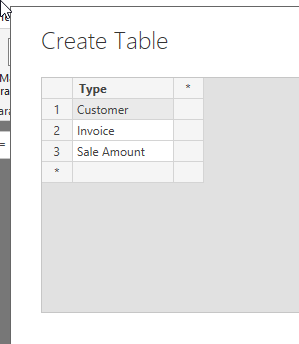
Yes, it has a little to do with the data structure. You will need to create another table with a single column and the values that you want shown in your slicer (often "Enter Data" is the way to do this). Once you have that table, create MType against that table.
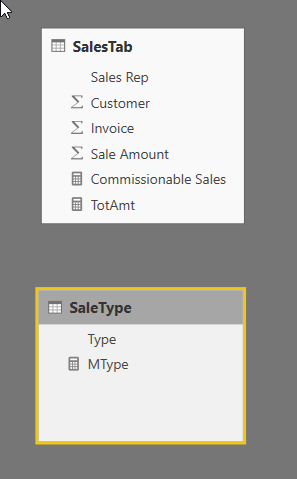
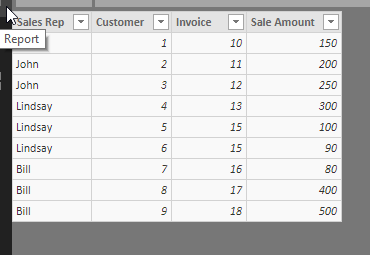
MType = SELECTEDVALUE(SaleType[Type])

TotAmt =
SWITCH (
    [MType],
    "Customer", SUM ( SalesTab[Customer] ),
    "Invoice", SUM ( SalesTab[Invoice] ),
    "Sale Amount", SUM ( SalesTab[Sale Amount] )
)
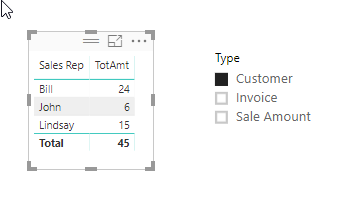
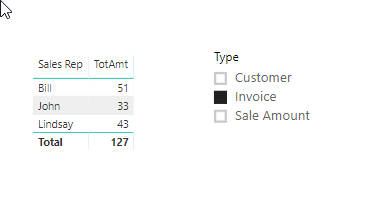
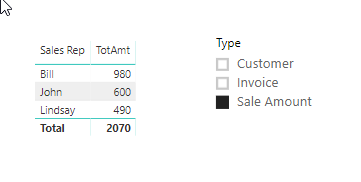
Hope this makes sense.
David
- Mark as New
- Bookmark
- Subscribe
- Mute
- Subscribe to RSS Feed
- Permalink
- Report Inappropriate Content
Thank you so much for the help!
The Slicer is working now!
When I try to do the comparison that was mentioned earlier I get an error for this part:
Measure Delta = var __SelectedMeasure =
     SWITCH (
            [MType];
            "bla bla"; AVERAGE(Table[Value]);
             etc etc
and then the error here (underlined):
var __PDMeasure = CALCULATE((__SelectedMeasure; PREVIOUSDAY(Blad1[Tid]))

RETURN __SelectedMeasure - __PDMeasure;
This Measure is made inside the table containing the values and time.
The MType measure is inside the second table
MType = SELECTEDVALUE(SelectValue[ValueSelect])
The syntax for 'RETURN' is incorrect. (DAX(var __SelectedMeasure = SWITCH( [MType], "BJ-HÖ1 etc etc...
- Mark as New
- Bookmark
- Subscribe
- Mute
- Subscribe to RSS Feed
- Permalink
- Report Inappropriate Content
Without seeing the entire code, it's hard to tell. Likely an extra ) somewhere in the SWITCH statement. Or it could be the ; at the end of RETURN. Can you post the entire measure code (you can replace the slicer values with XXX if need be as the actual values should be immaterial) ?
Also, doublecheck that it's a measure not a calculated column.
- Mark as New
- Bookmark
- Subscribe
- Mute
- Subscribe to RSS Feed
- Permalink
- Report Inappropriate Content
It was indeend an extra paranthesis... but I only get a "0" returned as a resulst in the graphs
Measure Delta = var __SelectedMeasure =
    SWITCH(
        [MType];
        "BJ-HÖ1"; AVERAGE(Blad1[BJ-HÖ1]);
        "BJ-MÄ"; AVERAGE(Blad1[BJ-MÄ]);
        "BJ-TS1"; AVERAGE(Blad1[BJ-TS1]);
        etc
    )
    var __PDMeasure = CALCULATE(__SelectedMeasure; PREVIOUSDAY(Blad1[Tid]))

    RETURN __SelectedMeasure - __PDMeasure
I then have measure called Disp that is the same as the code above without the vars and Return, så just the switch between the values.
In the second table i have:
MType = SELECTEDVALUE(SelectValue[ValueSelect])
and the column with the names of the different value "categories" (as seen in the code, BJ-HÖ1 etc)
The Slicer is coupled with this table column (Called ValueSelect) and properly changes the displayed values in my chart.
So maybe I missunderstood something regarding where to put the calucation vars?
- Mark as New
- Bookmark
- Subscribe
- Mute
- Subscribe to RSS Feed
- Permalink
- Report Inappropriate Content
"The Slicer is coupled with this table column (Called ValueSelect) and properly changes the displayed values in my chart. "
If by "coupled" you mean "having a relationship in the model", you do not want the slicer value table to have a relationship with the fact table. The slicer table is independent of anything else so it doesn't introduce any extra filters.
It shouldn't matter where the measures live, but best practice would be to put it either on the fact table (Blad1) or in a separate Measures table.
One other thing I notice is that you are using PREVIOUSDAY() on the date field that is on the fact table. PREVIOUSDAY() (and most of time intellegence functions) should be done against a Date table that has a 1-to-many relationship to the fact table. CALENDARAUTO() is the quickest way to make a Date table if you don't already have one.
- Mark as New
- Bookmark
- Subscribe
- Mute
- Subscribe to RSS Feed
- Permalink
- Report Inappropriate Content
Thank you for the speedy replies 🙂
Maybe coupled was a poor choice of words, I meant that it is selected in the slicer,
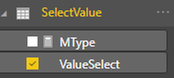
So if I understood right, I made a new table using calendarauto and gave it a 1 - * relationship with the table containing my "original" time column and the values.
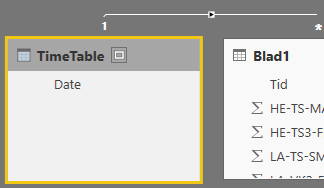
but when I use this new tables date column I get a blank image on my chart? The Original time still works.
- Mark as New
- Bookmark
- Subscribe
- Mute
- Subscribe to RSS Feed
- Permalink
- Report Inappropriate Content
Is Blad1[Tid] meant to be a time value or a date+time value or something else?
- Mark as New
- Bookmark
- Subscribe
- Mute
- Subscribe to RSS Feed
- Permalink
- Report Inappropriate Content
Date and time, YYYY-MM-DD HH-MM:SS every value is from 02:00:00
- Mark as New
- Bookmark
- Subscribe
- Mute
- Subscribe to RSS Feed
- Permalink
- Report Inappropriate Content
At this point I don't know if I can go further without seeing a copy of your actual PBIX file. If you can remove or mask sensitive data and put it on a sharing site, I can get a copy and see what is going on.
Alternatively, with a sample of data and a view of the model I may be able to reconstruct it without the need for you to send the entire thing.
- Mark as New
- Bookmark
- Subscribe
- Mute
- Subscribe to RSS Feed
- Permalink
- Report Inappropriate Content
Hi,
Thank you for your continued help,
I made a version with new names, I've uploaded the file to dropbox: PBIX file
Thanks
- Mark as New
- Bookmark
- Subscribe
- Mute
- Subscribe to RSS Feed
- Permalink
- Report Inappropriate Content
Hi @Anonymous -
Several observations on the fiel you sent:
1) The data prior to 1-Jul-2017 is all blank. You may want to look at filtering that out in the query. Also, many, many rows have a blank Date value
2) When creating any visuals (while doing Time Intelligence functions), use the date field from your calendar, not from the fact table.
3) That being said, the Date field in your fact table (Blad1) has 2:00 AM for all values. CALENDARAUTO() defaults to 12:00 AM for all dates, therefore even though you have created a relationship, there are no records that match between DateTimeTable and Blad1. You have two options here - strip off the time value from Blad1 (in which case it will default to 12;00 AM) or create the calendar in a different manner (I would lean heavily towards the first option).
All of the above being said, I am frankly stumped as to why the code is not working. I can get it working by creating a separate measure for the previous day value, and then a 3rd measure that is the difference between the today measure and previous day measure. But I can't get the simple subtraction working inside a single measure with variables. I will need to do some more digging.
- Mark as New
- Bookmark
- Subscribe
- Mute
- Subscribe to RSS Feed
- Permalink
- Report Inappropriate Content
Hi @Anonymous
I gave you some erroneous code previously (I hadn't tested it - i was making extrapolations from other similar work I've done, but I had some false assumptions).
Points 1-3 in the above reply still hold - please review them. However, now we need to modify the measures.
For transparency, we'll use 3 measures. I'll talk about where they can be combined afterwards
TodaysValue=
    SWITCH(
        [MType];
        "BJ-HÖ1"; AVERAGE(Blad1[BJ-HÖ1]);
        "BJ-MÄ"; AVERAGE(Blad1[BJ-MÄ]);
        "BJ-TS1"; AVERAGE(Blad1[BJ-TS1]);
        etc
    )

PrevDayValue = CALCULATE([TodaysValue]; PREVIOUSDAY(DateTimeTab[Date]))

Measure Delta = [TodaysValue] - [PrevDayValue]
The mistake was thinking we could store some of the complex code in variables and use the code again further down in the measure. I think we can really only have a minimum of 2 measures, unless you want to replicate a lot of code:
TodaysValue=
    SWITCH(
        [MType];
        "BJ-HÖ1"; AVERAGE(Blad1[BJ-HÖ1]);
        "BJ-MÄ"; AVERAGE(Blad1[BJ-MÄ]);
        "BJ-TS1"; AVERAGE(Blad1[BJ-TS1]);
        etc
    )

Measure Delta =
 //NOTE That variables are not needed here - just showing for illustrative purposes
   VAR __Todaysvalue = [TodaysValue]
   VAR __PrevValue = CALCULATE([TodaysValue], PREVIOUSDAY(DateTimeTab[Date])

   RETURN __Todaysvalue - __PrevValue

//You could do the following without any variables and get the same results
//Measure Delta = [TodaysValue] - CALCULATE([TodaysValue], PREVIOUSDAY(DateTimeTab[Date])
Hope this finally gets you to where you need to be. Sorry for the earlier confusion.
David
Helpful resources

FabCon Global Hackathon
Join the Fabric FabCon Global Hackathon—running virtually through Nov 3. Open to all skill levels. $10,000 in prizes!

Power BI Monthly Update - October 2025
Check out the October 2025 Power BI update to learn about new features.

FabCon Atlanta 2026
Join us at FabCon Atlanta, March 16-20, for the ultimate Fabric, Power BI, AI and SQL community-led event. Save $200 with code FABCOMM.


