FabCon is coming to Atlanta
Join us at FabCon Atlanta from March 16 - 20, 2026, for the ultimate Fabric, Power BI, AI and SQL community-led event. Save $200 with code FABCOMM.
Register now!- Power BI forums
- Get Help with Power BI
- Desktop
- Service
- Report Server
- Power Query
- Mobile Apps
- Developer
- DAX Commands and Tips
- Custom Visuals Development Discussion
- Health and Life Sciences
- Power BI Spanish forums
- Translated Spanish Desktop
- Training and Consulting
- Instructor Led Training
- Dashboard in a Day for Women, by Women
- Galleries
- Data Stories Gallery
- Themes Gallery
- Contests Gallery
- QuickViz Gallery
- Quick Measures Gallery
- Visual Calculations Gallery
- Notebook Gallery
- Translytical Task Flow Gallery
- TMDL Gallery
- R Script Showcase
- Webinars and Video Gallery
- Ideas
- Custom Visuals Ideas (read-only)
- Issues
- Issues
- Events
- Upcoming Events
The Power BI Data Visualization World Championships is back! Get ahead of the game and start preparing now! Learn more
- Power BI forums
- Forums
- Get Help with Power BI
- Desktop
- Current Week versus Last Week Totals as a Bar Char...
- Subscribe to RSS Feed
- Mark Topic as New
- Mark Topic as Read
- Float this Topic for Current User
- Bookmark
- Subscribe
- Printer Friendly Page

- Mark as New
- Bookmark
- Subscribe
- Mute
- Subscribe to RSS Feed
- Permalink
- Report Inappropriate Content
Current Week versus Last Week Totals as a Bar Chart
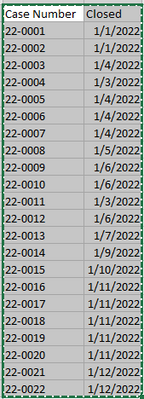
Current Week 1/9/2022 - 1/15/2022
Last Week 1/2/2022 - 1/8/2022
Is it possible to show this as a bar chart ?
Solved! Go to Solution.
- Mark as New
- Bookmark
- Subscribe
- Mute
- Subscribe to RSS Feed
- Permalink
- Report Inappropriate Content
Hi @Anonymous ~
I created a sample:
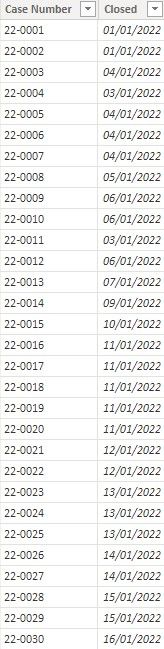
Please try these measures:
Current Week =
var __Today = TODAY()
var __WeekStartDate = __Today-WEEKDAY(__Today,1)+1
var __WeekEndDate = __WeekStartDate+6
return
CALCULATE(COUNTROWS('Table'),FILTER(ALL('Table'),__WeekStartDate<='Table'[Closed] && __WeekEndDate>='Table'[Closed]))
Last Week =
var __Today = TODAY()
var __WeekStartDate = __Today-WEEKDAY(__Today,1)-6
var __WeekEndDate = __WeekStartDate+6
return
CALCULATE(COUNTROWS('Table'),FILTER(ALL('Table'),__WeekStartDate<='Table'[Closed] && __WeekEndDate>='Table'[Closed]))
create a table:
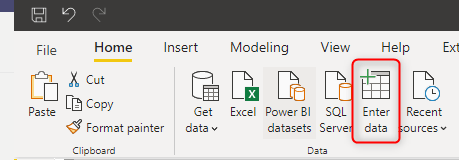
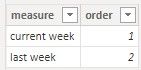
create a measure:
Measure Value =
SWITCH(
SELECTEDVALUE('Table1'[order]),
1,[Current Week],
2,[Last Week]
)
Finally create a bar chart:
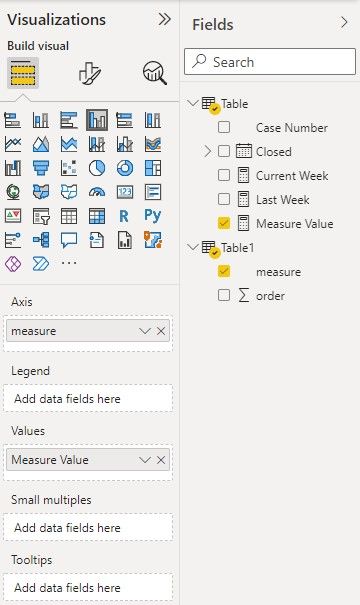
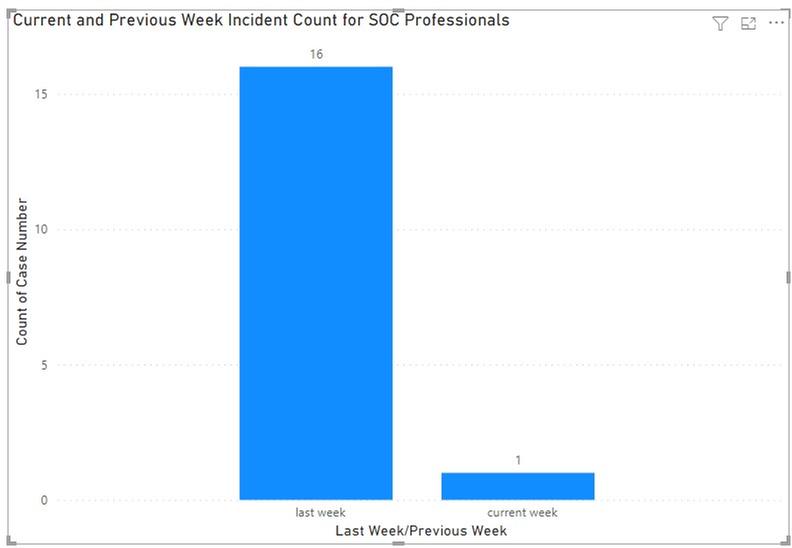
Hope it helps!
Best regards,
Community Support Team Gao
If this post helps, please consider Accept it as the solution to help the other members find it more quickly.


- Mark as New
- Bookmark
- Subscribe
- Mute
- Subscribe to RSS Feed
- Permalink
- Report Inappropriate Content
Hi,
The definition of a week itself is unclear. For the year 2022, when will the week start from - January 1 or the first Monday of January? If you can create a week number column in the Calendar table and share the download link of your PBI file, I can help.
Regards,
Ashish Mathur
http://www.ashishmathur.com
https://www.linkedin.com/in/excelenthusiasts/
- Mark as New
- Bookmark
- Subscribe
- Mute
- Subscribe to RSS Feed
- Permalink
- Report Inappropriate Content
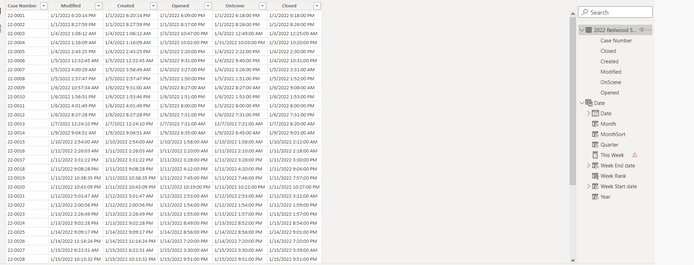
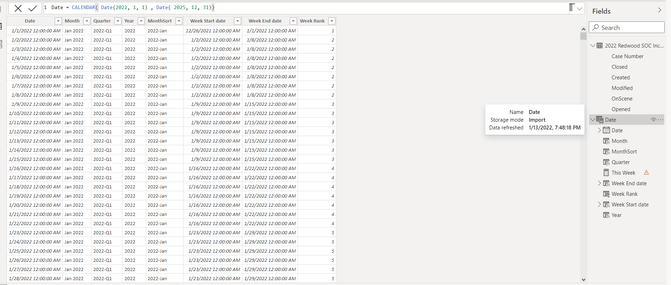
Hope this helps as I couldn't get the export form my desktop.
- Mark as New
- Bookmark
- Subscribe
- Mute
- Subscribe to RSS Feed
- Permalink
- Report Inappropriate Content
Hi~ @Anonymous
Please check the data type of the Order column.If it is in Text format, change it to Whole number format.Then check the bar chart.

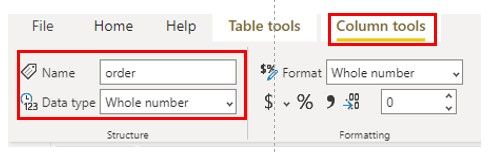
If the problem is not solved, please provide the error information, it will help me to find the problem, thank you very much!
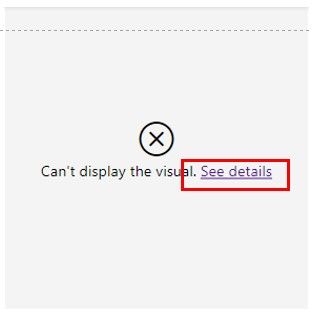
Best regards,
Community Support Team Gao
If this post helps, please consider Accept it as the solution to help the other members find it more quickly.
- Mark as New
- Bookmark
- Subscribe
- Mute
- Subscribe to RSS Feed
- Permalink
- Report Inappropriate Content
Here is the information you requested.


- Mark as New
- Bookmark
- Subscribe
- Mute
- Subscribe to RSS Feed
- Permalink
- Report Inappropriate Content
Hi~ @Anonymous
The problem is because of the data type of the data.
Please contrast the data type of the measures and columns. Hope it helps.
This is my Test File
Best regards,
Community Support Team Gao
If this post helps, please consider Accept it as the solution to help the other members find it more quickly.
- Mark as New
- Bookmark
- Subscribe
- Mute
- Subscribe to RSS Feed
- Permalink
- Report Inappropriate Content
Hi @Anonymous ~
I created a sample:
Please try these measures:
Current Week =
var __Today = TODAY()
var __WeekStartDate = __Today-WEEKDAY(__Today,1)+1
var __WeekEndDate = __WeekStartDate+6
return
CALCULATE(COUNTROWS('Table'),FILTER(ALL('Table'),__WeekStartDate<='Table'[Closed] && __WeekEndDate>='Table'[Closed]))
Last Week =
var __Today = TODAY()
var __WeekStartDate = __Today-WEEKDAY(__Today,1)-6
var __WeekEndDate = __WeekStartDate+6
return
CALCULATE(COUNTROWS('Table'),FILTER(ALL('Table'),__WeekStartDate<='Table'[Closed] && __WeekEndDate>='Table'[Closed]))
create a table:
create a measure:
Measure Value =
SWITCH(
SELECTEDVALUE('Table1'[order]),
1,[Current Week],
2,[Last Week]
)
Finally create a bar chart:
Hope it helps!
Best regards,
Community Support Team Gao
If this post helps, please consider Accept it as the solution to help the other members find it more quickly.
- Mark as New
- Bookmark
- Subscribe
- Mute
- Subscribe to RSS Feed
- Permalink
- Report Inappropriate Content
It look like the Closed (2022 Redwood Incidents) does not have Date associated with it. How can I resolve this issue?
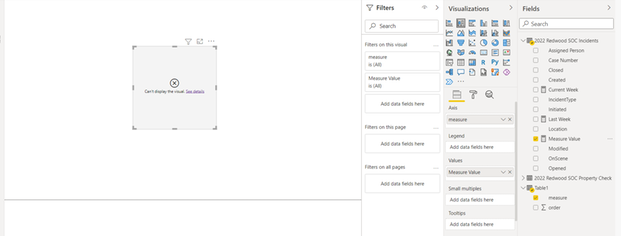

- Mark as New
- Bookmark
- Subscribe
- Mute
- Subscribe to RSS Feed
- Permalink
- Report Inappropriate Content
@Anonymous , Create these new columns in date table
new columns
Week Start date = 'Date'[Date]+-1*WEEKDAY('Date'[Date],1)+1
Week End date = 'Date'[Date]+ 7-1*WEEKDAY('Date'[Date],1)
Week Rank = RANKX(all('Date'),'Date'[Week Start date],,ASC,Dense)
OR
Week Rank = RANKX(all('Date'),'Date'[Year Week],,ASC,Dense) //YYYYWW format
Then try measures
measures
This Week = CALCULATE(sum('Table'[Qty]), FILTER(ALL('Date'),'Date'[Week Rank]=max('Date'[Week Rank])))
Last Week = CALCULATE(sum('Table'[Qty]), FILTER(ALL('Date'),'Date'[Week Rank]=max('Date'[Week Rank])-1))
Power BI — Week on Week and WTD
https://medium.com/@amitchandak.1978/power-bi-wtd-questions-time-intelligence-4-5-98c30fab69d3
https://community.powerbi.com/t5/Community-Blog/Week-Is-Not-So-Weak-WTD-Last-WTD-and-This-Week-vs-Last-Week/ba-p/1051123
https://www.youtube.com/watch?v=pnAesWxYgJ8
Or share data in text format as suggested by @mh2587
- Mark as New
- Bookmark
- Subscribe
- Mute
- Subscribe to RSS Feed
- Permalink
- Report Inappropriate Content
I'm getting the following error message:


- Mark as New
- Bookmark
- Subscribe
- Mute
- Subscribe to RSS Feed
- Permalink
- Report Inappropriate Content
Can you please elaborate it further with expected out put and provide dummy data
Did I answer your question? If so, please mark my post as a solution!
Proud to be a Super User!
- Mark as New
- Bookmark
- Subscribe
- Mute
- Subscribe to RSS Feed
- Permalink
- Report Inappropriate Content
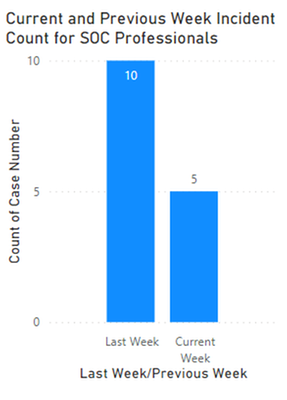
Helpful resources

Power BI Dataviz World Championships
The Power BI Data Visualization World Championships is back! Get ahead of the game and start preparing now!

Power BI Monthly Update - December 2025
Check out the December 2025 Power BI Holiday Recap!

FabCon Atlanta 2026
Join us at FabCon Atlanta, March 16-20, for the ultimate Fabric, Power BI, AI and SQL community-led event. Save $200 with code FABCOMM.

| User | Count |
|---|---|
| 40 | |
| 38 | |
| 36 | |
| 29 | |
| 28 |


| User | Count |
|---|---|
| 127 | |
| 88 | |
| 78 | |
| 66 | |
| 65 |


