Get Fabric or SQL Certified for Free.
Get certified for free when you join Fabric Data Days 2026 and dive into Fabric, Power BI, SQL, AI, and other essential data skills.
Join now- Power BI forums
- Get Help with Power BI
- Desktop
- Service
- Report Server
- Power Query
- Mobile Apps
- Developer
- DAX Commands and Tips
- Custom Visuals Development Discussion
- Health and Life Sciences
- Power BI Spanish forums
- Translated Spanish Desktop
- Training and Consulting
- Instructor Led Training
- Dashboard in a Day for Women, by Women
- Galleries
- Data Stories Gallery
- Themes Gallery
- Contests Gallery
- QuickViz Gallery
- Quick Measures Gallery
- Visual Calculations Gallery
- Notebook Gallery
- Translytical Task Flow Gallery
- TMDL Gallery
- R Script Showcase
- Webinars and Video Gallery
- Ideas
- Custom Visuals Ideas (read-only)
- Issues
- Issues
- Events
- Upcoming Events
Data Days is here! Join us now for 60+ days of learning, challenges, and connection. Learn more
- Power BI forums
- Forums
- Get Help with Power BI
- Desktop
- Current Status Filter
- Subscribe to RSS Feed
- Mark Topic as New
- Mark Topic as Read
- Float this Topic for Current User
- Bookmark
- Subscribe
- Printer Friendly Page

- Mark as New
- Bookmark
- Subscribe
- Mute
- Subscribe to RSS Feed
- Permalink
- Report Inappropriate Content
Current Status Filter
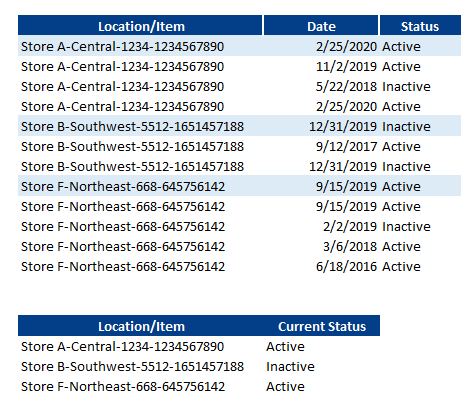
I have a Power BI table with a Location/ Item key, Audit Date and Item Status (as shown below). I need to add a filter in my reports that will shows only the most current status of each Location/Item key. Foe example, I need the filter to only give the results of the items highlighted in blue below (because they show the most current status) which is also illustrated in the second screen shot below that shows only the most current status for the items. How can I set this up in Power BI?
Thx
Solved! Go to Solution.


- Mark as New
- Bookmark
- Subscribe
- Mute
- Subscribe to RSS Feed
- Permalink
- Report Inappropriate Content
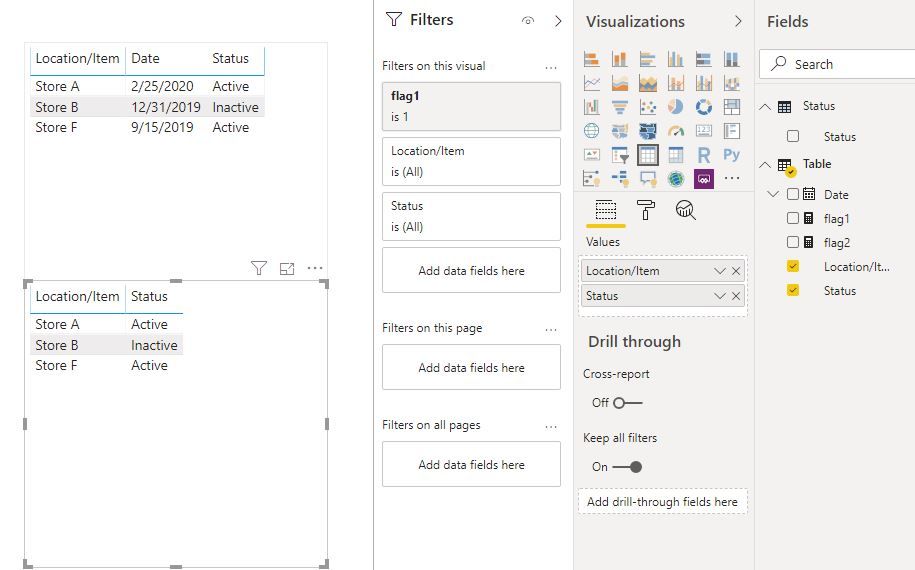
Hi @Anonymous
Create a measure and add it to visual level filter, then add [Status] to a slicer, you can filter the status.
flag1 =
VAR maxdate =
    CALCULATE (
        MAX ( 'Table'[Date] ),
        FILTER (
            ALLSELECTED ( 'Table' ),
            'Table'[Location/Item]
                = MAX ( 'Table'[Location/Item] )
        )
    )
RETURN
    IF (
        MAX ( 'Table'[Date] ) = maxdate,
        1,
        0
    )
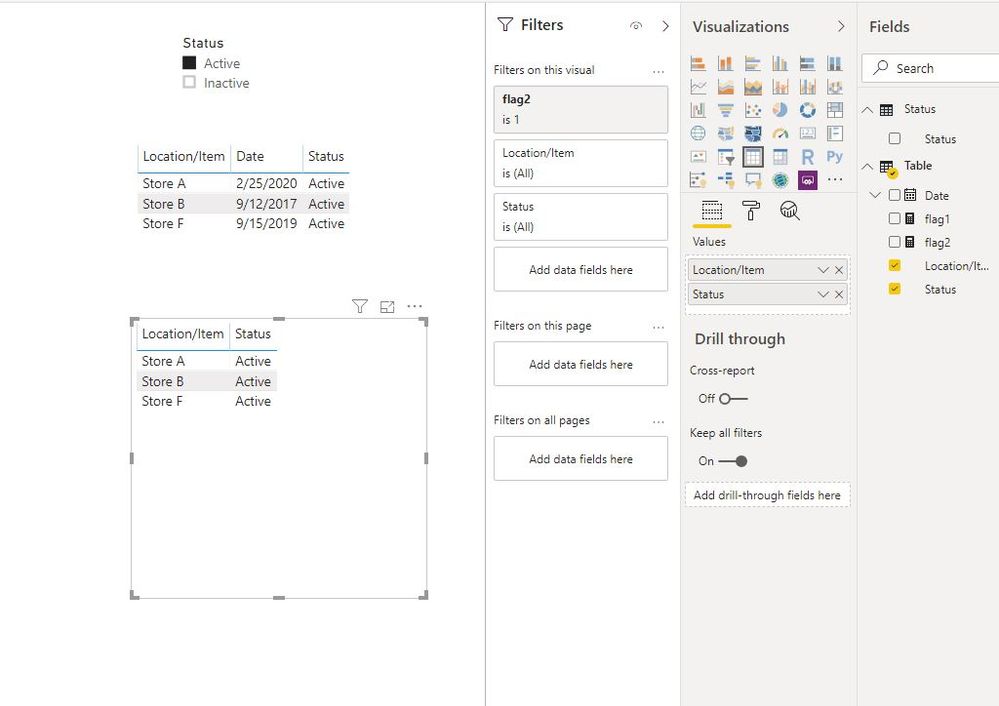
2. if you want to apply filter (active or inactive) in this manner:
show the lastest date's data which their status is active or inactive via slicer.
You could create a table
Status = VALUES('Table'[Status])Add [status] from this table to slicer, create measure below and add to viusal level filter
flag2 =
VAR maxdate =
    CALCULATE (
        MAX ( 'Table'[Date] ),
        FILTER (
            ALLSELECTED ( 'Table' ),
            'Table'[Location/Item]
                = MAX ( 'Table'[Location/Item] )
        )
    )
VAR maxdate_m =
    CALCULATE (
        MAX ( 'Table'[Date] ),
        FILTER (
            ALLSELECTED ( 'Table' ),
            'Table'[Location/Item]
                = MAX ( 'Table'[Location/Item] )
                && 'Table'[Status]
                    = SELECTEDVALUE ( 'Status'[Status] )
        )
    )
VAR switch1 =
    IF (
        HASONEVALUE ( 'Status'[Status] ),
        maxdate_m,
        maxdate
    )
RETURN
    IF (
        MAX ( 'Table'[Date] ) = switch1,
        1,
        0
    )
Best Regards
Maggie
Community Support Team _ Maggie Li
If this post helps, then please consider Accept it as the solution to help the other members find it more quickly.
- Mark as New
- Bookmark
- Subscribe
- Mute
- Subscribe to RSS Feed
- Permalink
- Report Inappropriate Content
Hi @Anonymous
- Mark as New
- Bookmark
- Subscribe
- Mute
- Subscribe to RSS Feed
- Permalink
- Report Inappropriate Content
Hi @Anonymous
Create a measure and add it to visual level filter, then add [Status] to a slicer, you can filter the status.
flag1 =
VAR maxdate =
    CALCULATE (
        MAX ( 'Table'[Date] ),
        FILTER (
            ALLSELECTED ( 'Table' ),
            'Table'[Location/Item]
                = MAX ( 'Table'[Location/Item] )
        )
    )
RETURN
    IF (
        MAX ( 'Table'[Date] ) = maxdate,
        1,
        0
    )
2. if you want to apply filter (active or inactive) in this manner:
show the lastest date's data which their status is active or inactive via slicer.
You could create a table
Status = VALUES('Table'[Status])Add [status] from this table to slicer, create measure below and add to viusal level filter
flag2 =
VAR maxdate =
    CALCULATE (
        MAX ( 'Table'[Date] ),
        FILTER (
            ALLSELECTED ( 'Table' ),
            'Table'[Location/Item]
                = MAX ( 'Table'[Location/Item] )
        )
    )
VAR maxdate_m =
    CALCULATE (
        MAX ( 'Table'[Date] ),
        FILTER (
            ALLSELECTED ( 'Table' ),
            'Table'[Location/Item]
                = MAX ( 'Table'[Location/Item] )
                && 'Table'[Status]
                    = SELECTEDVALUE ( 'Status'[Status] )
        )
    )
VAR switch1 =
    IF (
        HASONEVALUE ( 'Status'[Status] ),
        maxdate_m,
        maxdate
    )
RETURN
    IF (
        MAX ( 'Table'[Date] ) = switch1,
        1,
        0
    )
Best Regards
Maggie
Community Support Team _ Maggie Li
If this post helps, then please consider Accept it as the solution to help the other members find it more quickly.


- Mark as New
- Bookmark
- Subscribe
- Mute
- Subscribe to RSS Feed
- Permalink
- Report Inappropriate Content
So try creating a column like this:
Most Current Column =
  VAR __Latest = MAXX(FILTER(ALL('Table'), [Location/Item] = EARLIER([Location/Item]),[Date])
RETURN
  IF([Date] = __Latest, TRUE, FALSE)
Follow on LinkedIn
@ me in replies or I'll lose your thread!!!
Instead of a Kudo, please vote for this idea
Become an expert!: Enterprise DNA
External Tools: MSHGQM
YouTube Channel!: Microsoft Hates Greg
Latest book!: DAX For Humans
DAX is easy, CALCULATE makes DAX hard...
- Mark as New
- Bookmark
- Subscribe
- Mute
- Subscribe to RSS Feed
- Permalink
- Report Inappropriate Content
Thx Greg,
Here is my formula along with the error I got:
Store Item is the Location/Item in my inital example and New_Audit Date is the Date in my example. Thoughts? Also if I want to filter by the Status of "Active" and "Inactive" how does that come into play in this scenario?



- Mark as New
- Bookmark
- Subscribe
- Mute
- Subscribe to RSS Feed
- Permalink
- Report Inappropriate Content
- Mark as New
- Bookmark
- Subscribe
- Mute
- Subscribe to RSS Feed
- Permalink
- Report Inappropriate Content
It errors out as soon as I enter return...what could the issue be?

Helpful resources

Fabric Data Days 2026
Don't miss out on Data Days, June 15 through August 7. Learn Fabric, Power BI, SQL, AI and more.

Power BI Monthly Update - May 2026
Check out the May 2026 Power BI update to learn about new features.

Power BI DataViz World Championships - June 2026
A new Power BI DataViz World Championship is coming this June! Don't miss out on submitting your entry.

| User | Count |
|---|---|
| 23 | |
| 21 | |
| 20 | |
| 18 | |
| 13 |


| User | Count |
|---|---|
| 58 | |
| 50 | |
| 38 | |
| 31 | |
| 27 |


