Hi,
Data is as below:
| QB Name | Picks Thrown |
| Tom Brady | 0 |
| Tom Brady | 0 |
| Tom Brady | 1 |
| Tom Brady | 2 |
| Tom Brady | 4 |
| Tom Brady | 3 |
| Tom Brady | 1 |
| Tom Brady | 3 |
| Tom Brady | 2 |
| Tom Brady | 1 |
| Tom Brady | 0 |
| Tom Brady | 0 |
| Tom Brady | 2 |
| Tom Brady | 1 |
| Tom Brady | 0 |
| Nathan Peterman | 4 |
| Nathan Peterman | 3 |
| Nathan Peterman | 4 |
| Nathan Peterman | 0 |
| Nathan Peterman | 1 |
| Nathan Peterman | 1 |
| Nathan Peterman | 4 |
| Nathan Peterman | 3 |
| Nathan Peterman | 3 |
| Nathan Peterman | 4 |
| Nathan Peterman | 3 |
| Nathan Peterman | 4 |
| Nathan Peterman | 1 |
| Nathan Peterman | 1 |
| Nathan Peterman | 0 |
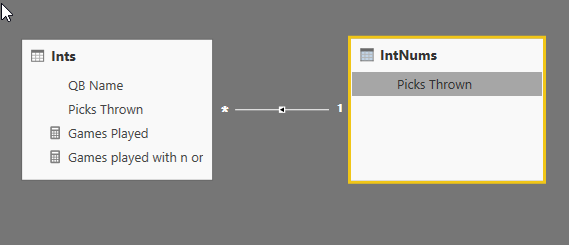
What I'm wanting to do is plot a graph that can show me the number of games where a QB has thrown at most 0, 1, 2 etc interceptions. So I count the number of games with a simple measure Games Played = countrows(Table1), and then I'm trying the following measure:
Games played with n or less picks = calculate([Games Played], filter(allselected(Table1),Table1[Picks Thrown]<=max(Table1[Picks Thrown])))
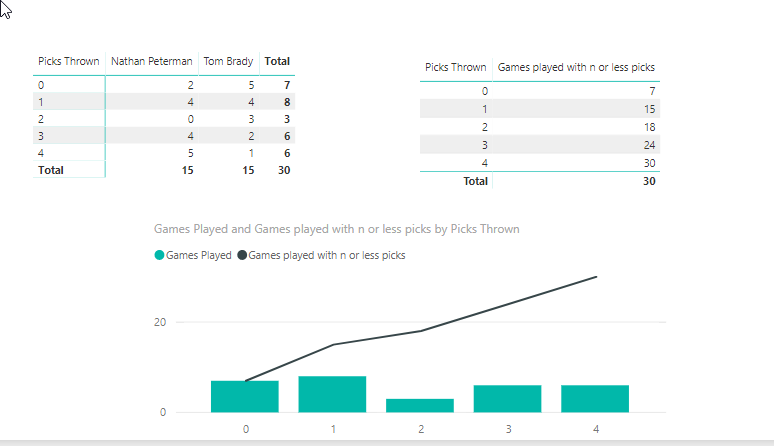
This works perfectly:

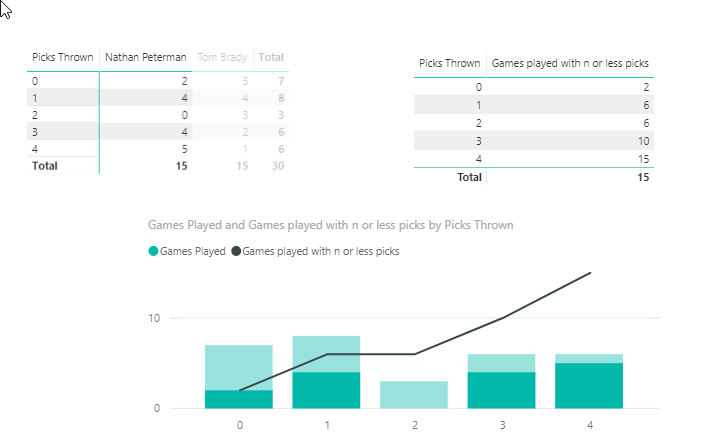
Now if I want to filter just Peterman's games, him not having a two-interception game is giving unwanted results. If I select his name from the other visual, this happens:
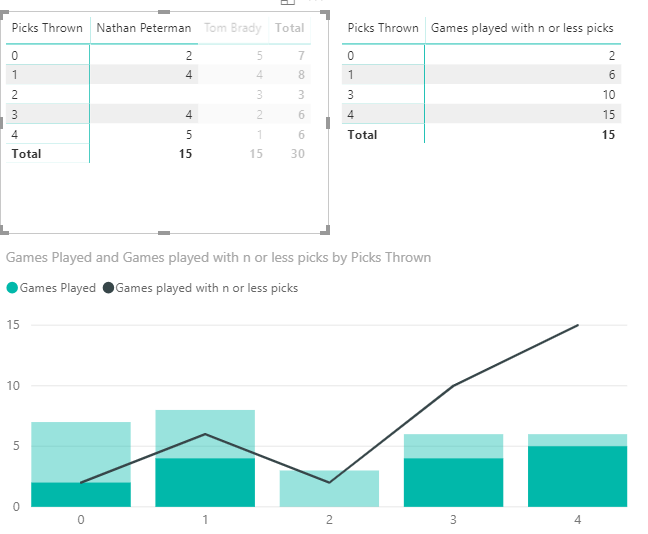
and if I hover over the value for two interceptions, it's calculating the measure to give 2. If I add a slicer instead, rather than evaluating the measure "incorrectly", it doesn't evaluate the measure at all and just completes a line directly from x-axis values 1 and 3 to y-axis values 6 and 10. Does anyone have any ideas how I can reword the cumulative measure so that it evaluates Peterman as having six games with two or less interceptions?