cancel
Showing results for 
Search instead for 
Did you mean: 

The Power BI Data Visualization World Championships is back! Get ahead of the game and start preparing now! Learn more

Reply
corange
Post Patron
Post Patron

Cumulative not carrying over when no purchase

Hi everyone, 


I am struggling with one of my report. I don't understand why it is not showing up the right results. 


I need to calculate points accrued for a client. Points are accrued each month and carried over if any left. 


For this, I have used a cumulative measure as follows: 


Cumulative Points = IF(ISBLANK(SUMX(test1,test1[Nber of Job])), BLANK(), CALCULATE(SUMX(test1,test1[Nber of Job]),FILTER(all('Calendar'),'Calendar'[SingleDate]<=max('Calendar'[SingleDate]))))


Then I use the following to know how many vouchers I need to give away (1 voucher for every 150 points). 


Tickets Current = QUOTIENT([Cumulative Points],150) 
 
To know exactly how many voucher I need to give for any given month, I deduct the number of voucher they have received the previous month as I use a cumulative measure to make sure I take into consideration carry over points. 
 
Ticket to get = ([Tickets Current]-[Tickets Last Month])
 
**Tickets last month = (CALCULATE([Tickets Current], DATEADD('Calendar'[SingleDate], -1, MONTH)))
 
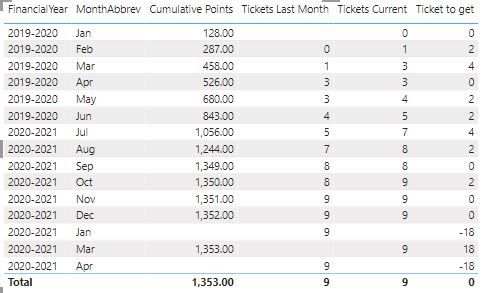
The below are the results I obtained:
Capture.JPG


I don't understand why the cumulative is not showing up for Jan. The client didnt make any purchase that month but I thought it will still carry over? Also I don't understand the -18 in Jan or 18 in March. With the cumulative results adding up for January even thought the client didnt purchase, will give me the right results for the voucher. 


Can someone please help with the formula to fix this? 


You can access the pbix file here if that can be useful: https://1drv.ms/u/s!AiS7XVNuQsBCfLR3YfEnr4wJxEo?e=fM0NE4 


Thank you. 


1 ACCEPTED SOLUTION
Ashish_Mathur
Super User
Super User

Hi,

Is this the result you are expecting?  Download the PBI file from here.

Untitled.png


Regards,
Ashish Mathur
http://www.ashishmathur.com
https://www.linkedin.com/in/excelenthusiasts/

View solution in original post

4 REPLIES 4
Ashish_Mathur
Super User
Super User

Hi,

Is this the result you are expecting?  Download the PBI file from here.

Untitled.png


Regards,
Ashish Mathur
http://www.ashishmathur.com
https://www.linkedin.com/in/excelenthusiasts/

Hi Ashish, 


Thank you so much. Exactly what I was after. 


Thanks. 

You are welcome.


Regards,
Ashish Mathur
http://www.ashishmathur.com
https://www.linkedin.com/in/excelenthusiasts/
Anonymous
Not applicable

This might get you a little further.


1.  Calendar - mark this as a date table


2.  Sample formula


Cumulative_Actual =
CALCULATE (
SUM ( 'Client'[Nber of Job] ),
filter( ALL ( 'Calendar' ),
'Calendar'[SingleDate] <= MAX( 'Calendar'[SingleDate] ))
)


Helpful resources

Announcements
Power BI DataViz World Championships

Power BI Dataviz World Championships

The Power BI Data Visualization World Championships is back! Get ahead of the game and start preparing now!

December 2025 Power BI Update Carousel

Power BI Monthly Update - December 2025

Check out the December 2025 Power BI Holiday Recap!

FabCon Atlanta 2026 carousel

FabCon Atlanta 2026

Join us at FabCon Atlanta, March 16-20, for the ultimate Fabric, Power BI, AI and SQL community-led event. Save $200 with code FABCOMM.