Join us at FabCon Atlanta from March 16 - 20, 2026, for the ultimate Fabric, Power BI, AI and SQL community-led event. Save $200 with code FABCOMM.
Register now!The Power BI Data Visualization World Championships is back! It's time to submit your entry. Live now!
Hi,
I have a fun challenge I've been working on for the last week or so and it's got me stumped.
Here's my data set:
| Project # | Job # | Date | Count | Category |
| 1 | 1 | 1/1/2022 | 5 | Red |
| 1 | 2 | 2/1/2022 | 10 | Green |
| 2 | 1 | 3/1/2022 | 15 | Blue |
What I need to do is for the Count to be returned for only the job who has the Max date on each project. So Project 1 would only return a Count of 10 since Job #2 is the Max date for that project. It also needs to be dynamic. So if Job #2 was filtered out, Project 1 would return a Count of 5 (since Job #1 now has the Max date for the Project in the current filter context).
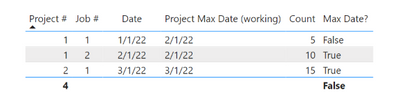
A colleuge was able to help me solve this issue. I created a measure that returned on the Max date for each Project based on the current filter context.
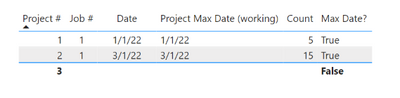
And if I filter down to only the Job #1s, it's still all roses as the Project Max Date updates to reflect the new Max date for Project one of 1/1/22.
However, there is a twist to this story, hence why I'm posting.
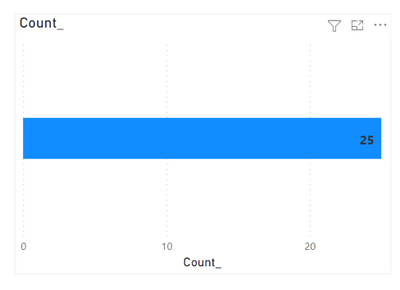
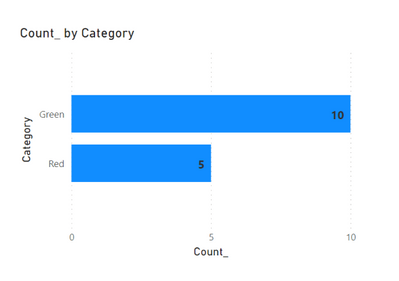
I created a measure that would only return the Count for the Jobs with the Max date for each project. So based off this table being unfiltered, it should return a count of 25. And it does, as you can see in the visual.
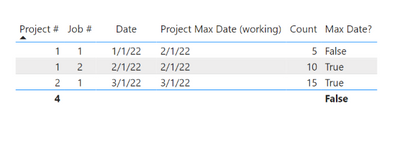
And if I filter down to just Project 1, it gives the correct value of 10...
However, here's the rub. When I try to add an additional filter context into the bar chart, it returns both categories, instead of just the one with the max date for the project. I want it to return just Green with a Count of 10, since that's the job that has the Max date for the project.
I've been playing around with different combinations of Filter and the ALL functions but I am stumped. Someone else recommened that I use REMOVEFILTERS, but that still wasn't working.
Any help is much appreciated!
Solved! Go to Solution.
That might be trickier, it depends on how you define "top date". It might work for either earliest or latest dates, I'm not sure. Another option would be to define another measure which ranked it appropriately and use that in the topn filter
On the bar chart place a TOPN filter on the category, based on the Count_ measure.
Thanks for the repsonse, John. If I'm not wanting the Top Count and only wanting the count associated with the Top date for each Project (within the filter context), should I do TOPN based on the date instead? Or are you thinking based on the count?
That might be trickier, it depends on how you define "top date". It might work for either earliest or latest dates, I'm not sure. Another option would be to define another measure which ranked it appropriately and use that in the topn filter
Any thoughts on how I could set up this measure?
Ya, I've gone that route before and the performance was horrible. But it was probably due to my janky DAX. I'll try that route again if the visual level filters aren't working like I want.
Thanks for the input.
| User | Count |
|---|---|
| 51 | |
| 38 | |
| 33 | |
| 22 | |
| 19 |
| User | Count |
|---|---|
| 136 | |
| 101 | |
| 58 | |
| 36 | |
| 35 |