cancel
Showing results for 
Search instead for 
Did you mean: 

Get Fabric Certified for FREE during Fabric Data Days. Don't miss your chance! Request now

Reply
zvm
Helper II
Helper II

Cumulative Sum wrong when using visual filter

Hello,

I have a strange behaviour (at least to me! 🙂 ) of Power BI Desktop report, for cumulative sum measure.

Here is the measure:

NaplKumulativ = 
VAR CurrNap = [NaplTotal]
RETURN    
        CALCULATE([NaplTotal];
               FILTER(ALL(SellOut[Proizvođač]); [NaplTotal] >=CurrNap ) 
         )

And everything is fine if I don't have Visual filter.
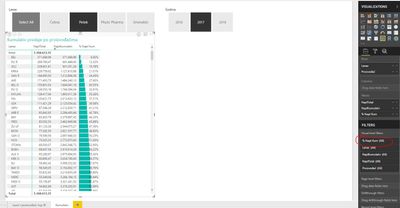
No Visual Filter - OK.JPG


But if I add visual filter (for instance, I want only those who contribute to the first 50% of total), some rows are not correct in cumulative sum, i.e. they are duplicated. Photo:
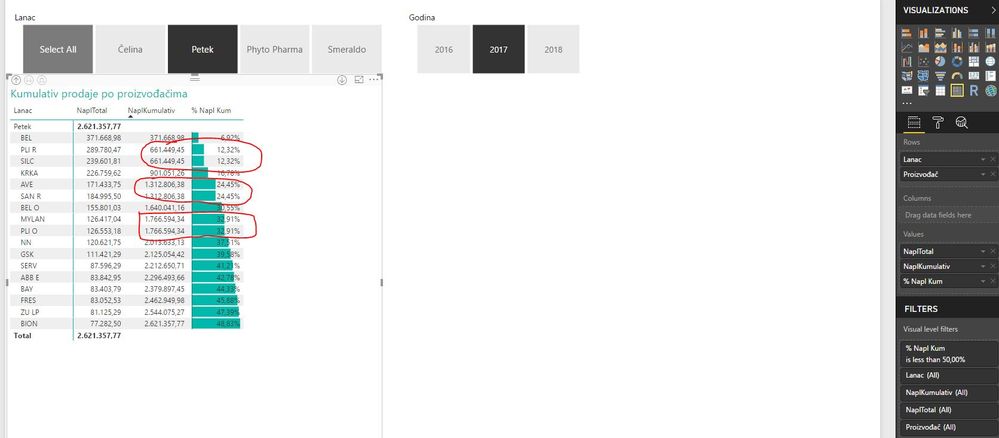
Select single - not OK.JPG


however, if I select all in Slicer, everything is ok again!
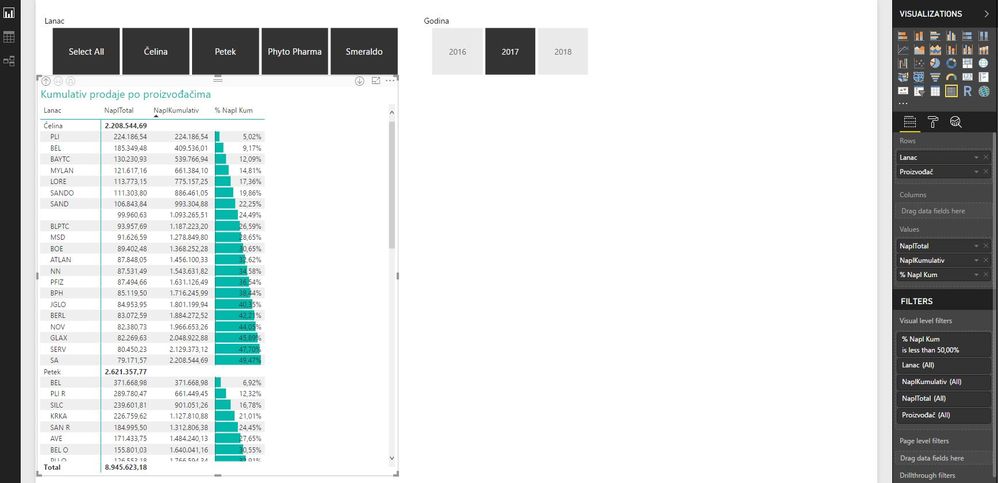
Select All - OK.JPG


If I make multiple selection, but not all, wrong results appear again in some rows (but not necessarily the same ones like for a single selection).


So, to summarize:

- no visual filter, single selection in slicer - cumsum is OK

- visual filter, single selection in slicer - cumsum is NOT OK

- visual filter, select all in slicer - cumsum is again OK


What might cause such a behaviour?


Thank you.

1 ACCEPTED SOLUTION
Greg_Deckler
Community Champion
Community Champion

Your ALL is overriding your slicer in the context of the calculation. That's what ALL does. If you want to preserve your filtering in your report, you need to use ALLEXCEPT and in the ALLEXCEPT arguments you need to specify your slicer column.


Follow on LinkedIn
@ me in replies or I'll lose your thread!!!
Instead of a Kudo, please vote for this idea
Become an expert!: Enterprise DNA
External Tools: MSHGQM
YouTube Channel!: Microsoft Hates Greg
Latest book!:
DAX For Humans

DAX is easy, CALCULATE makes DAX hard...

View solution in original post

4 REPLIES 4
Greg_Deckler
Community Champion
Community Champion

The issue is likely your ALL in your filter clause. You probably need to use ALLEXCEPT.


Follow on LinkedIn
@ me in replies or I'll lose your thread!!!
Instead of a Kudo, please vote for this idea
Become an expert!: Enterprise DNA
External Tools: MSHGQM
YouTube Channel!: Microsoft Hates Greg
Latest book!:
DAX For Humans

DAX is easy, CALCULATE makes DAX hard...

I am not sure how can I use ALLEXCEPT instead of ALL in this case?! 

Just to add, it does not matter what value I set in filter. It could be 200% (literally all products), but the behaviour is the same like for 30% or 50% or 70%.

As long as filter is present, value is wrong for some rows.


Important thing may be that I don't have that column in dimension. It is in fact table. I may try to move it , to create dimension, although there are some issues to do so (dirty data, additional preparation).

Greg_Deckler
Community Champion
Community Champion

Your ALL is overriding your slicer in the context of the calculation. That's what ALL does. If you want to preserve your filtering in your report, you need to use ALLEXCEPT and in the ALLEXCEPT arguments you need to specify your slicer column.


Follow on LinkedIn
@ me in replies or I'll lose your thread!!!
Instead of a Kudo, please vote for this idea
Become an expert!: Enterprise DNA
External Tools: MSHGQM
YouTube Channel!: Microsoft Hates Greg
Latest book!:
DAX For Humans

DAX is easy, CALCULATE makes DAX hard...

Hi an thanks!

I accepted your solution since it has logical and valuable explanation one should take into account any time writing DAX formulas.  But I solved it differently, through the model. I just moved slicer column to the dimension.

Basically, I got one huge Excel file with dimensions and facts all in one table (i.e. Excel sheet). But when I created artificial dimension, with SUMMARIZECOLUMNS, things got better. 

Helpful resources

Announcements
November Power BI Update Carousel

Power BI Monthly Update - November 2025

Check out the November 2025 Power BI update to learn about new features.

Fabric Data Days Carousel

Fabric Data Days

Advance your Data & AI career with 50 days of live learning, contests, hands-on challenges, study groups & certifications and more!

FabCon Atlanta 2026 carousel

FabCon Atlanta 2026

Join us at FabCon Atlanta, March 16-20, for the ultimate Fabric, Power BI, AI and SQL community-led event. Save $200 with code FABCOMM.

Top Solution Authors
Top Kudoed Authors