cancel
Showing results for 
Search instead for 
Did you mean: 

The Power BI Data Visualization World Championships is back! Get ahead of the game and start preparing now! Learn more

Reply
MH3
Helper V
Helper V

Cumulative Sum Not Working on Year

Hello,


I have Car sales per month each year. from 2007 till 2020.


the Fiscal year starts from July to June


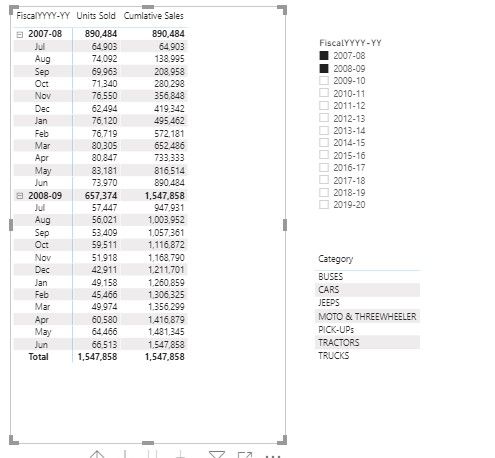
I have to caluclate the cumulative sum of each year  but the formula seems to be not working.


Visualization:

SummCummm.jpg

Cumulative Sales - Measure :


Cumlative Sales = 
VAR LastVisibleDate =
    MAX ( 'Date'[Date] )
VAR FirstVisibleDate =
    MIN ( 'Date'[Date] )
VAR LastDateWithSales =
    CALCULATE (
        MAX ( Sales[Date] ),
        REMOVEFILTERS ()   -- Use ALL ( Sales ) if REMOVEFILTERS () and ALL () 
                           -- are not available
    )
VAR Result =
    IF (
        FirstVisibleDate <= LastDateWithSales,
        CALCULATE (
           [Units Sold],
            'Date'[Date] <= LastVisibleDate 
        )
    )
RETURN
    Result


But the measure is jsut calculating the cumulative sum all over, neglecting the different year.


Any Help?

1 ACCEPTED SOLUTION
amitchandak
Super User
Super User

@MH3 , You can use datesytd with an end date of the year as June. With a date table


example

YTD Sales = CALCULATE(SUM(Sales[Sales Amount]),DATESYTD('Date'[Date],"6/30"))
Last YTD Sales = CALCULATE(SUM(Sales[Sales Amount]),DATESYTD(dateadd('Date'[Date],-1,Year),"6/30"))


Power BI — Year on Year with or Without Time Intelligence
https://medium.com/@amitchandak.1978/power-bi-ytd-questions-time-intelligence-1-5-e3174b39f38a


.Creating Financial Calendar - From Any Month
https://community.powerbi.com/t5/Community-Blog/Creating-Financial-Calendar-Decoding-Date-and-Calend...


To get the best of the time intelligence function. Make sure you have a date calendar and it has been marked as the date in model view. Also, join it with the date column of your fact/s. Refer :radacad sqlbi My Video Series Appreciate your Kudos.

Share with Power BI Enthusiasts: Full Power BI Video (20 Hours) YouTube
Microsoft Fabric Series 60+ Videos YouTube
Microsoft Fabric Hindi End to End YouTube

View solution in original post

2 REPLIES 2
amitchandak
Super User
Super User

@MH3 , You can use datesytd with an end date of the year as June. With a date table


example

YTD Sales = CALCULATE(SUM(Sales[Sales Amount]),DATESYTD('Date'[Date],"6/30"))
Last YTD Sales = CALCULATE(SUM(Sales[Sales Amount]),DATESYTD(dateadd('Date'[Date],-1,Year),"6/30"))


Power BI — Year on Year with or Without Time Intelligence
https://medium.com/@amitchandak.1978/power-bi-ytd-questions-time-intelligence-1-5-e3174b39f38a


.Creating Financial Calendar - From Any Month
https://community.powerbi.com/t5/Community-Blog/Creating-Financial-Calendar-Decoding-Date-and-Calend...


To get the best of the time intelligence function. Make sure you have a date calendar and it has been marked as the date in model view. Also, join it with the date column of your fact/s. Refer :radacad sqlbi My Video Series Appreciate your Kudos.

Share with Power BI Enthusiasts: Full Power BI Video (20 Hours) YouTube
Microsoft Fabric Series 60+ Videos YouTube
Microsoft Fabric Hindi End to End YouTube

Dear @amitchandak ,


I am sorry, there is some confusion.

I want to create a cumulative measure of each month for each year, right now my measure is summing from 2007 to 2020, from july 2007 to june 2020. But I need to refresh the Sum at July for each year. 


Any Help?

Helpful resources

Announcements
Power BI DataViz World Championships

Power BI Dataviz World Championships

The Power BI Data Visualization World Championships is back! Get ahead of the game and start preparing now!

November Power BI Update Carousel

Power BI Monthly Update - November 2025

Check out the November 2025 Power BI update to learn about new features.

FabCon Atlanta 2026 carousel

FabCon Atlanta 2026

Join us at FabCon Atlanta, March 16-20, for the ultimate Fabric, Power BI, AI and SQL community-led event. Save $200 with code FABCOMM.