Join us at FabCon Atlanta from March 16 - 20, 2026, for the ultimate Fabric, Power BI, AI and SQL community-led event. Save $200 with code FABCOMM.
Register now!The Power BI Data Visualization World Championships is back! Get ahead of the game and start preparing now! Learn more
Is there a way to filter our columns in a bar chart without affecting the calculation? For instance, I have 10 production loss categories, but I only want to show the top 4. The loss columns are on the Axis, but anytime I filter our the ones I don't want to show, it recalculates the percentages. Is there any way to avoid this?
Thanks
Jacob
Hi @Anonymous,
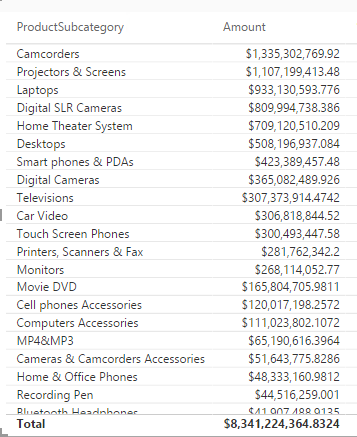
Take the following table for example, firstly create new columns using DAX below in the table.
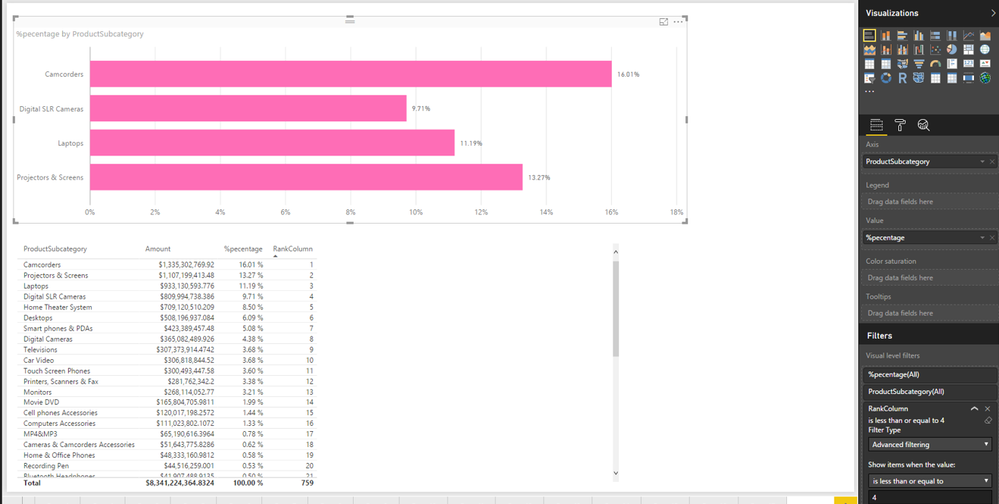
%pecentage = 'Table'[Amount]/SUM('Table'[Amount])
RankColumn = RANKX(ALL('Table'),'Table'[%pecentage],,DESC)
Secondly, create bar chart using ProductSubcategory and %pecentage, then drag RankColumn to Visual level filters and set the value of RankColumn to “is less than or equal to 4”.
If the above steps doesn't help, please share sample data of your table here.
Thanks,
Lydia Zhang
The Power BI Data Visualization World Championships is back! Get ahead of the game and start preparing now!
Check out the November 2025 Power BI update to learn about new features.
| User | Count |
|---|---|
| 59 | |
| 43 | |
| 42 | |
| 23 | |
| 17 |
| User | Count |
|---|---|
| 190 | |
| 122 | |
| 96 | |
| 66 | |
| 47 |