Forum Discussion

Cubes (SSAS) Date Filters and PowerBI
Hello,
Our company is starting to use cubes a lot and one of the issues is date filtering. When we connect to the cube in SSAS the date field seems to be treated as string and not an actual field, thus losing the innate date filtering functionality (is on or before, is before, etc.)
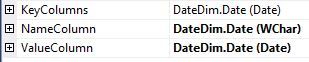
After a bit of research, I was able to change the properties of the date attribute in the dimension by updating ValueColumn to Date datatype.
Now I have two fields that come up in the list of attributes for the Date Dimension, one for Date (string) and one for Date.Value (date datatype). Needless to say, the Date.Value attribute shows the innate date filtering functions.
I just wanted to ask if this is by design? Is there a way to keep that just one date field but look at the ValueColumn instead of now having two fields? Is there another way to manage this?
Thank you!
10 Replies
 chasedqFrequent Visitor
Just thought I'd bump this up a bit :)
- chasedqFrequent Visitor
Happy Friday. Just another quick bump.
 Vicky_Song
Impactful Individual
chasedq, this issue can be reproduced on my side. I will report it internally to ask senior engineers for help. I will post back once I got any updates.
- LanceDelano
Microsoft Employee
Is the actual key of the Date dimension a different field? A common approach to these types of tables it to use an integer column and then things like the "Date" field are there but aren't actually used for the FK relationships.
And, where did you change the data type? In the source, data view, query view, etc.?
- chasedqFrequent Visitor
Yes, the actual key is a surrogate key called DateDimID. Good suggestion, I'll try this out and get back to you.
The datatype was already a datetime field from the source so I didn't really change the datatype per se, just the properties of the dimensions.
 SmithaNew Member
Hi did you find any solutions to this. Dont want 2 fields. Any way to hide one field
 AnonymousNot applicable
Hi chasedq,
I am trying to add a trendline to a bar-chart where the x-axis is Months (Apr, May, Jun,..). And I am unable to do so. I came across your post and found it helpful. How did you change the properties of the date attribute? Where do you go to get to this
I am new Power BI user. And I am not sure how to get here.
Thanks!!