FabCon is coming to Atlanta
Join us at FabCon Atlanta from March 16 - 20, 2026, for the ultimate Fabric, Power BI, AI and SQL community-led event. Save $200 with code FABCOMM.
Register now!- Power BI forums
- Get Help with Power BI
- Desktop
- Service
- Report Server
- Power Query
- Mobile Apps
- Developer
- DAX Commands and Tips
- Custom Visuals Development Discussion
- Health and Life Sciences
- Power BI Spanish forums
- Translated Spanish Desktop
- Training and Consulting
- Instructor Led Training
- Dashboard in a Day for Women, by Women
- Galleries
- Data Stories Gallery
- Themes Gallery
- Contests Gallery
- QuickViz Gallery
- Quick Measures Gallery
- Visual Calculations Gallery
- Notebook Gallery
- Translytical Task Flow Gallery
- TMDL Gallery
- R Script Showcase
- Webinars and Video Gallery
- Ideas
- Custom Visuals Ideas (read-only)
- Issues
- Issues
- Events
- Upcoming Events
The Power BI Data Visualization World Championships is back! Get ahead of the game and start preparing now! Learn more
- Power BI forums
- Forums
- Get Help with Power BI
- Desktop
- Creating multiple relationships between two tables
- Subscribe to RSS Feed
- Mark Topic as New
- Mark Topic as Read
- Float this Topic for Current User
- Bookmark
- Subscribe
- Printer Friendly Page

- Mark as New
- Bookmark
- Subscribe
- Mute
- Subscribe to RSS Feed
- Permalink
- Report Inappropriate Content
Creating multiple relationships between two tables
Hello,
I am trying to make a table visual of sales data that is filtered by a "sales manager" slicer. I currently have two tables:
- Responsibilities Table
- This table lists each "sales manager" and their respective product, region and team responsibilities. Some managers only one responsibility while others have multiple responsibilities.
- Sales Table
- This table lists each "sale" and its corresponding product, region and team.
These tables are related by product, region and team.
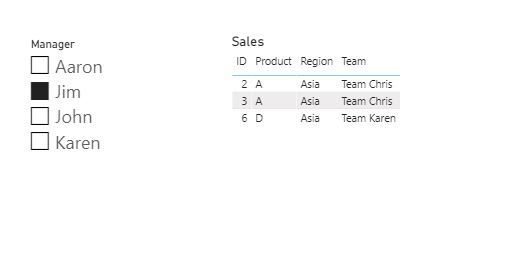
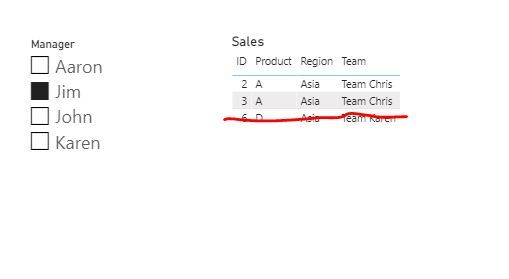
My requirement is that the sales table visual is filtered when a user selects a "sales manager" and then only the sales that correspond to the selected manager's responsibilties are visible. For example, Jim is responsible for Product A and Region Asia, so when Jim is selected, I would like the visual to only show sales that correspond to Product A and Region Asia. I am having trouble because you cannot create more than one relationship between two tables. Currently, when I select Jim my table visual is showing all sales that correspond to Region Asia, regardless of Product, because the only relationship that exists is Region --> Region. How would I go about creating this tri-relationship between two tables?
See below for my desired result as well as my current result, along with a sample dashboard.
Current Result (All Region Asia, regardless of Product):
Desired Result (Region Asia and Product A):
Sample Dashboard: https://www.dropbox.com/s/agmlpph9vnw0oqq/6-16%20Sample.pbix?dl=0
Thank you for your help.
Solved! Go to Solution.


- Mark as New
- Bookmark
- Subscribe
- Mute
- Subscribe to RSS Feed
- Permalink
- Report Inappropriate Content
Hi, @Anonymous
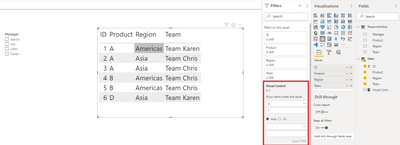
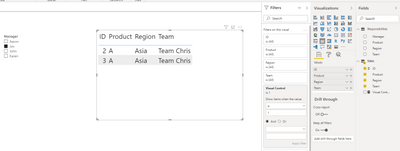
You may create a measure as below. There is no relationships between two tables. If you want relationships, you may create another same table to create realtionships. The pbix file is attached in the end.
Visual Control =
IF(
    NOT(ISFILTERED(Responsibilities[Manager])),
    1,
    IF(
        SELECTEDVALUE(Sales[Product]) in DISTINCT(Responsibilities[Product])&&
        SELECTEDVALUE(Sales[Region]) in DISTINCT(Responsibilities[Region]),
        1,0
    )
)
Then you need to put the measure in the visual level filter to filter the result.
Best Regards
Allan
If this post helps, then please consider Accept it as the solution to help the other members find it more quickly.
- Mark as New
- Bookmark
- Subscribe
- Mute
- Subscribe to RSS Feed
- Permalink
- Report Inappropriate Content
Hi, @Anonymous
You may create a measure as below. There is no relationships between two tables. If you want relationships, you may create another same table to create realtionships. The pbix file is attached in the end.
Visual Control =
IF(
    NOT(ISFILTERED(Responsibilities[Manager])),
    1,
    IF(
        SELECTEDVALUE(Sales[Product]) in DISTINCT(Responsibilities[Product])&&
        SELECTEDVALUE(Sales[Region]) in DISTINCT(Responsibilities[Region]),
        1,0
    )
)
Then you need to put the measure in the visual level filter to filter the result.
Best Regards
Allan
If this post helps, then please consider Accept it as the solution to help the other members find it more quickly.


- Mark as New
- Bookmark
- Subscribe
- Mute
- Subscribe to RSS Feed
- Permalink
- Report Inappropriate Content

- Mark as New
- Bookmark
- Subscribe
- Mute
- Subscribe to RSS Feed
- Permalink
- Report Inappropriate Content
Either normalize your data model, or use composite keys (for example a concatenation of sales manager and region)
There might be other solutions too.
- Mark as New
- Bookmark
- Subscribe
- Mute
- Subscribe to RSS Feed
- Permalink
- Report Inappropriate Content
Thank you for the reply. Can you elaborate on normalizing my data model? I'd rather not concatenate as the dataset is large and it would require a lot of memory.
- Mark as New
- Bookmark
- Subscribe
- Mute
- Subscribe to RSS Feed
- Permalink
- Report Inappropriate Content
Normalization= moving dimension columns (stuff you filter by) out into their own dimension table, leaving only facts (stuff you do math on) and keys (lookups to the dimension) in the facts table.
Anything with low cardinality is probably a dimension.
Helpful resources

Power BI Dataviz World Championships
The Power BI Data Visualization World Championships is back! Get ahead of the game and start preparing now!

Power BI Monthly Update - December 2025
Check out the December 2025 Power BI Holiday Recap!

FabCon Atlanta 2026
Join us at FabCon Atlanta, March 16-20, for the ultimate Fabric, Power BI, AI and SQL community-led event. Save $200 with code FABCOMM.

| User | Count |
|---|---|
| 40 | |
| 35 | |
| 34 | |
| 31 | |
| 28 |


| User | Count |
|---|---|
| 136 | |
| 102 | |
| 68 | |
| 66 | |
| 58 |


