cancel
Showing results for 
Search instead for 
Did you mean: 

The Power BI Data Visualization World Championships is back! Get ahead of the game and start preparing now! Learn more

Reply
wolfjnh
Frequent Visitor

Creating average on month with blanks

Hi,


I have a small problem, which lifts me to my edge.


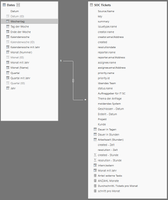
I have two tables:


Dates - typical date dimension with one row per day

SOC Tickets - tickets from our bug tracking tool with different categories etc.


Connected on Datum and Erstellt - Datum

modell.PNG


Now I just want to create the average amount of tickets per month.

I started with:

= COUNT('SOC Tickets'[key]) / DISTINCTCOUNT('SOC Tickets'[Monat mit Jahr]);

Monat mit Jahr is Yearmonth and is just a related DAX: 
Monat mit Jahr = RELATED(Dates[Monat mit Jahr])


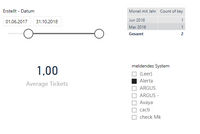
So far, so easy. I thougt, this would work, but when I filter on the data, I had to find out, that months without data for this category are ignored in the calculation. I added a simple example for you.


simple example.PNG


My expecatiation is, that PBI takes the month from 01.06.2017 to 31.10.2018 (17) and does following calculation

2 / 17 = 0,1176

but it ignores all months without a value and so I get a

2 / 2 = 1

How can I achive, that PBI gives me the right value? I found similiar posts, but nothing worked for me. 


2 ACCEPTED SOLUTIONS
AlB
Community Champion
Community Champion

Hi @wolfjnh

Try

DISTINCTCOUNT('Date'[Monat mit Jahr])

in your formula

'SOC tickets'[Monat mit Jahr] only has the months in which there is data.  The 'Date' table has all of them.

View solution in original post

wolfjnh
Frequent Visitor

Hi @AlB,


thank you for your post. I think, I found the solution.


First of all, you are right. I have to use the Date-Dimension in this formula.

But I have also to consider two more things. The connection between the two tables has to be unidirectional and the date filter in my report needs to come from my date table as well.


I will look, if there are side effects to my other reports, but I think, that this is the solution. Simple, just as I thought 🙂


Regards,

wolfjnh

View solution in original post

4 REPLIES 4
AlB
Community Champion
Community Champion

Hi @wolfjnh

Try

DISTINCTCOUNT('Date'[Monat mit Jahr])

in your formula

'SOC tickets'[Monat mit Jahr] only has the months in which there is data.  The 'Date' table has all of them.

wolfjnh
Frequent Visitor

Hi @AlB,


thank you for your post. I think, I found the solution.


First of all, you are right. I have to use the Date-Dimension in this formula.

But I have also to consider two more things. The connection between the two tables has to be unidirectional and the date filter in my report needs to come from my date table as well.


I will look, if there are side effects to my other reports, but I think, that this is the solution. Simple, just as I thought 🙂


Regards,

wolfjnh

AlB
Community Champion
Community Champion

@wolfjnh

Correct on both.  I had not seen you had a bidirectional relationship

Best

Stachu
Community Champion
Community Champion

can you share an anonymised sample of your data?
you can follow the advice here
https://community.powerbi.com/t5/Community-Blog/How-to-Get-Your-Question-Answered-Quickly/ba-p/38490


Did I answer your question? Mark my post as a solution!
Thank you for the kudos 🙂

Helpful resources

Announcements
Power BI DataViz World Championships

Power BI Dataviz World Championships

The Power BI Data Visualization World Championships is back! Get ahead of the game and start preparing now!

December 2025 Power BI Update Carousel

Power BI Monthly Update - December 2025

Check out the December 2025 Power BI Holiday Recap!

FabCon Atlanta 2026 carousel

FabCon Atlanta 2026

Join us at FabCon Atlanta, March 16-20, for the ultimate Fabric, Power BI, AI and SQL community-led event. Save $200 with code FABCOMM.