Join us at FabCon Atlanta from March 16 - 20, 2026, for the ultimate Fabric, Power BI, AI and SQL community-led event. Save $200 with code FABCOMM.
Register now!The Power BI Data Visualization World Championships is back! Get ahead of the game and start preparing now! Learn more
Hey Everyone,
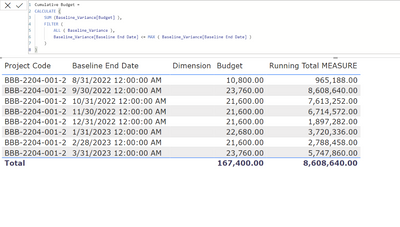
I am trying to create a measure to calculate a cumulative total in of a summerized table. I created a measure called "Cumulative Budget" to get the cummulative totals of the budget column but it doesn't seem to work. My desired result is to get 10,800 for 8/31, 34,560 for 9/30 and so on.
Here's the link to the test file: https://drive.google.com/file/d/1zrqIqMyksFj-x6hggzSKKP9Xae_sIKMf/view?usp=sharing
Any help is appreciated. Thanks!
Solved! Go to Solution.
Hi @akkitek
Try this code:
Budget Running Total =
CALCULATE(
SUM('Baseline_Variance'[Budget]),
FILTER(
ALLSELECTED('Baseline_Variance'[Baseline End Date]),
ISONORAFTER('Baseline_Variance'[Baseline End Date], MAX('Baseline_Variance'[Baseline End Date]), DESC)
)
)
Hi @akkitek
Try this code:
Budget Running Total =
CALCULATE(
SUM('Baseline_Variance'[Budget]),
FILTER(
ALLSELECTED('Baseline_Variance'[Baseline End Date]),
ISONORAFTER('Baseline_Variance'[Baseline End Date], MAX('Baseline_Variance'[Baseline End Date]), DESC)
)
)
This worked! Thanks!
The Power BI Data Visualization World Championships is back! Get ahead of the game and start preparing now!
| User | Count |
|---|---|
| 63 | |
| 55 | |
| 42 | |
| 41 | |
| 23 |
| User | Count |
|---|---|
| 167 | |
| 136 | |
| 120 | |
| 79 | |
| 54 |