cancel
Showing results for 
Search instead for 
Did you mean: 

The Power BI Data Visualization World Championships is back! Get ahead of the game and start preparing now! Learn more

Reply
juandroid
Helper I
Helper I

Creating a group Column

Hi Guys!!


I have the next data:


account   value      date

1105         300       01/17

1110         100       01/17

1120         300       01/17

1105         500       02/17

1110         300       02/17

1120         200       02/17

1105         600       03/17

1110         100       03/17

1120         400       03/17

1105         200       04/17

1110         400       04/17

1120         300       04/17


I create a new measure to calculate the difference of values between months like this:

value difference =
IF(
ISFILTERED('table'[date]);
VAR __PREV_MONTH =
CALCULATE(
SUM('table'[value]);
DATEADD('table'[date].[Date]; -1; MONTH)
)
RETURN
sum ('table'[value]) - __PREV_MONTH
)


So, if I create a matrix table using the values created in the measure, it shows the nex information:


account  february  march    april

1105          200         100     -400       (feb= 500-300, march=600-500, april=200-600)

1110          200        -200      300

1120        -100          200    -100


Now, for each month  I need to create a group column that put "use" if the result of the measure is was negative or "source" if it was positive; so the final result has to be something like this:


account   value      date        group

1105         300       01/17

1110         100       01/17

1120         300       01/17

1105         500       02/17        source

1110         300       02/17        source

1120         200       02/17        use

1105         600       03/17        source

1110         100       03/17        use

1120         400       03/17        source

1105         200       04/17        use

1110         400       04/17        source

1120         300       04/17        use


I try to create this column using IF ( [value difference]>0;"source";"use") but apparently you can't use a measure like this. Please help me.


Thanks in advance,


Juan D.

1 ACCEPTED SOLUTION
v-huizhn-msft
Microsoft Employee
Microsoft Employee

Hi @juandroid,

I try to reproduce your scenario and get expected result, please follow the steps below.

1. Create a calculated column to get month.

month = MONTH('table'[date])


2. Create a calculated column to get the previous month's value.

previous-month value = LOOKUPVALUE('table'[value],'table'[account],'table'[account],'table'[month],'table'[month]-1)
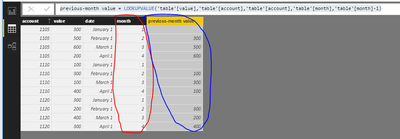
1.PNG

3. Create a measure using the formula. Finally create a table visual to display it.

result = IF(FIRSTNONBLANK('table'[month],1)=1,BLANK(),IF((SUM('table'[value])-SUM('table'[previous-month value]))>0,"source","use"))
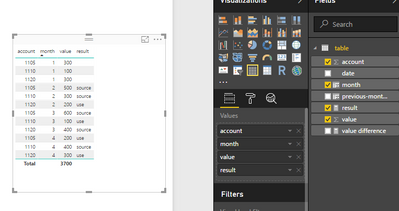
result tableresult table


Best Regards,
Angelia

View solution in original post

3 REPLIES 3
Ashish_Mathur
Super User
Super User

Hi,


You do not need to write a measure.  Just create this calculated column formula


=if(ISBLANK(CALCULATE(LASTNONBLANK(Table1[Value],MAX([Date])),FILTER(Table1,Table1[Account]=EARLIER(Table1[Account])&&[Date]<EARLIER([Date])))),BLANK(),if([Value]-CALCULATE(LASTNONBLANK(Table1[Value],MAX([Date])),FILTER(Table1,Table1[Account]=EARLIER(Table1[Account])&&[Date]<EARLIER([Date])))>0,"Source","Use"))

Hope this helps.


Regards,
Ashish Mathur
http://www.ashishmathur.com
https://www.linkedin.com/in/excelenthusiasts/
v-huizhn-msft
Microsoft Employee
Microsoft Employee

Hi @juandroid,

I try to reproduce your scenario and get expected result, please follow the steps below.

1. Create a calculated column to get month.

month = MONTH('table'[date])


2. Create a calculated column to get the previous month's value.

previous-month value = LOOKUPVALUE('table'[value],'table'[account],'table'[account],'table'[month],'table'[month]-1)

1.PNG

3. Create a measure using the formula. Finally create a table visual to display it.

result = IF(FIRSTNONBLANK('table'[month],1)=1,BLANK(),IF((SUM('table'[value])-SUM('table'[previous-month value]))>0,"source","use"))

result tableresult table


Best Regards,
Angelia

Hi @v-huizhn-msft


It was that simple!! The only thing I change was that I create a calculated column ('table [value] - 'table [previows month value]) instead of the last measure.

Helpful resources

Announcements
Power BI DataViz World Championships

Power BI Dataviz World Championships

The Power BI Data Visualization World Championships is back! Get ahead of the game and start preparing now!

December 2025 Power BI Update Carousel

Power BI Monthly Update - December 2025

Check out the December 2025 Power BI Holiday Recap!

FabCon Atlanta 2026 carousel

FabCon Atlanta 2026

Join us at FabCon Atlanta, March 16-20, for the ultimate Fabric, Power BI, AI and SQL community-led event. Save $200 with code FABCOMM.