cancel
Showing results for 
Search instead for 
Did you mean: 

View all the Fabric Data Days sessions on demand. View schedule

Reply
tina345
Helper II
Helper II

Creating a card using sql query

Hello Experts,

  I have a data like below which is from a database sql query.

  I need to use a card to display counts for each code (A,B in this case) in this query.

  What is the best approach to display counts on cards?


 Do I need to create separate measure for each code and use rowcount with filter using code? Or  we have something so that we don't need to create measure for each code (A,B)?


Code,Value,Date

------------------

A, 1, 7/1/2021

A,2, 7/2/2021

B,5,6/1/2021

B,6,7/2/2021

B,7,7/3/2021

1 ACCEPTED SOLUTION
v-easonf-msft
Community Support
Community Support

Hi, @tina345 

Solution1:
Create  separate measure for each code and put them to card visual

CountA = 
CALCULATE ( COUNTROWS ( 'Table' ), FILTER ( 'Table', 'Table'[Code] = "A" ) )
CountB = 
CALCULATE(COUNTROWS('Table'),FILTER('Table','Table'[Code]="B") )

Solution2:

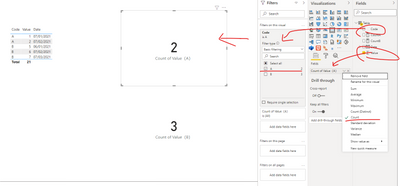
Put field "Value" to card visual and then change the aggregation from "Sum" to "Count".

Put field "Code" to visual filter pane and select "Basic filtering" to filter data you want.

11.png

Please check my sample file for more details.


Best Regards,
Community Support Team _ Eason


View solution in original post

1 REPLY 1
v-easonf-msft
Community Support
Community Support

Hi, @tina345 

Solution1:
Create  separate measure for each code and put them to card visual

CountA = 
CALCULATE ( COUNTROWS ( 'Table' ), FILTER ( 'Table', 'Table'[Code] = "A" ) )
CountB = 
CALCULATE(COUNTROWS('Table'),FILTER('Table','Table'[Code]="B") )

Solution2:

Put field "Value" to card visual and then change the aggregation from "Sum" to "Count".

Put field "Code" to visual filter pane and select "Basic filtering" to filter data you want.

11.png

Please check my sample file for more details.


Best Regards,
Community Support Team _ Eason


Helpful resources

Announcements
November Power BI Update Carousel

Power BI Monthly Update - November 2025

Check out the November 2025 Power BI update to learn about new features.

Fabric Data Days Carousel

Fabric Data Days

Advance your Data & AI career with 50 days of live learning, contests, hands-on challenges, study groups & certifications and more!

FabCon Atlanta 2026 carousel

FabCon Atlanta 2026

Join us at FabCon Atlanta, March 16-20, for the ultimate Fabric, Power BI, AI and SQL community-led event. Save $200 with code FABCOMM.

Top Solution Authors
Top Kudoed Authors