Get Fabric certified for FREE!
Don't miss your chance to take the Fabric Data Engineer (DP-700) exam on us!
Learn more- Power BI forums
- Get Help with Power BI
- Desktop
- Service
- Report Server
- Power Query
- Mobile Apps
- Developer
- DAX Commands and Tips
- Custom Visuals Development Discussion
- Health and Life Sciences
- Power BI Spanish forums
- Translated Spanish Desktop
- Training and Consulting
- Instructor Led Training
- Dashboard in a Day for Women, by Women
- Galleries
- Data Stories Gallery
- Themes Gallery
- Contests Gallery
- QuickViz Gallery
- Quick Measures Gallery
- Visual Calculations Gallery
- Notebook Gallery
- Translytical Task Flow Gallery
- TMDL Gallery
- R Script Showcase
- Webinars and Video Gallery
- Ideas
- Custom Visuals Ideas (read-only)
- Issues
- Issues
- Events
- Upcoming Events
We've captured the moments from FabCon & SQLCon that everyone is talking about, and we are bringing them to the community, live and on-demand. Starts on April 14th. Register now
- Power BI forums
- Forums
- Get Help with Power BI
- Desktop
- Creating a Measure
- Subscribe to RSS Feed
- Mark Topic as New
- Mark Topic as Read
- Float this Topic for Current User
- Bookmark
- Subscribe
- Printer Friendly Page


- Mark as New
- Bookmark
- Subscribe
- Mute
- Subscribe to RSS Feed
- Permalink
- Report Inappropriate Content
Creating a Measure
Hi,
I made a calculationg in SQL.. and i need to convert it to a measure in Power BI.
In my SQL i have 3 tables (FactParkingViolation,DimIssuer,DimIssuingAgency), when i added the the tables to Power BI i made a megre between the two tables - DimIssuer & DimIssuingAgency. so now I have two tables in Power BI -FactParkingViolation and DimIssuer.
I'm not so familiar with Dax that's way i don't know how to create this measure.
Help will be much appriciated!
This is the SQL Query:
SELECT SUM(IssuingAgencyAverageYearlySalary)*0.03
FROM(
SELECT DISTINCT(DI.IssuerID) ,IssuingAgencyAverageYearlySalary
FROM FactParkingViolation FPV LEFT JOIN
DimIssuer DI ON FPV.IssuerKey = DI.IssuerKey
LEFT JOIN DimIssuingAgency DIA
ON DI.IssuingAgencyCode = DIA.IssuingAgencyCode
WHERE YEAR(IssueDate) = 2016 ) R

- Mark as New
- Bookmark
- Subscribe
- Mute
- Subscribe to RSS Feed
- Permalink
- Report Inappropriate Content
Hi @SHAKEDALROY ,
Could you tell me if your problem has been solved?
If it is, kindly Accept it as the solution. More people will benefit from it.
Or you are still confused about it, please provide me with more details about your table and your problem or share me with your pbix file from your Onedrive for Business.
Best Regards,
Stephen Tao
- Mark as New
- Bookmark
- Subscribe
- Mute
- Subscribe to RSS Feed
- Permalink
- Report Inappropriate Content
Hi @SHAKEDALROY ,
You could leran the merge from this link.
After you merged, try this measure.
CALCULATE(SUM('Table'[IssuingAgencyAverageYearlySalary]),FILTER('TABLE',YEAR([IssueDate]) = 2016))*0.03
Best Regards,
Stephen Tao
If this post helps, then please consider Accept it as the solution to help the other members find it more quickly.


- Mark as New
- Bookmark
- Subscribe
- Mute
- Subscribe to RSS Feed
- Permalink
- Report Inappropriate Content
@SHAKEDALROY the DAX For this is simple:
Salary Measure = SUM(FactParkingViolation[IssuingAgencyAverageYearlySalary])*0.03
Or if you want it always for the year 2016:
UPDATED SYNTAX:
Salary 2016 = SUMX(FILTER(FactParkingViolation, RELATED(Table[IssueDate]) = 2016), [IssuingAgencyAverageYearlySalary])*0.03)
The trick is creating the relationships. You don't need to do the Merge if you don't want to, but you do need to create relationships on FPV.IssuerKey = DI.IssuerKey and DI.IssuingAgencyCode = DIA.IssuingAgencyCode
https://excelwithallison.blogspot.com/search?q=relationships
Please @mention me in your reply if you want a response.
Copying DAX from this post? Click here for a hack to quickly replace it with your own table names
Has this post solved your problem? Please Accept as Solution so that others can find it quickly and to let the community know your problem has been solved.
If you found this post helpful, please give Kudos C
I work as a Microsoft trainer and consultant, specialising in Power BI and Power Query.
www.excelwithallison.com
- Mark as New
- Bookmark
- Subscribe
- Mute
- Subscribe to RSS Feed
- Permalink
- Report Inappropriate Content
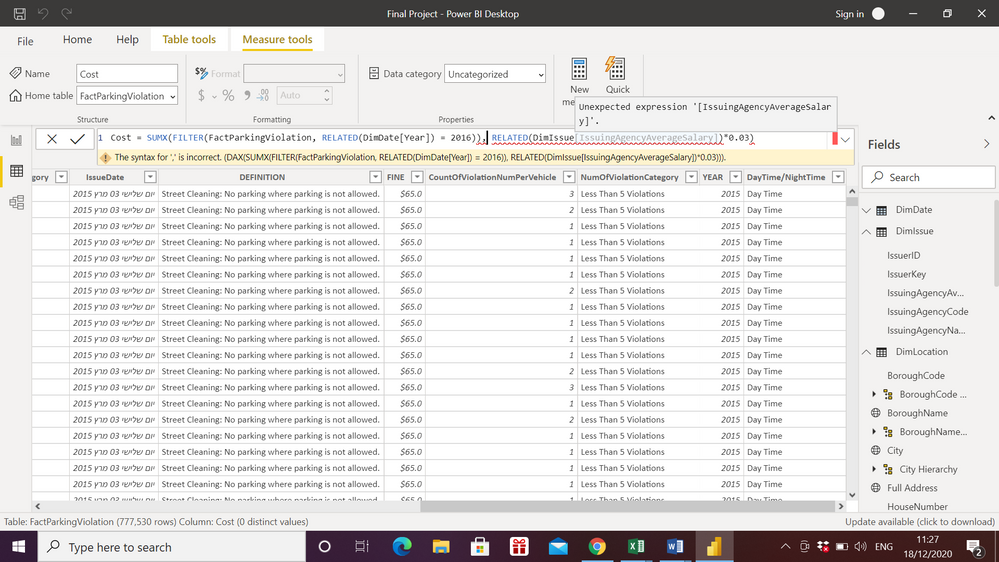
Hi @AllisonKennedy thank you for your reponse,
i needed to make that merge for different calculations.. i tried to add 'related' to the DAX formula you wrote to me but it still doesn't work, do you know way?
thank you.
- Mark as New
- Bookmark
- Subscribe
- Mute
- Subscribe to RSS Feed
- Permalink
- Report Inappropriate Content
@SHAKEDALROY It looks like you have an extra ) before the comma. Sorry, that was my fault as it was in my formula too. That's what I get for writing DAX blindly!
Please @mention me in your reply if you want a response.
Copying DAX from this post? Click here for a hack to quickly replace it with your own table names
Has this post solved your problem? Please Accept as Solution so that others can find it quickly and to let the community know your problem has been solved.
If you found this post helpful, please give Kudos C
I work as a Microsoft trainer and consultant, specialising in Power BI and Power Query.
www.excelwithallison.com
- Mark as New
- Bookmark
- Subscribe
- Mute
- Subscribe to RSS Feed
- Permalink
- Report Inappropriate Content
i think something is still missing @AllisonKennedy /:
The result in SQL is 18,639,996
and when i tried your formula in Power BI the result is 451,796,281
- Mark as New
- Bookmark
- Subscribe
- Mute
- Subscribe to RSS Feed
- Permalink
- Report Inappropriate Content
How have you done the merge? Did you remove duplicates, your SQL code uses DISTINCT, which we haven't accounted for in the DAX. Also, it's possible to increase rows in merge if you're not careful. https://excelwithallison.blogspot.com/2020/10/merge-ahead-one-for-one.html
Please @mention me in your reply if you want a response.
Copying DAX from this post? Click here for a hack to quickly replace it with your own table names
Has this post solved your problem? Please Accept as Solution so that others can find it quickly and to let the community know your problem has been solved.
If you found this post helpful, please give Kudos C
I work as a Microsoft trainer and consultant, specialising in Power BI and Power Query.
www.excelwithallison.com


- Mark as New
- Bookmark
- Subscribe
- Mute
- Subscribe to RSS Feed
- Permalink
- Report Inappropriate Content
@SHAKEDALROY , You have create 1 - Many retion between dimesions and fact
DimIssuingAgency - FactParkingViolation, DimIssuer -FactParkingViolation , Also join FactParkingViolation with date table having year on IssueDate (Date[Date])
Then You can add +0 in the measure you are creating to have left join
To get the best of the time intelligence function. Make sure you have a date calendar and it has been marked as the date in model view. Also, join it with the date column of your fact/s. Refer :radacad sqlbi My Video Series Appreciate your Kudos.
Helpful resources

New to Fabric Survey
If you have recently started exploring Fabric, we'd love to hear how it's going. Your feedback can help with product improvements.

Power BI DataViz World Championships - June 2026
A new Power BI DataViz World Championship is coming this June! Don't miss out on submitting your entry.

Join our Fabric User Panel
Share feedback directly with Fabric product managers, participate in targeted research studies and influence the Fabric roadmap.

Power BI Community Update - March 2026
Check out the March 2026 Power BI update to learn about new features.

| User | Count |
|---|---|
| 57 | |
| 37 | |
| 34 | |
| 19 | |
| 17 |


| User | Count |
|---|---|
| 74 | |
| 70 | |
| 37 | |
| 35 | |
| 25 |


