cancel
Showing results for 
Search instead for 
Did you mean: 

The Power BI Data Visualization World Championships is back! Get ahead of the game and start preparing now! Learn more

Reply
dduffy
Regular Visitor

Creating a Line Chart with a Direct Query

Hi,


I am using a direct query to an oracle database, all data retrieves back, the data includes


a column called "When" this is a Date / Time column.

a column called "Timing" this is a decimal value i.e. represents seconds.


So, overall this data represents timing over 5 minute intervals during the day. Ihave uploaded an image of this data.1.png


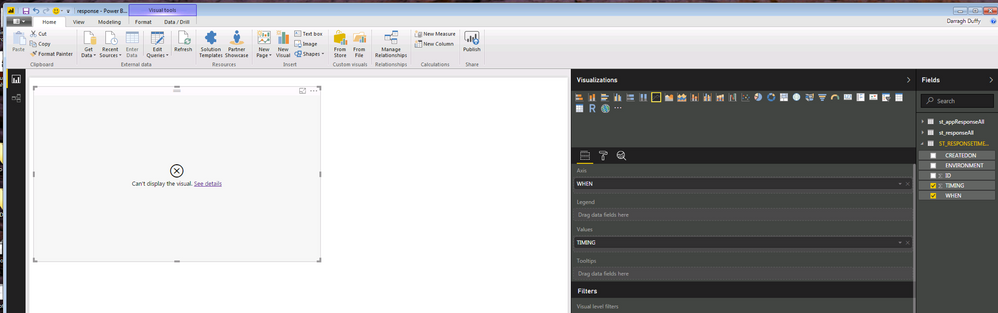
I want a line chart to represent this data. The Axis to represent the "When" Column, and the "Timing" represents Values. PowerBi does not work here and I get the errorCant display this visual. And, powerBI assumes I want to count the "Timing" data, I dont I just want the Axis to displat "When" and the values to display Values a simple line chart.


Why does this not work, is this becuase I have a direct query ?


2.png


1 ACCEPTED SOLUTION

thanks for your response, though this did not help. Instead the timeline precision was too great for lineChart. I changed precision to 3 decimals and it works. Also not your suggestion of conversion wont work for direct queries.

View solution in original post

2 REPLIES 2
Anonymous
Not applicable

Hi @dduffy,


Current line chart not support time type as axis.(it only support date type and text)

For your scenario, please add a calculated column to store the converted string value or whole number, then use it on line chart.


Regards,

Xiaoxin Sheng

thanks for your response, though this did not help. Instead the timeline precision was too great for lineChart. I changed precision to 3 decimals and it works. Also not your suggestion of conversion wont work for direct queries.

Helpful resources

Announcements
Power BI DataViz World Championships

Power BI Dataviz World Championships

The Power BI Data Visualization World Championships is back! Get ahead of the game and start preparing now!

December 2025 Power BI Update Carousel

Power BI Monthly Update - December 2025

Check out the December 2025 Power BI Holiday Recap!

FabCon Atlanta 2026 carousel

FabCon Atlanta 2026

Join us at FabCon Atlanta, March 16-20, for the ultimate Fabric, Power BI, AI and SQL community-led event. Save $200 with code FABCOMM.