cancel
Showing results for 
Search instead for 
Did you mean: 

Learn from the best! Meet the four finalists headed to the FINALS of the Power BI Dataviz World Championships! Register now

Reply
E-Z
New Member

Creating a Filter that evaluates multiple (Boolean) columns

Hi, newbie here 🙂

I have a table that has three booleans: 
- Has Product A
- Has Product B
- Has Product C

I want to create a filter that allows users to filter the table by Product. (drop down filter, multi-select).
How? 

2 REPLIES 2
E-Z
New Member

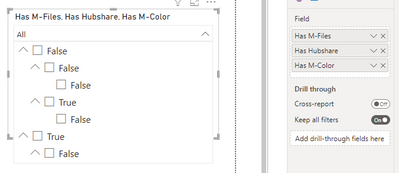
🙂 not really - remember that the product columsn are booleans (true/false), so adding all three columns to the same slicer produces this:

EZ_0-1679658508741.png

I need the drop-down values in the filter to become "Has M-Files", "Has Hubshare" and "Has M-Color".


E-Z

Mahesh0016
Super User
Super User

Hello @E-Z 

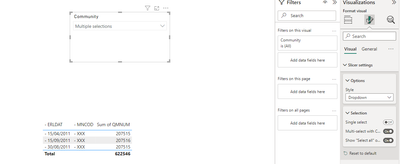
Select Slicer >> Go to format tab >> Slicer Setting >> Style >> Dropdown >> Selection >> Multi - select With Control Press.

Mahesh0016_0-1679653781233.png


i hope this solution helps you!

Helpful resources

Announcements
Join our Fabric User Panel

Join our Fabric User Panel

Share feedback directly with Fabric product managers, participate in targeted research studies and influence the Fabric roadmap.

March Power BI Update Carousel

Power BI Community Update - March 2026

Check out the March 2026 Power BI update to learn about new features.