cancel
Showing results for 
Search instead for 
Did you mean: 

Learn from the best! Meet the four finalists headed to the FINALS of the Power BI Dataviz World Championships! Register now

Reply
Anonymous
Not applicable

Creating New Table Aggregation From Another

Hello -


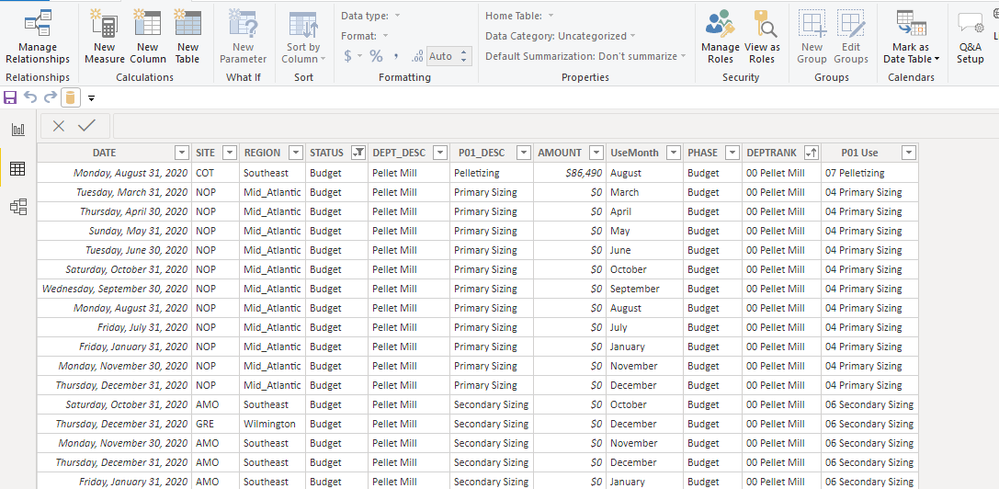
New to the forum and new to Power BI -  I have worked with SQL extensively in the past and am trying to relate to what i am looking to solve. I have the below table located right now - within the Phase Column, i have 4 values; budget, purchase order, requisitions, and GL. I'd like to create an identical table (keeping same structure), however, in the Phase column i'd like to rename to "act/fcst" and sum where phase = 'purchase order', 'requisiton'. This data would be grouped by all other columns listed in the table. The purchase order and requisition are on different rows and do not exist as a separate column so i cannot add up. Any advice on the DAX coding? i have looked all over and cannot seem to figure the syntax out. Thanks.


Capture.PNG


1 ACCEPTED SOLUTION
Greg_Deckler
Community Champion
Community Champion

So, that should be something along the lines of:


Table1 =
SELECTCOLUMNS(
  GROUPBY(
    FILTER(
      'Table',
      'Table'[PHASE] = 'purchase order' || 'Table'[PHASE]="requisition"
    ),
    [DATE],
    [SITE],
    [REGION],
    [STATUS],
    [DEPT_DESC],
    [P01_DESC],
    [UseMonth]
    [PHASE]
    [DEPTRANK],
    [P01 Use],
    "AMOUNT",SUMX(CURRENTGROUP(),[AMOUNT])
  ),
"act/fcst",[PHASE],"DATE",[DATE],"SITE",[SITE],"STATUS",[STATUS],"DEPT_DESC",[DEPT_DESC],"P01_DESC",[P01_DESC],"AMOUNT",[AMOUNT],"UseMonth",[UseMonth],"DEPTRANK",[DEPTRANK],"P01 Use",[P01 Use]
)


Follow on LinkedIn
@ me in replies or I'll lose your thread!!!
Instead of a Kudo, please vote for this idea
Become an expert!: Enterprise DNA
External Tools: MSHGQM
YouTube Channel!: Microsoft Hates Greg
Latest book!:
DAX For Humans

DAX is easy, CALCULATE makes DAX hard...

View solution in original post

1 REPLY 1
Greg_Deckler
Community Champion
Community Champion

So, that should be something along the lines of:


Table1 =
SELECTCOLUMNS(
  GROUPBY(
    FILTER(
      'Table',
      'Table'[PHASE] = 'purchase order' || 'Table'[PHASE]="requisition"
    ),
    [DATE],
    [SITE],
    [REGION],
    [STATUS],
    [DEPT_DESC],
    [P01_DESC],
    [UseMonth]
    [PHASE]
    [DEPTRANK],
    [P01 Use],
    "AMOUNT",SUMX(CURRENTGROUP(),[AMOUNT])
  ),
"act/fcst",[PHASE],"DATE",[DATE],"SITE",[SITE],"STATUS",[STATUS],"DEPT_DESC",[DEPT_DESC],"P01_DESC",[P01_DESC],"AMOUNT",[AMOUNT],"UseMonth",[UseMonth],"DEPTRANK",[DEPTRANK],"P01 Use",[P01 Use]
)


Follow on LinkedIn
@ me in replies or I'll lose your thread!!!
Instead of a Kudo, please vote for this idea
Become an expert!: Enterprise DNA
External Tools: MSHGQM
YouTube Channel!: Microsoft Hates Greg
Latest book!:
DAX For Humans

DAX is easy, CALCULATE makes DAX hard...

Helpful resources

Announcements
New to Fabric survey Carousel

New to Fabric Survey

If you have recently started exploring Fabric, we'd love to hear how it's going. Your feedback can help with product improvements.

Power BI DataViz World Championships carousel

Power BI DataViz World Championships - June 2026

A new Power BI DataViz World Championship is coming this June! Don't miss out on submitting your entry.

Join our Fabric User Panel

Join our Fabric User Panel

Share feedback directly with Fabric product managers, participate in targeted research studies and influence the Fabric roadmap.

March Power BI Update Carousel

Power BI Community Update - March 2026

Check out the March 2026 Power BI update to learn about new features.