cancel
Showing results for 
Search instead for 
Did you mean: 

July 7 - July 17 | Round 2 of the Power BI Dataviz World Championships. Don't miss your chance! Learn more

Reply
Vinothsusai
Helper III
Helper III

Creating Dynamic subtotal in column matrix

Hi,

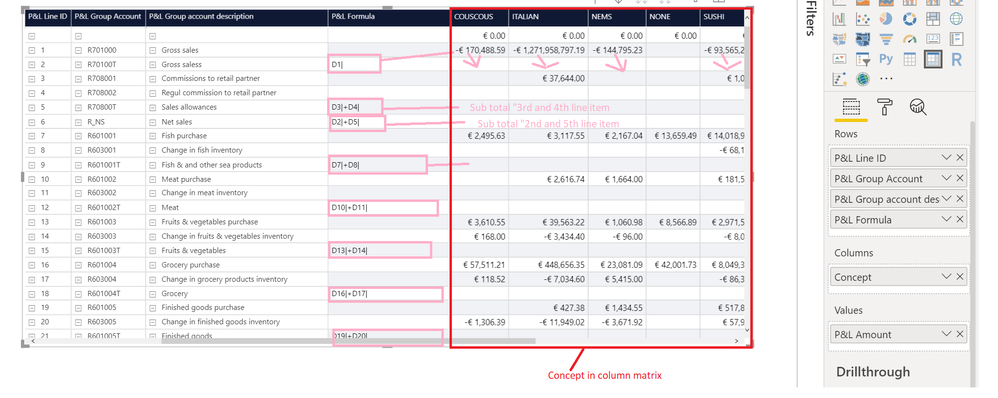
I am new in power bi. I already created a Matrix table in that i need to create a sub total measure based on the Formula.13.pngCould you please advise.


Thanks

Vinoth SUSAINATHAN


1 ACCEPTED SOLUTION
v-lili6-msft
Community Support
Community Support

HI, @Vinothsusai 

Here is a similar post for you refer to:

https://community.powerbi.com/t5/Desktop/Calculate-formula-column-based-on-Id-referred-column-Non/m-...

For your case, Just create a similar measure onstead of drag [P&L Amount] to Values directly.


Best Regards,

Lin

Community Support Team _ Lin
If this post helps, then please consider Accept it as the solution to help the other members find it more quickly.

View solution in original post

1 REPLY 1
v-lili6-msft
Community Support
Community Support

HI, @Vinothsusai 

Here is a similar post for you refer to:

https://community.powerbi.com/t5/Desktop/Calculate-formula-column-based-on-Id-referred-column-Non/m-...

For your case, Just create a similar measure onstead of drag [P&L Amount] to Values directly.


Best Regards,

Lin

Community Support Team _ Lin
If this post helps, then please consider Accept it as the solution to help the other members find it more quickly.

Helpful resources

Announcements
FabCon and SQLCon Barcelona 2026

FabCon & SQLCon – Barcelona 2026

Join us in Barcelona for FabCon and SQLCon, the Fabric, Power BI, SQL, and AI community event. Save €200 with code FABCMTY200.

60 days of Data Days Carousel

Data Days 2026

Join Fabric Data Days 2026: 60 days of free live/on-demand sessions, challenges, study groups, and certification opportunities.

Power BI DataViz World Championships carousel

Power BI DataViz World Championships - June 2026

A new Power BI DataViz World Championship is coming this June! Don't miss out on submitting your entry.